

Electronic Health Records (EHR) systems are critical in healthcare, but poor usability leads to serious challenges like clinician burnout, inefficiency, and errors.
Behavioral health providers face additional hurdles due to complex workflows and compliance requirements. Here’s a quick breakdown of the main issues and solutions:
Cluttered Interfaces: Excessive clicks, disorganized layouts, and irrelevant information overload users.
Fix: Role-based dashboards, smart defaults, and clinician input during design.
Workflow Mismatches: Systems often don’t align with behavioral health needs, causing inefficiencies.
Fix: Workflow audits, better automation, and integrated tools for seamless data entry.
Alert Fatigue: Too many notifications desensitize clinicians and disrupt focus.
Fix: Prioritize critical alerts, use context-aware logic, and reduce redundant notifications.
Disorganized Data: Scattered or poorly structured information wastes time.
Fix: Tailored templates, improved search functions, and digital intake tools.
Insufficient Training: Lack of role-specific training hinders adoption and productivity.
Fix: Tailored, ongoing training and post-implementation support.
Documentation Overload: Extensive manual entry increases workload and stress.
Fix: Automation, AI-driven tools, and structured templates to streamline tasks.
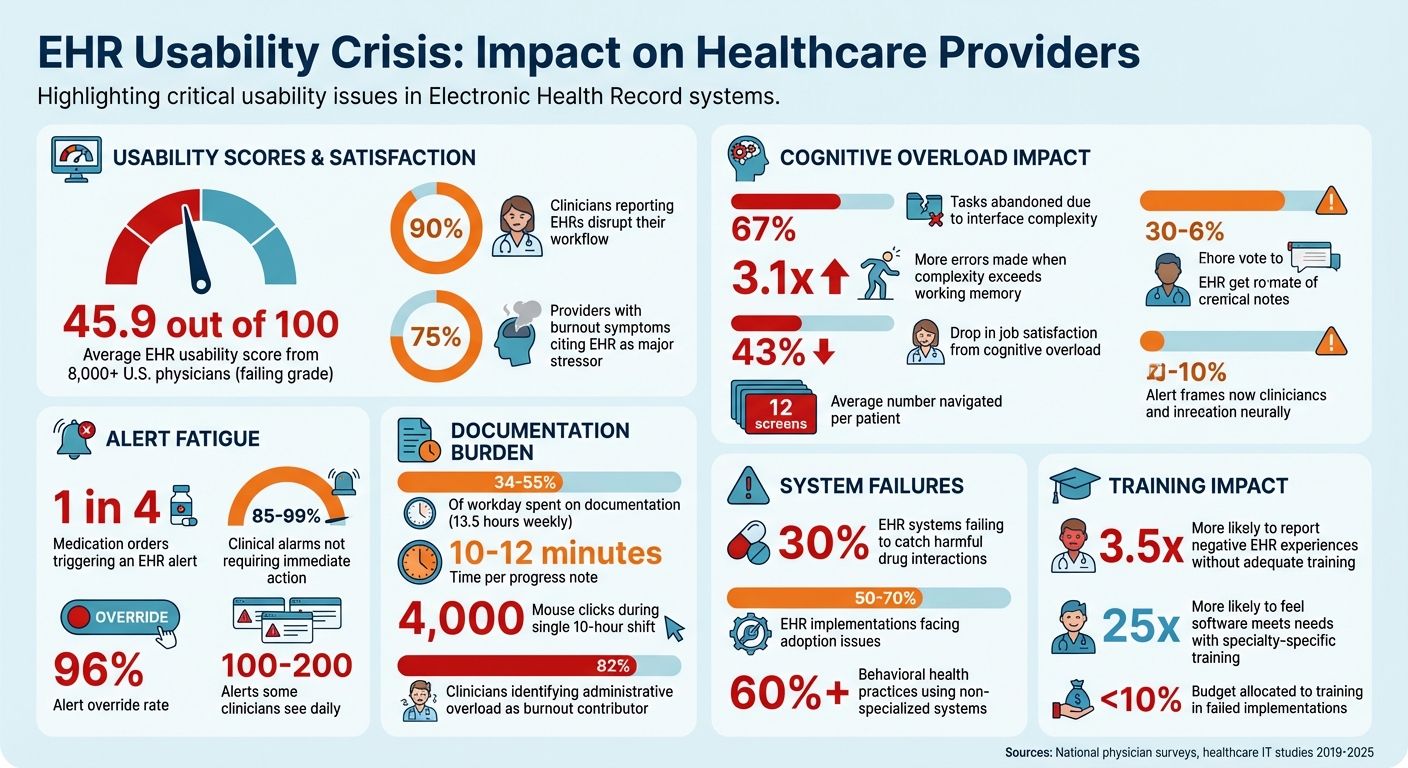
EHR Usability Crisis: Key Statistics on Clinician Burnout and System Failures
Electronic Health Records: Usability and Unintended Safety Issues
Complex Interfaces and Mental Overload
Cluttered EHR screens are more than just an annoyance - they actively pull clinicians' focus away from their patients.
A national study involving over 8,000 U.S. physicians gave current EHR systems an average usability score of just 45.9 out of 100. To put it bluntly, that's a failing grade [9]. Nearly 90% of clinicians report that EHRs disrupt their workflow, with poor usability being the main culprit [8].
But this isn’t just about inconvenience. It’s about cognitive overload. When the complexity of an interface exceeds the brain’s working memory capacity (typically 4–7 items), the consequences are serious: clinicians abandon 67% of tasks, make 3.1 times more errors, and experience a 43% drop in job satisfaction [10].
To address this, it’s critical to examine what’s creating such cluttered, overwhelming interfaces.
What Causes Interface Complexity
One of the biggest offenders? Excessive clicking. In some healthcare systems, providers must navigate an average of 12 different screens per patient [7].
This constant "screen hopping" disrupts clinical thought processes and adds unnecessary mental strain [9][10].
Then there’s visual clutter. Small fonts, poorly organized layouts, and chaotic information architecture leave clinicians sifting through irrelevant details to find what they need [1][9].
A major reason for this disconnect is that many EHR systems are designed without enough input from the clinicians who actually use them [7][9].
By addressing these issues, we can pave the way for simpler, more intuitive interfaces.
How to Simplify Behavioral Health Interfaces
One effective approach is adopting role-based dashboards. These dashboards display only the information relevant to a specific role.
For instance, case managers might see client resources and appointment schedules, while therapists could access narrative templates and treatment plans without wading through unrelated options [2][6].
Consolidating related tasks - like vitals, medications, and recent notes - into a single screen can also dramatically reduce the need for constant tab-switching [11][6].
Smart defaults and auto-population are another game-changer. By pre-selecting common options and automating repetitive fields, these features cut down on decision fatigue [2][10][11].
Quick-action shortcuts, such as hotkeys for prescription refills or frequently used order sets, further reduce unnecessary clicks [11]. One health system even managed to slash its annual EHR alerts from 23 million to 18 million, significantly reducing cognitive noise and allowing clinicians to focus more on their patients [5].
Finally, involving clinicians as "user champions" during the design and testing process is vital. Nearly 70% of EHR users want vendors to prioritize usability improvements, and specialty-specific training has made users 25 times more likely to feel the software meets their clinical needs [7][6].
Simplifying interfaces not only makes navigation easier but also boosts the overall efficiency clinicians need in behavioral health workflows.
Workflow Mismatches and Constant Task Switching
Even the most user-friendly interface can fail if it doesn’t align with how clinicians actually work. A significant amount of their time can be wasted switching between disconnected screens and re-entering the same data over and over.
This issue is especially noticeable in behavioral health. Most primary care EHRs are built for quick, 15-minute appointments with checkbox-heavy workflows and vital sign tracking.
In contrast, behavioral health often involves 50-minute therapy sessions that rely on detailed narrative formats like SOAP, DAP, or BIRP [13]. When systems don’t fit these needs, clinicians are forced to create workarounds - like using external spreadsheets to track follow-ups, manually sharing notes between team members, or repeatedly entering the same information.
These inefficiencies not only waste time but also increase the likelihood of errors [4][13].
Finding Workflow Gaps
The first step in addressing these issues is pinpointing where workflows break down. For example, many systems fail to sync calendar data with clinical notes, forcing clinicians to manually re-enter appointment details into progress notes [4].
Additionally, therapists and prescribers are often treated as separate users, which blocks shared treatment plans and requires manual coordination [13][14].
Medication management is another common pain point. Standard EHRs often require multiple clicks to handle PRN (as-needed) medications or med-pass tasks, which are especially common in residential settings [4].
On top of that, many systems lack built-in tools for task management, pushing staff to rely on paper or external apps to track things like authorizations and compliance deadlines [4]. These inefficiencies don’t just slow things down - they contribute to burnout. In fact, 75% of providers who report burnout symptoms cite their EHR as a major stressor [13].
Spotting these gaps is the first step toward designing systems that better align with actual clinical workflows.
Building EHR Systems That Match Workflows
Fixing these issues starts with workflow audits. Observing clinicians in action can reveal the workarounds they’ve developed to compensate for system shortcomings [1]. Identifying where staff rely on external tools or duplicate data entry helps pinpoint areas that need better automation or integration.
One solution is implementing digital patient intake processes that map data directly to EHR fields, reducing errors caused by manual entry [3]. Embedding tools like telehealth, e-prescribing, and billing into the EHR - using standards like HL7 and FHIR - can also eliminate the need to juggle multiple platforms [1].
Systems can be configured to automatically generate and pre-populate clinical notes when appointments are scheduled [4], and structured narrative templates with built-in DSM-5 criteria can save time by reducing the need for reformatting [13][2].
Most importantly, clinicians should be involved in system design from the start. Testing workflows with real users before rolling out a new system can help catch misalignments early [1].
The benefits are clear: organizations using software tailored to behavioral health have reported a 30% increase in client engagement and a 28% improvement in positive outcomes [13]. When systems fit clinicians’ workflows, everyone wins.
Alert Fatigue and Disruptive Notifications
Alert fatigue is another major challenge in effectively using EHR systems. While alerts are designed to protect patients, their excessive frequency can lead to desensitization, causing even critical warnings to be ignored. This constant barrage of notifications disrupts workflows and diminishes their intended safety benefits.
How Alert Fatigue Affects Clinicians
The numbers tell a challenging story. Nearly 1 in 4 medication orders triggers an EHR alert [19]. Yet, a staggering 85% to 99% of clinical alarms don't require immediate action [17]. Override rates for alerts can reach as high as 96% [17][19].
Dr. Amy Robbins from Premier Clinical Decision Support Solutions explains the impact: "Some doctors or nurses might see 100 to 200 alerts a day" [16].
The sheer volume of alerts often results in redundancy. For instance, 25% of drug alerts and 33% of clinical reminders repeat information clinicians already know. Each drug–drug interaction alert takes about 8 seconds to address, adding up to significant workflow interruptions [17][19].
Additionally, more than 66% of medication-allergy alerts highlight non-life-threatening reactions, and 86.9% of primary care physicians report that excessive alerts disrupt their workflow [19].
Alarmingly, studies have shown that alert fatigue contributes to serious medical errors because clinicians may miss or dismiss critical warnings [18].
Creating Better Alert Systems
Improving alert systems starts with prioritization. Life-threatening alerts should be clearly marked with hard-stop cues, like flashing red borders, while routine reminders can be delivered as less intrusive notifications [20][22].
The CREATOR framework provides a checklist to create better alerts, ensuring they are Consistent, Relevant, Evaluable, Actionable, Transparent, Overridable, and Referenced [19].
Examples from real-world implementations highlight the effectiveness of these strategies. In 2019, Jurong Health Campus in Singapore revamped its alert system, reducing total interruptive alerts by 74.3% and achieving a 59% reduction across all clinical groups by optimizing workflows and removing redundant notifications [18].
Similarly, Optimum Healthcare IT found that after adjusting alert patterns, the number of alerts per 100 medication orders dropped from 49 to 27, while the action rate increased from 12% to 33% [21].
Making alerts more relevant through context-aware logic is another effective measure. For instance, steroid prescriptions could exclude non-systemic forms, like eye drops, unless clinically necessary [21].
Role-based routing ensures non-critical alerts, such as vaccination reminders, are sent to the appropriate team members instead of interrupting clinicians [18][23]. Additionally, forming a governance committee of clinicians and IT staff to review override rates can help identify which alerts to deactivate or redesign [17][18][19].
Disorganized Data and Difficult Information Retrieval
Efficient patient care relies heavily on having well-organized data. When clinicians struggle to find the information they need, what should be a quick lookup can turn into a frustrating, time-consuming task.
Poorly structured documentation, scattered data, and confusing layouts can drag a simple 30-second search into several minutes, wasting precious time that could be spent on patient care.
Data Retrieval Problems
The trouble often starts at the point of data entry. Errors like transcription drift - mistakes made when transferring information from paper forms into an EHR - can compromise the accuracy of clinical records [3].
This issue is compounded by the widespread use of generic EHR systems. Over 60% of behavioral health practices rely on systems that aren't tailored to their needs, creating siloed documentation that makes it harder to share and coordinate treatment plans [13].
Poor visual design also adds to the frustration. For example, alphabetical sorting of data can hide critical details like a penicillin allergy in the middle of a long list, making it easy to miss [24][25].
Search functions often fail to guide users when no results are found, leaving clinicians unsure if the issue is a lack of data or a poorly worded query [25]. During EHR migrations, vital information like medication histories or diagnoses can be lost or improperly mapped, further eroding trust in the system [2].
Fixing these problems at the source - both in data entry and system design - is essential for creating a more reliable and efficient workflow.
Better Ways to Organize Data
One effective approach is using digital intake tools to eliminate handwriting errors and automatically map information to the correct EHR fields. This prevents transcription drift and ensures data is easily searchable [3].
Structured templates tailored to behavioral health, such as SOAP, DAP, or BIRP formats with embedded DSM-5 criteria, can replace sprawling free-text entries with clean, reportable data [2][13].
Practices using specialized behavioral health software have seen measurable improvements, including a 30% increase in client engagement and a 28% rise in positive outcomes [13].
Improving how data is displayed can also make a big difference. Adjusting default settings to prioritize key information - like listing current medications and highlighting allergies - reduces the mental load for clinicians [25].
Features like favorites folders for commonly used diagnosis codes or order sets can save significant time during daily use [15]. Together, these strategies create a more streamlined system that not only organizes data better but also aligns with clinicians' workflows, enabling more effective care.
Insufficient Training and Poor Change Management
Even the best-designed EHR systems can fail if users aren’t properly trained. A quick three-hour onboarding session might seem sufficient, but it often isn’t.
When training is treated as a one-and-done task rather than an ongoing process, clinicians face unnecessary hurdles. This lack of preparation contributes to significant adoption issues in 50% to 70% of EHR implementations [26].
The result?
Productivity suffers, frustration grows, and confidence takes a hit.
Why Users Resist Adoption
A one-size-fits-all training approach doesn’t work. A psychiatrist’s workflow differs greatly from that of a billing specialist, yet generic training often overlooks these nuances [27].
This mismatch can lead to anxiety, as users worry about appearing incompetent when navigating unfamiliar systems [26].
The impact of poor training is clear. Physicians who don’t receive adequate instruction are 3.5 times more likely to report negative experiences with EHRs [27].
Many end up spending over eight hours a week on after-hours documentation - commonly referred to as "pajama time" - because they haven’t learned efficient workflows [27].
Organizations that allocate less than 10% of their EHR budget to training and support consistently fall short of their adoption goals [26]. These outcomes underline the importance of tailored, role-specific training programs.
Training Programs That Work
To overcome resistance, training must be comprehensive and customized to each role. For example:
Physicians benefit from at least 16 hours of onboarding that focuses on documentation shortcuts, e-prescribing, and specialty-specific templates.
Nurses excel with 8+ hours of training on tasks like charting vitals and administering medications.
Front desk staff typically need 4–6 hours to master scheduling and patient registration workflows [27].Timing also plays a critical role. The most effective programs start super user training 5–6 months before the system goes live. Role-specific sessions follow in the final 4–6 weeks to ensure skills are fresh [27].
Structured change management efforts pay off, making organizations 3.5 times more likely to meet their adoption targets within six months [26].
Real-world examples show how effective training makes a difference. In 2025, Sutter Health introduced targeted EHR efficiency training for physicians, focusing on documentation shortcuts and inbox management.
This initiative cut after-hours charting by 14% [27]. Similarly, a primary care group highlighted by the American Medical Association reduced clinician burnout by 64% by combining workflow redesign with team-based documentation support and targeted training [27].
Another key to success is offering "at-the-elbow" support. Having trained coaches available during the first 2–4 weeks after go-live helps users adapt quickly and minimizes the typical 10–25% productivity dip during transitions [26].
Documentation Overload and Manual Data Entry
The Documentation Burden Problem
Behavioral health clinicians dedicate a staggering 34%–55% of their workday - approximately 13.5 hours weekly - just to documentation. Each progress note takes about 10–12 minutes to complete, and some clinicians report nearly 4,000 mouse clicks during a single 10-hour shift [28].
This challenge is rooted in the fact that many EHR systems were originally built for primary care. These systems are tailored for short visits and standardized lab work, but they fall short when it comes to the detailed narratives required in behavioral health.
Adding to the problem, insurers now demand extensive clinical documentation, insisting on a clear "Golden Thread" that connects diagnosis, treatment plans, and progress notes.
Furthermore, EHR systems often come loaded with features like lab integrations that behavioral health providers rarely use, cluttering the interface and making workflows even more cumbersome.
Unsurprisingly, 82% of clinicians identify administrative overload as a key contributor to burnout [28].
"In today's Behavioral health landscape, administrative demands can diminish both provider efficiency and client care... The number one complaint was that typing notes took too much time."
Tabatha Golding, Senior Vice President of Operations, Beacon Outpatient Management [28]
These mounting documentation demands highlight the urgent need for tools that simplify the process without sacrificing quality.
Using Automation and AI to Reduce Documentation
Automation and AI are stepping in to ease the documentation burden. For example, in May 2024, Coleman Health Services introduced an AI platform into their Welligent EHR workflow, slashing documentation time by 70% and reducing note submission delays from five days to just 1.5 days [28].
Similarly, GRAND Mental Health in Oklahoma began using automation in January 2024, saving over 400 staff hours within six months by automating more than 80% of each progress note [28].
Ambient AI scribes, powered by natural language processing, have also made a significant impact. These tools cut documentation time from 10–12 minutes to under 3 minutes per note and reduced clinician burnout rates from 52% to 39% in just 30 days [28].
Behavioral health–specific templates, such as SOAP, DAP, BIRP, and GIRP, further simplify workflows by providing structured formats, eliminating the stress of starting with a blank page.
Digital patient intake forms also play a role, reducing transcription errors by allowing patients to input their own information directly [3].
Opus Behavioral Health EHR takes these efficiencies a step further with its AI-driven tools. Features like Copilot AI automate documentation, while customizable templates are specifically designed for behavioral health practices.
Opus seamlessly integrates with telehealth, e-prescribing, and lab systems, significantly reducing manual data entry. Its real-time compliance auditing ensures that documentation aligns with the Golden Thread before submission, eliminating the need for extra manual reviews.
Organizations using these strategies report not only time savings but also improved compliance and accuracy [28].
How to Implement Usability Improvements
Addressing common EHR usability challenges requires targeted changes that focus on clinicians' needs and measurable outcomes.
User-Centered Design Principles
Improving EHR usability begins with user-centered design (UCD) - a process that prioritizes clinicians in every design decision. Unfortunately, many EHR vendors overlook rigorous UCD practices.
As Ross Teague, Ph.D., Director of User Experience Research at Allscripts, points out, clinicians often lack meaningful involvement in the design process [29].
True UCD involves creating interfaces that reflect how behavioral health professionals actually work, rather than forcing them to conform to the software's structure [29][30].
To achieve this, start with workflow mapping by observing clinicians, conducting interviews, and using surveys to identify pain points [12].
Techniques like card sorting and tree testing can help structure content in a way that aligns with clinicians' mental models and ensures easy navigation [31].
Iterative formative testing is another key step. Regular task-based evaluations using sketches, wireframes, or prototypes can help identify design flaws early on [29][31].
Before rolling out changes, conduct summative testing with a larger user group to measure task completion rates and time-on-task [29]. Monthly testing with just 3–5 users can uncover usability issues without requiring expensive consultants [31][32].
Even small improvements, like reducing a workflow by 30 seconds, can add up significantly - saving a clinician 50 hours annually if the task is performed 100 times daily [32].
Equally important is tracking the impact of these improvements to ensure they deliver practical benefits.
Measuring Results After Implementation
Once user-centered design changes are implemented, it’s essential to measure their effectiveness. Start by establishing baseline productivity metrics to compare performance before and after the changes.
Use tools like the System Usability Scale (SUS) to assess improvements in effectiveness, efficiency, and user satisfaction. A SUS score above 68 indicates above-average usability [31][33].
In addition to surveys, analyze EHR audit logs to gather objective data. These logs can reveal inefficiencies, such as excessive time spent on documentation, chart reviews, or messaging tasks [31].
Key metrics to monitor include click counts (aim for fewer than five clicks for core tasks), the number of screens visited, and error rates [31][34][32]. For instance, a 2017 study by Arcadia Healthcare Solutions found that a single clinician used 2,541 clicks to document 24 patient visits during a 16-hour workday [34].
Platforms like Opus Behavioral Health EHR come equipped with built-in analytics and audit trails to track system usage.
These tools allow organizations to monitor how usability changes affect documentation time, compliance rates, and clinician satisfaction. By doing so, they ensure that improvements translate into measurable, real-world benefits for behavioral health providers.
Conclusion
EHR usability challenges - like cluttered designs, workflows that don’t align with clinical needs, alert fatigue, and overwhelming documentation - are taking a toll on both clinician efficiency and patient safety.
The numbers are telling: nearly 75% of clinicians facing burnout link their struggles to poor EHR usability [6], and 30% of EHR systems fail to catch harmful drug interactions and medication errors [7].
The solutions outlined earlier emphasize one crucial element: involving clinicians every step of the way during EHR improvements. Christine Sinsky, MD, Vice President of Professional Satisfaction at the AMA, puts it plainly:
"Burdensome EHR systems are a leading contributing factor in the physician burnout crisis and demand urgent action" [1].
Despite this, a large portion of users continue to call for better usability, highlighting the ongoing gap between software developers and the realities of clinical practice.
To address these issues, organizations must commit to continuous improvement.
This means creating feedback loops that include clinician input, appointing user champions, setting up centralized support systems, conducting usability tests, and fine-tuning alerts based on how they’re used in practice.
For example, BayCare Health System has shown that reducing unnecessary alerts can enhance both safety and clinician responsiveness [5].
Specialized tools like Opus Behavioral Health EHR can also play a role by offering built-in analytics and audit trails. These features help track the impact of changes on documentation time, compliance, and clinician satisfaction.
When paired with targeted, specialty-specific training, clinicians are 25 times more likely to feel the software meets their needs [6]. Even small workflow improvements - like saving 30 seconds per task - can add up to 50 hours saved annually for each clinician [32].
The way forward is straightforward: focus on user-centered design, measure outcomes rigorously, and continuously integrate clinician feedback. By doing so, EHR systems can evolve from being a burden into a valuable tool for behavioral health care.
FAQs
What are the fastest EHR usability fixes we can implement first?
To improve EHR usability quickly, focus on simplifying the interface. This means cutting out unnecessary data to minimize clicks and reduce excessive scrolling. Tailoring workflows and dashboards to fit specific roles is another effective step, as it streamlines tasks and boosts efficiency while lowering cognitive overload.
Involving clinicians in the system's design process is also key. Their input ensures the system meets real-world needs. Lastly, offering role-specific training can make a big difference, helping users adapt to the system more effectively and improving overall usability in a short amount of time.
How can we reduce alert fatigue without missing critical safety warnings?
To tackle alert fatigue while maintaining critical warnings, it's essential to fine-tune alert systems for both relevance and timing. Begin by implementing fewer, carefully tested alerts to ensure they trigger accurately and deliver only the most important information.
Eliminating low-priority or false alerts can significantly cut down on needless disruptions. Additionally, tailoring alerts to fit clinical workflows and making them specific to individual roles allows clinicians to focus on the most urgent warnings, improving patient safety and reducing the strain of constant notifications.
What metrics should we track to prove EHR usability improvements worked?
To assess improvements in EHR usability, focus on key indicators such as clinician satisfaction, workflow efficiency (like reducing clicks or shortening task completion times), clinician burnout rates, and patient safety outcomes.
Using tools like the System Usability Scale (SUS) can provide a clear way to measure these changes.



- Behavioral Health
- EHR Systems
- Addiction Treatment EHR
- mental health
- Telehealth
- addiction treatment
- Behavioral health facility
- Substance Abuse Disorder
- behavioral Health center
- HIPPA Compliant
- ehrsoftware
- PTSD
- behavioral health ehr
- Depression
- hipaa
- Anxiety
- MentalHealthMatters
- RCM
- claim denials
- clinical documentation
- mental health awareness
- screening tools

September 15, 2026

September 15, 2026

September 14, 2026

September 11, 2026

September 10, 2026

September 09, 2026
Recommended Posts

Thursday, December 18, 2025
Real-Time Alerts in Behavioral Health EHRs
Real-Time Alerts in Behavioral Health EHRs Real-time alerts in behavioral health EHRs are reshaping mental health and ...

Thursday, February 05, 2026
EHR Usability Challenges in Behavioral Health
EHR Usability Challenges in Behavioral Health Behavioral health professionals often face unique challenges with ...

Sunday, December 14, 2025
AI in Patient Intake: What Clinics Need to Know
AI-powered patient intake systems are changing how clinics handle data collection and patient interactions. These tools ...