

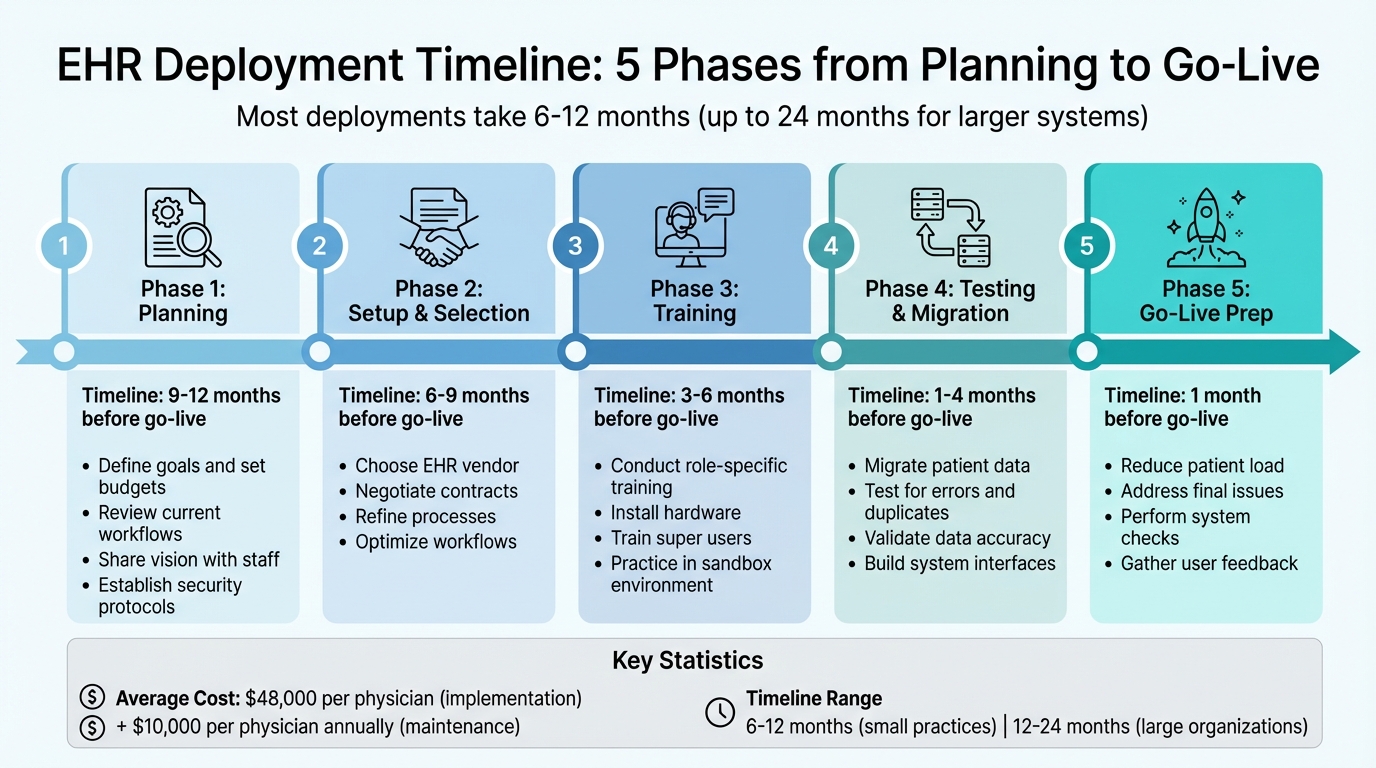
Timeline: Most EHR deployments take 6 to 12 months, with larger systems needing up to 24 months.
Cost: Expect an average of $48,000 per physician for implementation and $10,000 per physician annually for maintenance.
Phases:
1. Planning (9–12 months prior): Define goals, set budgets, review workflows.
2. Setup & Selection (6–9 months prior): Choose vendors and refine processes.
3. Training (3–6 months prior):Conduct role-specific training and install hardware.
4. Testing & Migration (1–4 months prior): Migrate data and test for errors.
5. Go-Live Prep (1 month prior): Reduce patient load, address final issues.
Key Roles:
Include a Project Manager, IT Lead, Clinical Champion, Super Users, and Billing Lead to oversee technical, clinical, and administrative needs.
Behavioral Health Needs: Plan for compliance with 42 CFR Part 2, group therapy templates, and custom workflows.Quick Tips:
Set SMART goals to track progress effectively.
Use phased rollouts and reduce patient volume during go-live.
Regularly review progress post-launch to identify and fix issues.
By following a structured process, you can avoid common pitfalls like budget overruns, missed deadlines, and poor staff adoption.
Step 1: Assess Your Organization's Readiness
Review Your Current Workflows and Systems
Start by mapping out the entire patient journey, from intake to discharge. Pinpoint areas where manual processes or duplicate data entries slow things down - these are opportunities for your new EHR system to simplify and streamline operations.
"Consider evaluating whether the EHR workflow gives value to patients and does it require additional skill or training. Fill the gaps and inefficiencies to create a better workflow." - Chaitali Avadhani, Technology Writer, Arkenea [2]
For behavioral health practices, it’s especially important to prioritize features like group therapy note templates and intake assessments to meet both compliance standards and clinical needs.
Make sure your system can handle stricter privacy rules especially those tied to substance use treatment records. Additionally, plan ahead for smooth data migration, which will be discussed in more detail later.
Evaluate your technical infrastructure, including network reliability and computer systems.
It’s also critical to plan for contingencies - think about how your organization will handle potential downtime, natural disasters, or cyber threats [2].
As part of this step, identify how many staff members will need system access and define their roles. This will guide both training efforts and system permissions [1]. These evaluations don't just improve workflows; they also shape the overall requirements for deployment, from staffing to technical needs.
Once you’ve assessed your current processes and technical capabilities, you’ll be ready to set specific, measurable objectives.
Set SMART Goals for Implementation
Using the insights from your workflow review, define clear and actionable goals.
SMART goals - Specific, Measurable, Achievable, Relevant, and Time-bound - help your team stay focused and track progress effectively. For instance, instead of a vague goal like "improve documentation", aim for something more concrete, such as "Reduce time spent on group therapy notes by 20% within six months" [3].
Your goals should aim to boost compliance, clinical efficiency, and revenue. For example, you might target 100% audit readiness for 42 CFR Part 2 consent forms by the time the system goes live [3].
Another goal could be reducing billing errors due to missing diagnostic codes by 15% within 90 days [4]. A 2010 study of primary care practices revealed that organizations with well-defined post-implementation milestones - such as returning to pre-implementation patient throughput levels within a month and increasing that by 5% within six months - achieved better long-term results [6].
Involve key team members like therapists, nurses, and billing staff in setting these goals. Their input ensures the system is tailored to their needs, making it a tool that supports their daily work rather than adding unnecessary complexity [3].
Step 2: Build Your Implementation Team
Define Key Roles and Responsibilities
Getting your EHR system up and running is no small task - it takes a well-rounded team with clearly defined roles to make it work.
As one expert put it, "EHR system implementation is a leadership project - not just an IT task" [5]. This means you need people who can coordinate, communicate, and manage both the technical and human sides of the process.
Start with a Project Manager to oversee the entire operation. This person ensures the timeline, budget, and daily tasks stay on track. They’ll also need to understand how your clinic operates so they can align the EHR system with your workflows.
Next, assign an IT Lead to handle the technical side of things. This includes setting up hardware like computers, printers, and scanners, as well as managing system security. On the clinical side, appoint a Clinical Champion - a physician or nurse who can bridge the gap between the technical team and healthcare providers. Having someone in this role is crucial for addressing concerns and encouraging staff to embrace the new system.
You’ll also need Super Users - team members trained in advance to help their peers when issues arise. They’ll also assist with training and troubleshooting once the system is live. For behavioral health practices, include counselors or therapists in this group to ensure the system supports specialized features like EPCS. Lastly, don’t forget the Administrative/Billing Lead, who will focus on integrating the system with billing processes and making sure revenue cycles run smoothly.
|
Role |
Primary Responsibility |
Key Contribution |
|---|---|---|
|
Project Manager |
Timeline and budget management |
Keeps the project on schedule and within scope |
|
IT Lead |
Technical infrastructure and hardware |
Manages software deployment and resolves tech issues |
|
Clinical Champion |
Provider advocacy and buy-in |
Ensures clinical workflows remain effective |
|
Super User |
Peer support and training |
Troubleshoots and guides staff during the rollout |
|
Billing Lead |
Revenue cycle protection |
Ensures billing processes integrate seamlessly |
Involve Stakeholders from the Start
To make the transition smoother, get your team involved early. Clinicians, administrative staff, and leadership should all have a say in the process.
Having key staff attend vendor demos is a great way to ensure the system you choose works for everyone. This approach not only helps identify potential issues early but also gives your team a sense of ownership in the project.
"The staff must also be dynamically involved in the integration so that they feel that they have direct input and will eventually come to actively support it." - Michael Crosnick, MikeOnHealthcare.com [7]
Your leadership team, including figures like the Chief Medical Officer, should start communicating the goals and vision for the EHR adoption well in advance - ideally 9 to 12 months before launch.
Clear communication about why this change is happening can help reduce confusion and resistance. Set up regular touchpoints like weekly review meetings or progress dashboards to keep everyone informed and on the same page. Once you’ve secured buy-in from your stakeholders, you’ll be ready to map out a phased deployment plan.
Step 3: Create a Phased Deployment Timeline
The 5 Phases of EHR Deployment
Breaking the deployment process into distinct phases helps manage the workload and keeps tasks organized.
Typically, EHR implementations follow a five-phase structure, which can take anywhere from 6 to 12 months, depending on the size and complexity of your organization [1].
Phase 1: Planning (9–12 Months Before Go-Live) is all about laying the foundation.
This phase includes onboarding your medical staff, sharing the vision for the new system, and drafting a detailed project plan. Key elements of this plan should cover your budget, hardware and software requirements, and security protocols [2]. It's also the time for leadership to communicate the purpose behind the system change.
Phase 2: Setup & Selection (6–9 Months Before Go-Live) focuses on choosing the right vendor, negotiating contracts, and refining your workflows.
This phase is your chance to identify and address inefficiencies in your current operations. Take your time with contract reviews - signing early ensures you're added to the vendor's implementation schedule and helps maintain your target go-live date [1].
Phase 3: Training (3–6 Months Before Go-Live) is when your team learns to navigate the system.
Role-based training is particularly effective, as it ensures staff members focus on the features relevant to their jobs rather than the entire platform [2]. This is also the time to install hardware and finalize decisions about which system features you'll use.
Phase 4: Testing & Data Migration (1–4 Months Before Go-Live) involves building system interfaces, setting up downtime protocols, and migrating data.
Testing after migration is essential to catch errors or duplicate entries. Smaller practices might complete this phase in as little as two weeks, while larger or more complex organizations may need two months or more [6].
Phase 5: Go-Live & Final Prep (1 Month Before Go-Live) is the final stretch. During this time, reducing your patient load allows staff to practice using the system and troubleshoot without the stress of a packed schedule. Perform final system checks and gather user feedback to address any last-minute concerns [2].
|
Phase |
Timeline |
Key Activities |
|---|---|---|
|
Planning |
9–12 Months Before |
Vision sharing, budgeting, security setup [2] |
|
Setup & Selection |
6–9 Months Before |
Vendor selection, workflow optimization [2] |
|
Training |
3–6 Months Before |
Role-specific training, hardware setup [2] |
|
Testing & Migration |
1–4 Months Before |
System testing, data validation [2] |
|
Go-Live Prep |
1 Month Before |
Reduced patient load, final checks [2] |
Once these phases are outlined, adjust them to suit your practice's specific needs.
Adjust Timelines Based on Practice Size
After establishing the phased plan, tailor the timeline to match the scale of your practice. The size and complexity of your behavioral health practice will influence how long each phase takes. Generally, timelines range between 6 and 12 months [2].
Smaller practices with 1 to 10 clinicians and simpler workflows often complete the process within 6 to 9 months. With fewer staff to train, less data to migrate, and straightforward billing, smaller practices can handle planning in about a month and finish testing in just two weeks [6].
In contrast, larger organizations with 20 or more clinicians, multiple locations, or advanced needs - like integrated billing or custom forms - should plan for 12 months or more [1][6].
For example, planning alone can take up to six months, and data migration becomes more complex when consolidating records from multiple legacy systems. A study of five-physician primary care practices found that about 52.5 hours of organizational training were required, with individual physicians needing roughly 23.9 hours each [6]. Scaling this up for larger facilities means extended training timelines.
To speed up deployment, consider running some tasks in parallel.
For example, you could hold training sessions while completing the final stages of software testing and data migration [6]. Just ensure your team can handle overlapping tasks without sacrificing quality.
Step 4: Manage Critical Milestones and Activities
Data Migration and System Testing
Data migration can be one of the trickiest parts of implementing an EHR system. Start by auditing your database for duplicate entries, inactive accounts, and missing information.
Then, map out how key data like clinical notes, medication lists, diagnoses, and document attachments will transition from your old system to the new one. These steps will help you fine-tune your project timeline [1][8].
Begin with a test migration of 10–20 sample records to ensure everything transfers correctly [3]. This pilot run helps identify formatting problems or missing data early on. Once you're confident in the process, focus on migrating critical data first, followed by active patient records and then historical information [2].
After the migration, conduct spot checks on larger data batches for accuracy and test real-world scenarios like creating treatment plans, scheduling appointments, and processing billing claims [3].
If you’re in behavioral health, double-check that privacy settings comply with HIPAA and 42 CFR Part 2, especially for sensitive information like psychotherapy notes [3].
"An EHR migration is not complete until clinical workflows function reliably." - Cortney Swartwood, ChartPath [8]
Plan for extra time to validate the migration. Weekly feedback sessions during the first month can help uncover recurring issues and workflow bottlenecks [8].
This phase should align with the broader 1–4 month pre-go-live timeline. Once your data is validated, shift your attention to preparing your team for the transition.
Staff Training and Phased Rollouts
After successfully migrating and testing your data, focus on training your staff thoroughly. Start by evaluating their computer skills and offering basic training if needed. Identify "super users" within your team - those who are more tech-savvy - and provide them with advanced training. These individuals will act as on-site experts, helping to resolve issues and guide their colleagues during and after the go-live phase [3].
Research consistently shows that effective training is one of the strongest predictors of clinician satisfaction with EHR systems [10].
Schedule training sessions as close to the go-live date as possible - ideally within 2–4 weeks for physicians - to ensure the information remains fresh [9]. Dedicate uninterrupted time for training so staff can focus without the pressure of patient care duties.
Use a sandbox environment with anonymized patient data to let your team practice realistic scenarios without risking actual records.
To minimize risks, consider a phased rollout supported by a command center to address any issues as they arise [11]. During the first week of go-live, reduce patient loads to give clinicians extra time to adjust to the new system without compromising the quality of care [2].
Finally, enforce a strict "no training, no access" policy. Staff should only receive system credentials once they’ve demonstrated competency with the new EHR. This ensures everyone is adequately prepared to use the system effectively.
Step 5: Track Progress and Optimize
Schedule Regular Progress Reviews
Keeping an eye on your progress is key to a smooth EHR deployment. Regularly scheduled reviews - at 3, 6, and 12 months - can help you measure how well your implementation plan is performing.
Focus on metrics like workflow speed, data accuracy, user satisfaction, and billing claim success rates to evaluate your progress [2][14]. During the initial implementation phase, weekly meetings with your team and vendors can help address issues quickly and keep everything on track [2].
Metrics such as task completion times and data accuracy are vital, but don’t stop there. Conduct regular surveys with clinicians to identify potential problems early [2][14].
These checkpoints allow for timely adjustments, ensuring that both your operational and clinical workflows remain efficient. As Dara Scott, VP of Operations at Mindful Health, shared:
"Standardizing and organizing schedules has been on my list of features and now we will finally have it from Opus EHR" [12].
Use Opus Behavioral Health EHR Features for Smoother Deployment
Opus Behavioral Health EHR offers tools designed to make tracking and optimizing your deployment easier. With over 140 real-time practice management reports and features like the Copilot AI tool, which cuts clinical documentation time by 40%, this platform helps you identify which areas are running smoothly and which need attention [12].
Real-time alerts are another standout feature, flagging documentation issues as they occur so you can address training gaps immediately [12].
Jennifer Gozy, Director of Clinical Systems at Care Counseling Clinics, highlighted this benefit:
"We are excited to expand our ability to track and report on data so that we can improve our quality assurance and reporting processes" [12].
Other tools, like digital intake features, can shrink the patient intake process by up to 50% while significantly reducing phone call volume [13].
These efficiencies give your staff more time to focus on mastering clinical workflows instead of getting bogged down by administrative tasks. In fact, automation tools within the platform can boost staff productivity by over 30% [13].
And with 24/7 technical support, you can resolve any deployment hiccups quickly, keeping your implementation schedule on track [12].
Conclusion
Review of the Deployment Process
Planning an effective EHR deployment timeline requires a well-structured strategy, typically taking about 6 to 12 months [1][2].
Start by evaluating your organization's readiness - this means reviewing workflows and establishing SMART goals. From there, form a multidisciplinary implementation team that includes a project manager, clinical champion, IT lead, and billing lead to ensure all perspectives are represented from the very beginning [5][3].
The deployment process is best divided into five key phases:
1. Preparation (9–12 months before launch)
2. Vendor selection (6–9 months out)
3. System configuration and data migration (3–6 months)
4. Testing (1–4 months)
5. Go-live [2]
This phased approach helps allocate resources wisely and identify potential problems before they escalate. Key milestones, like data cleansing to eliminate duplicates and verify legacy records, are critical to avoid post-launch errors [2][5].
Training should be hands-on and tailored to specific roles rather than a one-size-fits-all approach, ensuring every team member is adequately prepared [6].
As outlined earlier, validating data migration and providing role-specific training are essential steps that lay the groundwork for a successful launch.
Final Recommendations for Success
To build on this structured process, here are some final recommendations to enhance your chances of success. Keep your timeline flexible. EHR implementation is a multi-phase journey, and if staff resistance arises, allocate additional time for training and orientation [6].
During the first 1–2 weeks post-launch, consider reducing patient volume to allow staff to adapt without compromising care quality [5][2]. Assign tech-savvy "super-users" who can offer peer support and quickly resolve issues as they arise [1][3].
Regular check-ins, such as daily huddles or weekly reviews during go-live, can help address feedback promptly and keep the project on track [2][3].
Lastly, select a scalable behavioral health solution. Opus Behavioral Health EHR offers specialized tools like electronic prescriptions for controlled substances (EPCS), compliance with 42 CFR Part 2, AI-powered documentation, and over 140 reporting options.
These features can help you navigate challenges and support your deployment for a seamless transition.
FAQs
What usually causes EHR go-live delays?
EHR go-live delays often stem from several key challenges. These include tight implementation timelines, workflow interruptions, technical glitches, resistance from staff, and unexpected expenses. The process can become particularly tricky due to the complexity of coordinating different EHR components and insufficient planning.
To reduce the risk of delays, it’s crucial to prioritize thorough preparation, develop detailed project schedules, and practice proactive resource management. Tackling these issues early on can make the deployment process far smoother and more efficient.
How much staff time should we budget for training?
The amount of time required for EHR training varies based on the size of your organization and the complexity of the system being implemented. Training generally demands a substantial investment of time, often ranging from several days to a few weeks.
This period typically includes hands-on practice sessions and customized instruction tailored to your team's needs. For the best results, it's crucial to dedicate sufficient time not only for the initial training but also for follow-up support and ongoing practice. This should align with the broader 6–12 month timeline often needed for a full EHR implementation.
What data should we migrate vs leave behind?
Migrating data for healthcare systems requires a focus on the essentials.
This includes transferring patient histories, clinical documentation, scheduling information, billing records, and compliance data - all of which are vital for maintaining care quality and operational efficiency.
At the same time, it's important to leave behind or clean up anything unnecessary, such as duplicate entries, irrelevant files, or outdated records.
Doing so not only enhances data quality but also improves the performance of the new system. Ultimately, this approach ensures a seamless transition while safeguarding the accuracy and reliability of the data.



- Behavioral Health
- EHR Systems
- Addiction Treatment EHR
- mental health
- Telehealth
- addiction treatment
- Behavioral health facility
- Substance Abuse Disorder
- behavioral Health center
- HIPPA Compliant
- ehrsoftware
- PTSD
- behavioral health ehr
- Depression
- hipaa
- Anxiety
- MentalHealthMatters
- RCM
- claim denials
- clinical documentation
- mental health awareness
- screening tools

September 15, 2026

September 15, 2026

September 14, 2026

September 11, 2026

September 10, 2026

September 09, 2026
Recommended Posts

Monday, May 25, 2026
Multi User Billing Software for Behavioral Health Clinics
Multi User Billing Software for Behavioral Health Clinics Behavioral health clinics face unique challenges in billing - ...
Monday, September 14, 2026
HIPAA Security Rule Training for Behavioral Health Staff
Behavioral health providers need HIPAA Security Rule training that is role-based, documented, and tied to daily work.

Monday, March 09, 2026
Case Study: Billing Errors Reduced with EHR Integration
Billing errors are a major headache for behavioral health centers,leading to claim denials, delayed payments, and lost ...