

Acting fast matters.
When someone seeks behavioral health support, your response time can make or break the opportunity to help.
Studies show that contacting leads within 60 seconds increases your chances of securing them by 400%, while waiting five minutes reduces success by 80%.
Automation ensures immediate, consistent follow-ups - via email, text, or messages - so no lead is left waiting.
Key Insights:
78% of customers choose the first responder to their inquiry.
Automated follow-ups boost conversion rates by over 50% and reduce no-shows by up to 30%.
Tools like Opus Behavioral Health EHR integrate workflows, saving staff 10+ hours weekly while improving patient engagement.Automation replaces manual processes, enabling faster responses, better communication, and more efficient operations. This guide explains how to set up, optimize, and track lead follow-up automation to improve outcomes and patient care.
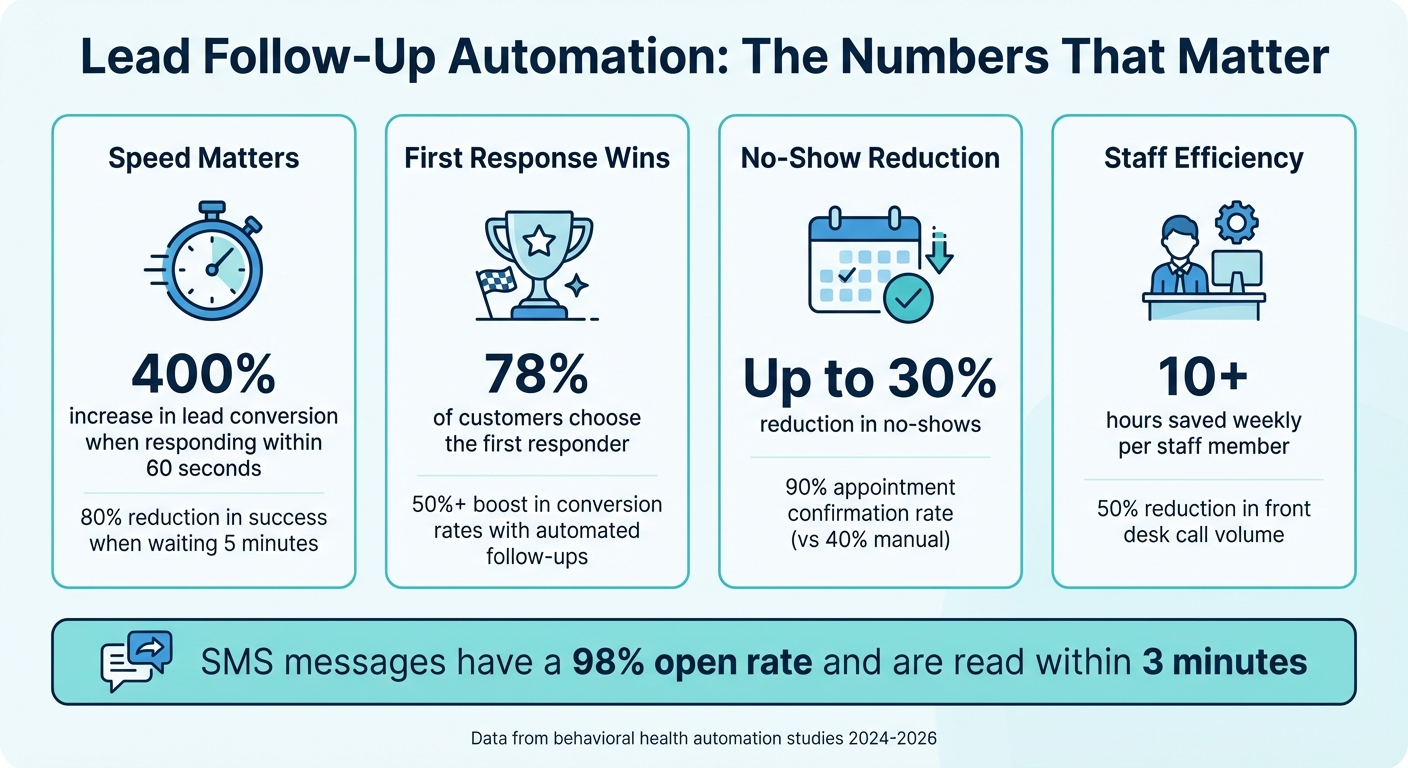
Lead Follow-Up Automation Impact: Key Statistics for Behavioral Health Centers
Benefits of Automating Lead Follow-Ups
Automation offers a game-changing solution for behavioral health centers, addressing challenges like slow response times and inefficient workflows. By replacing manual processes with automated systems, facilities can improve both patient interactions and overall efficiency. Here's how automation is reshaping lead follow-ups in behavioral health.
Better Patient Engagement and Conversion Rates
Timing is everything when it comes to engaging potential patients. Studies reveal that responding within five minutes can boost conversion rates by over 50%. On the flip side, waiting 30 minutes could mean losing the lead to another facility [5].
As Mira Gwehn Revilla aptly puts it:
"Speed wins in addiction treatment admissions. The facilities that respond first, respond fast, and respond with empathy will capture more of the people reaching out for help" [5].
Automation plays a critical role here. It can instantly send a secure link for insurance submissions, keeping the lead engaged during their fleeting moment of willingness.
Features like two-way SMS make it easy for patients to ask questions, confirm appointments, or reschedule - eliminating common barriers associated with phone calls or patient portals.
The benefits extend to appointment attendance as well. Automated reminders can cut no-show rates by up to 30% [3][4].
Facilities that implement a multi-touch reminder system - sending alerts 48 hours, 24 hours, and 2 hours before appointments - see even better results.
Automated systems achieve a 90% appointment confirmation rate, far surpassing the roughly 40% rate achieved through manual phone calls [4]. For a 30-day program, missing just four admissions per month due to slow follow-ups could result in $100,000 in lost revenue [5].
More Efficient Staff Workflows
Manual follow-ups can be a significant drain on staff resources, often requiring 2–3 hours daily for tasks like reminder calls [4]. Automation eliminates this time sink, saving staff 10 or more hours each week. That freed-up time can be redirected to more critical activities, such as patient care and intake coordination [4][7].
Two-way texting further reduces the workload, cutting front desk call volumes by 50% [3][4]. Instead of chasing down faxed insurance cards or playing phone tag, staff can rely on secure automated texts to collect documents instantly.
Digital patient intake also streamlines workflows, saving between 45 and 60 minutes of administrative work per patient [8].
Automation isn't just about efficiency - it can also enhance clinical safety. When a patient misses a confirmation or stops responding, the system alerts staff immediately.
This is especially important in behavioral health, where disengagement might signal a potential relapse [3][6]. Platforms like Opus Behavioral Health EHR integrate these automated workflows with clinical systems, ensuring real-time data updates while reducing manual data entry errors.
By optimizing resources and improving workflows, automation sets the foundation for a deeper understanding of how it outperforms manual processes.
Comparison: Manual vs. Automated Follow-Up
To highlight the advantages of automation, here’s a side-by-side look at manual versus automated follow-up processes:
|
Operational Metric |
Manual Follow-Up |
Automated Follow-Up |
|---|---|---|
|
Response Timing |
Often delayed; depends on staff availability [2] |
Instant; works 24/7 [2] |
|
Confirmation Rate |
~40% (voicemails often ignored) [4] |
~90% (SMS read and responded to quickly) [4] |
|
No‑Show Rate |
18%–25% [4] |
8%–12% [4] |
|
Staff Time Spent Daily |
2–3 hours on manual calls [4] |
Negligible [4] |
|
Data Integrity |
Prone to manual entry errors [8] |
|
|
Phone Call Volume |
High; front desk overwhelmed [3] |
50% reduction with two‑way texting [3] |
This comparison underscores how automation not only saves time but also improves patient outcomes and operational reliability. By transitioning away from manual methods, behavioral health centers can focus on what truly matters - delivering quality care.
Key Features for Lead Follow-Up Automation
Selecting the right automation system means finding one that tackles the specific challenges of managing leads in behavioral health. The most effective platforms combine speed, personalization, and seamless integration to convert inquiries into admissions without overloading your team.
Real-Time Lead Filtering and Prioritization
Not every lead needs the same level of attention.
AI-powered tools can instantly engage with inquiries through chat, email, or SMS, asking important questions about factors like budget, timeline, insurance coverage, and treatment needs.
These tools then assign lead scores, ensuring high-priority prospects are routed directly to your admissions team while routine questions are handled automatically [9].
This kind of filtering is crucial because responding immediately can make all the difference, especially in crisis situations where a quick and empathetic response can secure an admission [5].
AI agents also help with backfilling strategically.
For example, if a patient cancels, the system can immediately notify staff and send messages to waitlisted leads, helping protect revenue and ensuring patients get the care they need faster [4].
For common inquiries - like questions about hours, accepted insurance, or program details - AI can manage the conversation 24/7, freeing up staff to focus on more critical admissions tasks [10].
Once leads are filtered intelligently, the next step is delivering responses tailored to their specific needs.
Customizable Automated Workflows
Behavioral health requires workflows that align closely with patient needs. Generic, one-size-fits-all sequences simply don’t work. The best automation platforms allow you to customize workflows for different treatment types - whether it’s detox, residential programs, intensive outpatient (IOP), or medication-assisted treatment (MAT) - and adjust messaging based on where leads are in their journey [3][4].
For example, effective workflows might include an instant auto-reply, a link for insurance verification, and scheduled reminders sent 48, 24, and 2 hours before intake [3][5]. That final reminder, sent just two hours before, can reduce late arrivals and gives patients a way to reschedule without pressure if needed [4].
Two-way SMS features are also key. They allow patients to ask questions and confirm appointments quickly, which builds trust. This level of engagement makes patients 60% more likely to respond to a follow-up clinical screening call [5].
Integration with Behavioral Health Tools
Filtering and custom workflows are important, but integration with other systems is what truly ties everything together.
Standalone tools often create data silos, but a unified approach ensures that information flows seamlessly across all departments. Your lead follow-up system should integrate directly with your EHR, CRM, and RCM platforms so that every interaction, document, and status update syncs in real time [3][5].
For instance, Opus Behavioral Health EHR exemplifies this unified approach. It connects automated workflows with clinical records, billing systems, and case management tools.
If a lead uploads their insurance card via a secure SMS link, it’s automatically added to their digital file, eliminating the need for manual data entry [5]. Similarly, if a high-risk patient misses a confirmation, the system can alert case managers immediately - an essential feature since missed confirmations can sometimes signal a relapse risk [6].
Integration also simplifies compliance and administrative work. Every outreach attempt, message, and confirmation is automatically logged into the EHR, creating the audit trails needed for insurance reviews and accreditation. This ensures compliance without adding extra burdens to your team [3][5]. When your automation system works seamlessly with your clinical tools, you’ll capture more leads, fill more beds, and ultimately improve patient outcomes.
Steps to Set Up Lead Follow-Up Automation
To make the most of automation in behavioral health lead engagement, you need a structured setup. This process begins with identifying gaps in your current system and ends with a smoothly running operation that doesn’t require constant intervention.
Assessing Current Workflows and Goals
Before diving into configuration, take a close look at your existing processes. Start by exporting lead data from the past 90 days and measure your "speed to lead" - the time it takes from when a web form is submitted to when your team makes the first contact attempt [11].
If this takes hours or even days, there’s a clear problem to address.
Next, segment your leads by source. Break them down by channel - whether that’s website forms, insurance verification requests, webinar sign-ups, or phone inquiries. Leads without clear ownership are especially vulnerable to being overlooked [11].
Map out the full patient journey, from the first inquiry to admission, and pinpoint where leads tend to drop off. Common issues include slow response times ("The Latency Trap"), repeated missed calls ("phone tag"), and poor transitions between marketing and admissions teams [11][5]. Look at how many leads receive no follow-up or are abandoned after just one contact attempt. Also, ensure your documentation practices comply with HIPAA to avoid unnecessary risks [5].
Once you’ve identified weak points, define clear, measurable goals. Do you want to increase intake meetings, re-engage leads that have gone cold, or speed up the Verification of Benefits (VOB) process? These goals will guide your automation setup decisions [2].
With these insights in hand, you’re ready to configure targeted triggers and automated workflows.
Configuring Triggers and Sequences
Start by setting up triggers that activate instantly. For example, when a lead submits a web form, your system can send an auto-reply acknowledging their submission. This message should include a secure link for document uploads or insurance verification, along with clear next steps [5].
Acting quickly during a lead's "window of willingness" is critical.
"The window of time when someone is ready to seek help is often very short. Miss that moment, and you may never hear from them again."
– Mira Gwehn Revilla, Curogram [5]
Next, prioritize leads based on intent. High-intent leads should trigger a response within five minutes. Warm leads can wait up to an hour, while low-priority leads may have a 24-hour response window [11].
Design multi-channel follow-up sequences that alternate between SMS, email, and phone calls. For example:
Day 1: Email and phoneDay 2: Email
Day 4: Phone
Day 7: Email [11]
SMS is particularly effective, with a 98% open rate and most messages read within three minutes [3]. Use dynamic fields such as [Lead First Name], [Clinic Name], and [Inquiry Type] to personalize messages, making them feel more human [12].
Enable two-way SMS to allow leads to respond directly, fostering trust and engagement [5]. Include secure upload links in your messages to make it easy for patients to submit documents, which can help speed up the VOB process [5].
Set up escalation protocols to alert staff if a lead hasn’t been contacted within a specific timeframe (e.g., 30 minutes or two hours). This ensures no lead is neglected. Also, prevent duplicate messages in cases where a lead re-engages [12].
Once your system is configured, test it thoroughly and refine it based on performance.
Testing and Optimizing Automation
Test every trigger by submitting your own web forms to ensure messages are delivered correctly and data integrates seamlessly with your EHR and CRM systems [2].
For behavioral health centers using platforms like Opus Behavioral Health EHR, it’s essential to confirm that all records remain accurate and up-to-date.
Check that your contact list is at least 98% accurate, and keep bounce rates below 2% to maintain strong deliverability [13][14]. Set up authentication protocols (SPF, DKIM, and DMARC) and, if you’re using a new domain, warm up your inbox by gradually increasing email volume over two to three weeks [14].
Enable features like stop-on-reply to automatically end sequences once a lead responds, ensuring your communication feels natural and not overly automated [14].
Test your sequences across all channels - email, SMS, phone, and even social media. Multi-channel approaches often outperform single-channel efforts [13].
Train your team on how to handle automated notifications and establish clear guidelines for when they should step in.
Create a feedback loop between sales and marketing teams to capture insights beyond what metrics alone can reveal. Monitor your campaigns closely - if bounce rates exceed 2%, pause and re-verify your contact list. Schedule regular reviews to evaluate reply rates, meeting bookings, and revenue impact.
Setup Checklist for Automation
Here’s a quick checklist to ensure you’ve covered all the steps:
|
Setup Step |
Action Required |
Status |
|---|---|---|
|
Data Audit |
Export 90 days of lead data; calculate speed to lead |
☐ |
|
Journey Mapping |
Document every touchpoint from inquiry to admission |
☐ |
|
Goal Definition |
Establish measurable outcomes (e.g., more intakes, faster VOB) |
☐ |
|
Immediate Triggers |
Configure instant auto-replies with secure upload links |
☐ |
|
Tiered SLAs |
Set response standards: 5 min (high-intent), 1 hr (warm), 24 hr (low) |
☐ |
|
Multi-Channel Sequences |
Build cadences alternating SMS, email, and phone |
☐ |
|
Dynamic Personalization |
Incorporate variables like [First Name], [Clinic Name], [Inquiry Type] |
☐ |
|
Two-Way SMS |
Enable reply functionality for patient engagement |
☐ |
|
Escalation Protocols |
Set up internal alerts for uncontacted leads (e.g., 30 min/2 hr) |
☐ |
|
Manual Test Run |
Test all forms to verify triggers, messaging, and data integration |
☐ |
|
Data Hygiene Check |
Ensure 98% contact accuracy; keep bounce rates below 2% |
☐ |
|
Authentication Setup |
Implement SPF, DKIM, and DMARC for deliverability |
☐ |
|
Inbox Warmup |
Gradually ramp email sends over 2–3 weeks (if using a new domain) |
☐ |
|
Stop-on-Reply |
Enable automatic sequence termination after lead engagement |
☐ |
|
Staff Training |
Train the team on handling automation notifications and intervention SOPs |
☐ |
|
Feedback Loop |
Establish regular communication between sales and marketing for continual refinement |
☐ |
|
Monthly Reviews |
Schedule monthly reviews to analyze reply rates, meeting bookings, and revenue attribution |
☐ |
Measuring and Improving Lead Follow-Up Automation
Once your automation is up and running, the next step is to track its performance and refine your workflows. By focusing on specific metrics and testing strategies, you can ensure your system is delivering results.
Key Metrics to Track
One of the most important metrics to monitor is speed-to-lead. Responding to high-intent leads within five minutes can increase conversion rates by 50%–75% [5].
You'll also want to keep an eye on your lead-to-patient conversion rates, which reflect how effectively your leads are turning into enrollments. Another key figure is your no-show rate, as this directly impacts revenue.
For example, a mid-sized IOP facility in Texas managed to cut its no-show rate from 22% to 10% in February 2026 by using automated SMS reminders via Curogram integrated with Opus EHR. This adjustment led to nearly $78,000 in recovered annual revenue [4].
Staff efficiency is another area to measure. Automated systems often free up significant time - many facilities report reclaiming 10 or more hours per week, particularly at the front desk [4][3]. Lastly, track your follow-up completion rate, which measures the percentage of leads that receive the full sequence of outreach efforts across all channels.
These benchmarks will help you evaluate and fine-tune your workflows over time.
Using A/B Testing to Improve Workflows
Experimentation is key to optimizing your automation. Test different subject lines, calls-to-action, and timing to find what works best. For instance, if open rates fall below expectations, try tweaking your approach to see what sparks interest [15]. Research suggests that questions like "Would it make sense to discuss...?" often elicit more responses [2].
Cohort analysis can also provide valuable insights. Do your leads respond better to frequent reminders or longer intervals between messages? By segmenting leads based on behavior or intent, you can tailor your testing to their specific preferences. Be sure to wait for statistically significant results before implementing changes on a broader scale [15].
Before and After Automation: Metrics Comparison
Automation's impact becomes evident when you compare key metrics from before and after implementation:
|
Metric |
Before Automation (Manual) |
After Automation |
|---|---|---|
|
Time-to-First-Response |
Hours or even days [11] |
Under 5 minutes [5] |
|
Lead Conversion Rate |
Around 20% [5] |
50%–75% increase [5] |
|
No-Show Rate |
18%–25% [4] |
8%–12% [4] |
|
Confirmation Rate |
~40% (voicemails often ignored) [4] |
~90% (SMS quickly read and responded to) [4] |
|
Staff Time (Daily) |
2–3 hours spent calling [4] |
0 hours (fully automated) [4] |
|
Message Open Rate |
Variable/Low [5] |
98% (for SMS-based automation) [5] |
This comparison highlights the value automation can bring, from faster response times to improved efficiency.
To keep your system performing well, establish a review schedule. Plan weekly 15-minute check-ins for performance tracking, monthly reviews to evaluate pipeline impact, and quarterly audits to ensure compliance and scoring accuracy [15][11].
Additionally, foster collaboration between your admissions and marketing teams. Staff feedback on lead quality or common objections can uncover issues that metrics alone might miss [1][15].
Conclusion
Lead follow-up automation does more than just save time - it ensures you're responding at the most crucial moment when someone reaches out for help.
Studies show that responding within five minutes can boost conversion rates by over 50% [5]. Additionally, automated SMS reminders can reduce no-show rates by as much as 30% [3].
For behavioral health centers, these advancements directly enhance patient care while improving financial performance.
Automated workflows not only save staff hours but also significantly improve follow-up success rates. Facilities report reclaiming over 10 hours of staff time each week [4], cutting phone call volumes in half [4], and achieving a 90% confirmation rate - far surpassing the 40% seen with traditional voicemail outreach [4].
With text messages boasting a 98% open rate [5], patients are reached quickly and effectively, ensuring engagement when it matters most.
Implementing automation does require thoughtful integration with your existing systems. This involves reviewing current workflows, setting up multi-step communication sequences, and ensuring your CRM is synced with your EHR to maintain a unified and secure patient record.
Platforms like Opus Behavioral Health EHR streamline this process by combining EHR, CRM, and automated triggers into one cohesive solution, making patient engagement seamless.
The numbers make it clear: automation isn't just an operational improvement - it's a game-changer.
By consistently tracking metrics like speed-to-lead, conversion rates, no-show reductions, and staff efficiency, you can fine-tune your system to deliver reliable results. This allows your team to shift their focus from administrative tasks to providing exceptional care, turning inquiries into admissions faster and more effectively.
FAQs
What should my center automate first?
The first step in automation is handling lead follow-up and patient inquiries. An automated CRM system can take care of capturing, tracking, and nurturing leads through tools like follow-up emails and reminders.
On top of that, automating appointment reminders and SMS communication can significantly cut down on no-shows and help improve patient retention.
Focusing on these areas lays the groundwork for simplifying workflows, increasing conversions, and improving how patients engage with your behavioral health center.
How do I keep automated follow-ups HIPAA-compliant?
To stay compliant with HIPAA regulations, it’s essential to use secure, encrypted messaging platforms that keep a log of all communications for audit purposes.
Personal texting by staff should be avoided to minimize federal risks and ensure patient information remains protected.
Additionally, always track patient consent when contacting them externally, particularly when dealing with sensitive information like addiction treatment details governed by 42 CFR Part 2.
Tools such as Opus EHR, which offer integrated secure messaging, can help you uphold compliance while safeguarding patient privacy.
Which metrics show automation is effective?
Key results highlight a 30% drop in no-shows, improved patient interaction reflected in prompt responses to reminders, and boosted clinical efficiency - like reclaiming over 10 hours of staff time each week thanks to automated workflows. These changes clearly show how automation is streamlining operations effectively.



- Behavioral Health
- EHR Systems
- Addiction Treatment EHR
- mental health
- Telehealth
- addiction treatment
- Behavioral health facility
- Substance Abuse Disorder
- behavioral Health center
- HIPPA Compliant
- ehrsoftware
- PTSD
- behavioral health ehr
- Depression
- hipaa
- Anxiety
- MentalHealthMatters
- RCM
- claim denials
- clinical documentation
- mental health awareness
- screening tools

September 15, 2026
September 15, 2026

September 14, 2026

September 11, 2026

September 10, 2026

September 09, 2026
Recommended Posts
Tuesday, August 04, 2026
AI Follow-Up Automation for Behavioral Health
Behavioral health follow-up often breaks down after the visit, not during it.

Sunday, March 15, 2026
Best Practices for Patient Appointment Reminders that Reduce No-Shows
Patient no-shows cost healthcare providers billions annually, with missed appointments averaging $200 each.

Thursday, July 30, 2026
How AI Enhances Online Appointment Booking Systems
AI booking does more than let patients pick a time. It helps clinics cut no-shows, fill canceled slots, match patients ...