

The right EHR should save your small practice time, cut billing mistakes, and keep costs clear from day one.
If a system slows notes, hides fees, or makes claims harder, it's probably the wrong fit - especially when switching can cost $5,000 to $25,000.
Five must-have features:
1. Notes that are fast to finish with SOAP, DAP, BIRP, MSE, and common screening tools
2. Scheduling and telehealth that fit behavioral health, including recurring visits, group sessions, reminders, and online booking
3. Pricing that is plain upfront, including setup, training, migration, and add-on fees
4. Billing tools that help send clean claims, with eligibility checks, ERA posting, and mental health coding support
5. Support after signup, with role-based training, test claims, and same-day help when issues come up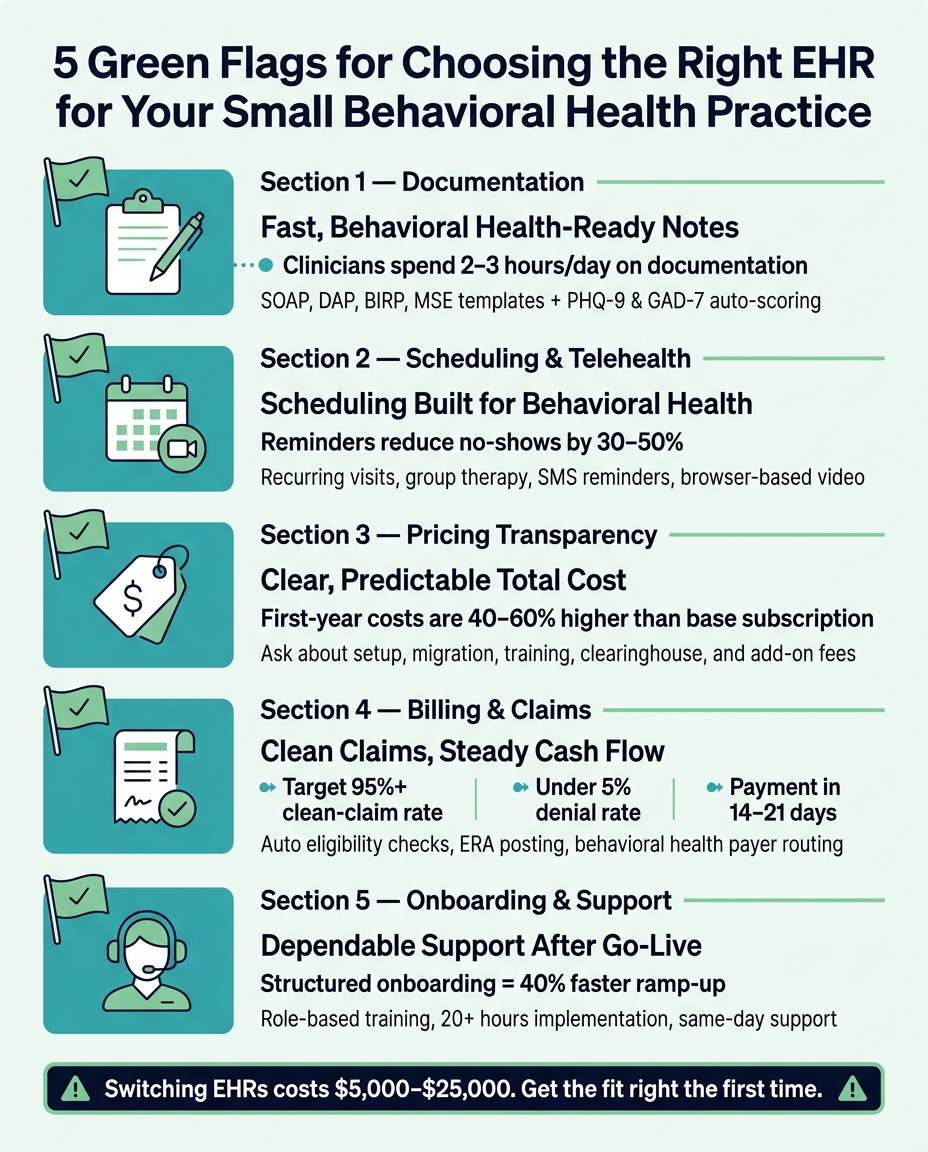
5 Green Flags for Choosing the Right EHR for Small Behavioral Health Practices
Quick Comparison
|
Green Flag |
What I’d Look For |
Why It Matters |
|---|---|---|
|
Documentation |
Built-in behavioral health templates and scored assessments |
Less charting time and fewer missed note details |
|
Scheduling + Telehealth |
Recurring visits, group therapy, reminders, portal, browser-based video |
Less front-desk work and fewer no-shows |
|
Pricing |
Full first-year cost in plain terms |
Fewer surprise charges |
|
Billing + Claims |
Claims from notes, eligibility checks, ERAs, payer routing |
Better cash flow and less rework |
|
Onboarding + Support |
Role-based training, test claims, same-day help |
Smoother setup and less downtime |
Judge an EHR by what happens in a normal workday:
how long notes take, how easy visits are to book, how clean claims go out, and how fast support responds.
What the Right EHR Should Do for a Small Practice
A small behavioral health practice usually wants the same few things: fewer clicks, faster notes, steadier cash flow, and help that doesn’t depend on an in-house IT team. That’s the lens to use when judging any EHR. If a feature doesn’t tie back to one of those needs, it’s probably just extra noise.
The first thing to check is documentation. Clinicians should be able to finish notes fast, not wrestle with the software. Native SOAP, DAP, and BIRP templates can help them document care more quickly [1].
Billing matters just as much. The EHR should help the practice get claims out cleanly instead of creating more manual work on the back end.
That usually means:
A built-in CPT/HCPCS code library for mental health
ICD-10 diagnosis lookup
Electronic claim submission
Real-time eligibility verification
Automated ERA (Electronic Remittance Advice) postingIf the practice treats substance use disorders, the system should also support 42 CFR Part 2 segmented record-keeping [1].
Patient access is another big piece of the puzzle. People expect simple tools now, not extra friction. Text reminders, online self-scheduling, and browser-based telehealth with no download can make it easier for patients to show up and stay involved in care. And that’s not a small detail: reminders can reduce no-shows by 30% to 50% [1].
Pricing should be plain from the start. That includes implementation and training costs, not just the monthly fee. If a vendor can’t explain the full price in clear terms, that’s a bad sign.
1. Behavioral Health Documentation That Clinicians Will Actually Use
When clinicians hate opening the chart after every session, the problem is often the EHR itself. It just doesn’t match how they work. Therapists spend an average of 2–3 hours a day on clinical documentation [1], so the way notes are built has a direct effect on the day.
A good fit usually includes pre-built SOAP, DAP, and BIRP templates, built-in Mental Status Exam (MSE) templates, risk assessment forms, and tools like the PHQ-9 and GAD-7 that auto-score and show trend lines in the chart [1][6]. For practices treating substance use disorders, there’s another box to check: 42 CFR Part 2 support, plus an audit trail for any redisclosed information [2]. If charting feels clunky, that’s often a warning sign for the rest of the system too.
Small-Practice Efficiency
The clearest test is simple: how fast can a clinician write a note?
During the demo, ask the vendor to build a progress note from scratch. That tells you a lot, fast. Progress notes, treatment plans, and assessments should take only a few clicks [4]. If it takes a long chain of menus and extra fields just to finish a routine note, that friction adds up session after session.
Compliance and Reimbursement Support
Notes also need to hold up for billing, not just clinical care. An EHR made for behavioral health should include built-in CPT codes for psychotherapy like 90834 and 90837, ICD-10 diagnosis lookup, and checks for missing notes before sign-off [1][7]. That setup can help cut denials and keep documentation lined up with reimbursement rules.
When note-taking works this smoothly, scheduling and telehealth should feel just as easy.
2. Scheduling and Telehealth That Match How You See Patients
Once notes are fast, your calendar needs to move just as smoothly. In behavioral health, scheduling has to deal with recurring visits, group therapy, waitlists, and intake forms without dumping extra work on the front desk. When a scheduler is made for general medicine, those weak spots show up fast.
Behavioral-Health Workflow Fit
A behavioral health scheduler should show remaining authorized hours at the time of booking, so you don't schedule a session insurance won't pay for [5]. It also needs to support group sessions as a built-in feature, not as a workaround for one-on-one visits.
That matters a lot if your caseload includes intensive outpatient or partial hospitalization programs. In those settings, a rigid calendar can turn into a daily headache.
Small-Practice Efficiency
The right system cuts admin work without cutting corners. Automated appointment reminders by SMS or email reduce manual follow-up and help keep the schedule full. A self-service client portal, where patients can book, reschedule, and fill out intake forms on their own, cuts down the back-and-forth that drains staff time [8].
If staff still have to step in for those routine tasks, the system probably isn't built for a lean team.
Compliance and Reimbursement Support
Telehealth should live inside the EHR, not sit off to the side. Native video launched from the calendar lets clinicians start visits without bouncing between tools [3]. The system should also include real-time insurance eligibility checks, so coverage issues show up before the session begins.
When scheduling and telehealth work this cleanly, pricing needs to be just as easy to understand.
3. Clear Pricing and a Predictable Total Cost
Once scheduling checks out, pricing is the next stress test. You should know what you'll pay before you sign. For a small practice, surprise fees don't just hurt the budget. They also eat up staff time.
Total Cost
The monthly subscription is only one piece of the bill. The Total Cost of Ownership (TCO) also includes implementation, data migration, training, and add-on fees that may not show up until later.
On average, first-year costs are 40% to 60% higher than the base subscription price by itself [1].
A vendor should be able to give you a total cost estimate for your practice size within 15 minutes. If they can't, that's a red flag. It often means the pricing model wasn't built for small practices.
Behavioral-Health Workflow Fit
A lot of hidden fees show up in the tools behavioral health teams use every day. Clearinghouse fees are often around $100 per month when they aren't bundled, and credit card processing usually falls between 2.9% and 3.5% per transaction [1].
Admin-seat fees can pile up too.
If your practice treats substance use disorders, check that 42 CFR Part 2 support is included in the plan price. It shouldn't show up later as a separate compliance add-on [1].
Small-Practice Efficiency
Feature bloat can drive costs up fast. Enterprise systems often bill for modules a behavioral health practice may never touch, including unrelated specialty modules [1].
What you want is simple: pay for the tools your team will use.
Ask these questions up front:
Is e-prescribing included in the base plan?
Is EPCS for controlled substances included, or billed on top?
Is the patient portal part of the base price or a separate fee? [4][1]Compliance and Reimbursement Support
A signed Business Associate Agreement (BAA) should come with your plan. It shouldn't be locked behind an enterprise tier [4].
Integrated claim submission and Electronic Remittance Advice (ERA) posting should also be part of the main workflow. If your staff has to patch things together by hand, payments can slow down and admin work grows fast [1][7].
Before you sign, get the data export terms in writing. That's the easiest way to avoid exit fees later.
Once pricing is clear, the next green flag is whether billing and claims run just as cleanly.
4. Built-In Billing and Claims That Keep Cash Flow Steady
The next test is simple: can the EHR turn finished sessions into clean claims without adding more admin work?
Behavioral-Health Workflow Fit
Behavioral health billing has a few odd rules that general-purpose systems often miss. One of the biggest is separate behavioral-health payer routing. In some plans, behavioral health benefits must go to a different payer.
If your EHR misses that during eligibility checks, the claim may go out to the wrong payer and come back denied. A good system catches that before submission [9].
Group therapy brings its own billing headache. For CPT 90853, each person in the session needs an individual claim and an individual progress note. A billing-ready EHR should create both automatically for each member, without extra clicking or duplicate entry [9][10].
After the payer is confirmed, the next step is just as important: the system should turn that visit into a clean claim on its own.
Small-Practice Efficiency
The clearest sign of a smooth billing setup is this: claims are created straight from session notes. That way, the clinical record and billing data stay in sync, without someone copying details by hand from one screen to another. It also cuts the lag between finishing documentation and sending the claim [5][10].
First-pass denials are common in behavioral health, and many small practices never appeal them [9].
Compliance and Reimbursement Support
Time-based CPT codes such as 90832, 90834, and 90837 need actual start and stop times in the note. If those timestamps are missing, you may be opening the door to audit trouble [9].
NPI mapping is another spot where small errors can cost you. The Individual NPI (Type 1) belongs in Box 24J on the CMS-1500 form. The Group NPI (Type 2) goes in Box 33a. Mix those up, and you can end up with rendering-provider denials [9].
If billing is this clean, the next green flag is whether the vendor can keep your team moving after go-live.
5. Dependable Onboarding, Training, and Customer Support
Once billing is set up, the last big green flag is simple: the vendor should treat onboarding like a planned rollout, not a single setup call. A solid EHR can still fall apart if the setup is rushed or support fades after go-live.
Behavioral-Health Workflow Fit
Basic onboarding usually covers navigation and a few core tasks. Behavioral-health onboarding needs to go further.
Your trainers should walk the team through field-specific work, like documenting group therapy sessions, using ASAM-based assessment templates, and handling 42 CFR Part 2 consent tracking [2]. That level of training matters. If a trainer can't explain how to document a family therapy note, the training probably wasn't built for your field [1].
Small-Practice Efficiency
A small team doesn't have time to sit around for 48 hours waiting on support in the middle of the workday. You need a setup process that respects how tight the schedule is.
Ask for:
Role-based training
At least 20 hours of implementation time
Practices that use that structure ramp up 40% faster [1]. Before go-live, get written pricing for extra training, data exports, and integrations. That helps you avoid surprise charges when the team is already under pressure.
Compliance and Reimbursement Support
Training should also cover the money side, not just the clinical side. That means hands-on claim scrubbing and denial-management training.
Before go-live, submit test claims. Also confirm that the vendor provides a BAA and SOC 2 Type II report before data migration [1][2].
Once those pieces are in place, the difference shows up in daily use.
What These 5 Green Flags Look Like in Daily Practice
Green flags only matter if they show up in the day-to-day. The easiest way to judge fit is to watch a normal workday and see where the system helps - or gets in the way.
A therapist finishes a 50-minute session and has just a short window to complete a progress note before the next client walks in. In a well-fitted EHR, that note - whether it uses a SOAP, DAP, or BIRP format - gets done in under five minutes and in fewer than three clicks [1][4]. That gap matters. It can mean wrapping up charting on time instead of dragging it into the next session. And that same ease should show up across scheduling, telehealth, and billing too.
For front-desk staff, rescheduling recurring visits should take seconds, not a string of extra steps. The right system manages recurring appointments and automated reminders without making staff jump through hoops. A psychiatrist should also be able to start the visit straight from the calendar without switching tools [1].
On the billing side, a biller should be able to catch an error before the claim leaves the system [2]. That’s what happens when documentation, telehealth, and billing stay connected instead of living in separate places. If the money side runs this smoothly, there’s one more thing to check: support.
A practice owner who hits a technical snag early in the morning needs help before the first patient arrives. Same-day support keeps a small practice moving [4]. When support is fast, the whole day is less likely to go sideways.
Use these everyday moments to build your vendor checklist.
Comparison Tables to Use When Evaluating EHR Options
Use these tables as a quick scorecard during demos and vendor calls. They make side-by-side scoring much easier, especially when two platforms look similar at first glance.
|
Feature |
General EHR |
Behavioral Health-Specific EHR |
|---|---|---|
|
Note Formats, Assessments, and Outcome Tools |
Standard SOAP, generic text fields, and manual outcome entry |
SOAP, DAP, BIRP, group notes, MSE, risk assessments, ASAM Criteria, and built-in PHQ-9, GAD-7, PCL-5 |
|
SUD Compliance |
Standard HIPAA controls only |
HIPAA plus 42 CFR Part 2 segmented records and consent tracking |
|
Group Therapy |
Workarounds or individual notes only |
Native group notes, billing, and multi-clinician signatures |
|
Prescribing |
Basic e-prescribing or none |
Controlled-substance e-prescribing (EPCS) |
This next table gets at day-to-day workflow. And that matters more than most sales pitches admit. A system can look polished in a demo but still slow your team down if staff have to jump between tabs, apps, and logins all day.
|
Workflow Step |
Integrated Tools |
Separate Tools |
|---|---|---|
|
Joining a visit |
One-click from the calendar |
Manual link copying and pasting |
|
Note-taking |
Done inside the video session |
Requires switching between windows |
|
Billing modifiers |
Applied automatically |
Entered manually per claim |
|
Patient experience |
Single portal login |
Multiple logins |
Cost is where surprises tend to show up. So don’t stop at the monthly subscription. Ask vendors to walk through each line item and spell out what’s included versus what costs extra.
|
Cost Component |
What to Confirm |
|---|---|
|
Base subscription |
Per-provider pricing and any feature-tier changes |
|
Implementation |
One-time setup and onboarding fees |
|
Data migration |
Cost to move historical records |
|
Training |
Included hours vs. paid onboarding |
|
Admin users |
Whether non-clinical accounts are included or require extra licenses |
|
Billing and claims |
Clearinghouse integration or per-claim fees |
|
E-prescribing (EPCS) |
Whether controlled-substance prescribing is included or an add-on |
|
Telehealth |
Whether video is included or billed separately |
|
Data export |
Any fees to export your records if you leave |
Once cost is clear, look at billing performance too. A lower sticker price doesn’t help much if claims go out late, denials pile up, or staff spend hours fixing avoidable errors.
|
Billing Metric |
Target Benchmark |
|---|---|
|
Clean-Claim Rate |
95%+ |
|
Days in A/R |
30 days or less |
|
Denial Rate |
Under 5% |
|
Time to Payment |
14–21 days from service date |
|
Staff Rework Time |
Under 2 hours per week |
Support can be the tie-breaker, especially after go-live. Plenty of vendors promise help. The better question is: what kind of help, how fast, and from whom?
|
Support Factor |
Standard Support |
High-Quality BH Support |
|---|---|---|
|
Onboarding |
Virtual only; self-paced |
On-site onboarding; 4 to 12 weeks of training and go-live support |
|
Training |
Documentation/videos only |
Blended e-learning + superuser model |
|
Hours |
9:00 a.m. to 5:00 p.m. EST |
24/7 or extended clinical hours |
|
Channels |
Email or ticket only |
Phone, live chat, and video |
|
Expertise |
General technical support |
Behavioral health billing specialists |
|
Response Time |
24–48 hours |
Same-day, under 4 hours |
Turn the strongest rows into your vendor checklist in the next section.
How to Turn the 5 Green Flags Into a Vendor Checklist
Turn those five green flags into a simple scorecard your team can use in every demo.
Start with a weighted scoring matrix. Give each criterion a 25% weight, then score each vendor from 1–5. That way, one flashy feature doesn’t throw off the whole decision.
|
Criteria |
Weight |
Vendor A Score (1–5) |
Vendor B Score (1–5) |
|---|---|---|---|
|
BH Workflow Fit (templates, DAP/SOAP/BIRP, ASAM, MSE) |
25% |
||
|
Billing & Compliance (claims, BAA, audit logs, real-time eligibility) |
25% |
||
|
Lean Team Efficiency (clicks, mobile, reminders, portal, telehealth) |
25% |
||
|
Total Cost Clarity (no hidden fees, first-year TCO) |
25% |
||
|
Total Score |
100% |
Use the same scorecard on every vendor call so each demo gets judged by the same standard.
Before the demo, map out your intake, assessment, and billing workflows. Then ask the vendor to follow those steps exactly. That’s how you find out whether the tool fits your process, not just what it can show in a polished sales walkthrough.
During the demo, ask how the system handles claim submission and what happens when a claim gets denied. If the answer is slow or fuzzy, that tells you something too.
Here’s a simple gut check: if a vendor can’t give you the full cost for a practice your size within 15 minutes, the pricing model probably wasn’t built with small practices in mind.
Before you sign anything, test real scenarios in a sandbox. Verify the BAA and SOC 2 Type II report.
Then talk to a practice that’s about your size and ask two plain questions:
Were there any surprise costs?What was post-go-live support like?
Conclusion
Taken together, these five green flags point to one thing: operational fit.
The right EHR for a small behavioral health practice is not the one with the longest feature list on paper. It’s the one your team can use every day without friction. In plain English, these five green flags lead to faster documentation, smoother scheduling, clearer pricing, steadier billing, and support that responds fast.
A bad fit gets expensive fast. EHR migration typically costs between $5,000 and $25,000 once you factor in data migration, downtime, and retraining [1]. That’s why the first decision matters most.
When the fit is right, the system can grow with the practice. As your practice grows, a system built around these five green flags should scale with you.
FAQs
How do I know if an EHR will save my team time?
Test it against your day-to-day work during a trial or demo. Time how long real notes take, and check whether scheduling, documentation, telehealth, and billing fit together smoothly without making staff enter the same details twice.
Look for fast documentation tools, auto-filled fields, and billing support that connects directly to clinical work. If common tasks take only a few clicks and onboarding and support are dependable, the EHR is more likely to save your team time.
What hidden EHR costs should a small practice ask about?
Ask about fees beyond the base price, including:
ImplementationData migration
Extra training
Higher support tiers
Integrations
Data export
Storage limits
Inactive users
Added features
Those are the places where costs often creep up.
Which billing features matter most for behavioral health?
The most important billing features for behavioral health are:
Integrated claim submission from notes
Real-time eligibility verification
Denial management workflows
ERA posting
Support for behavioral health billing codes and note formats like SOAP, DAP, and BIRP
These features help teams bill with fewer errors, get paid sooner, and cut down on claim rejections.



- Behavioral Health
- EHR Systems
- Addiction Treatment EHR
- mental health
- Telehealth
- addiction treatment
- Behavioral health facility
- Substance Abuse Disorder
- behavioral Health center
- HIPPA Compliant
- ehrsoftware
- PTSD
- behavioral health ehr
- Depression
- hipaa
- Anxiety
- MentalHealthMatters
- RCM
- claim denials
- clinical documentation
- mental health awareness
- screening tools

September 15, 2026

September 15, 2026

September 14, 2026

September 11, 2026

September 10, 2026

September 09, 2026
Recommended Posts

Monday, June 01, 2026
What Makes an EHR the Best Fit for Your Mental Health Practice
Choosing the right EHR for your mental health practice matters. It directly impacts how you manage clinical ...

Monday, July 13, 2026
The Pros and Cons of Using Free EHR for Mental Health Practices
A free EHR can work at first - but only for a small, simple mental health practice. If you're solo, cash-pay, and just ...

Wednesday, March 25, 2026
Signs Your EMR Behavioral Health Platform Fits Your Team
Your EMR system should make your team’s work easier, not harder.