Custom workflow templates are transforming addiction treatment centers by automating tasks like intake, treatment, and discharge processes.
These templates reduce paperwork, eliminate errors, and speed up patient admissions - key factors in preventing dropouts and improving outcomes.
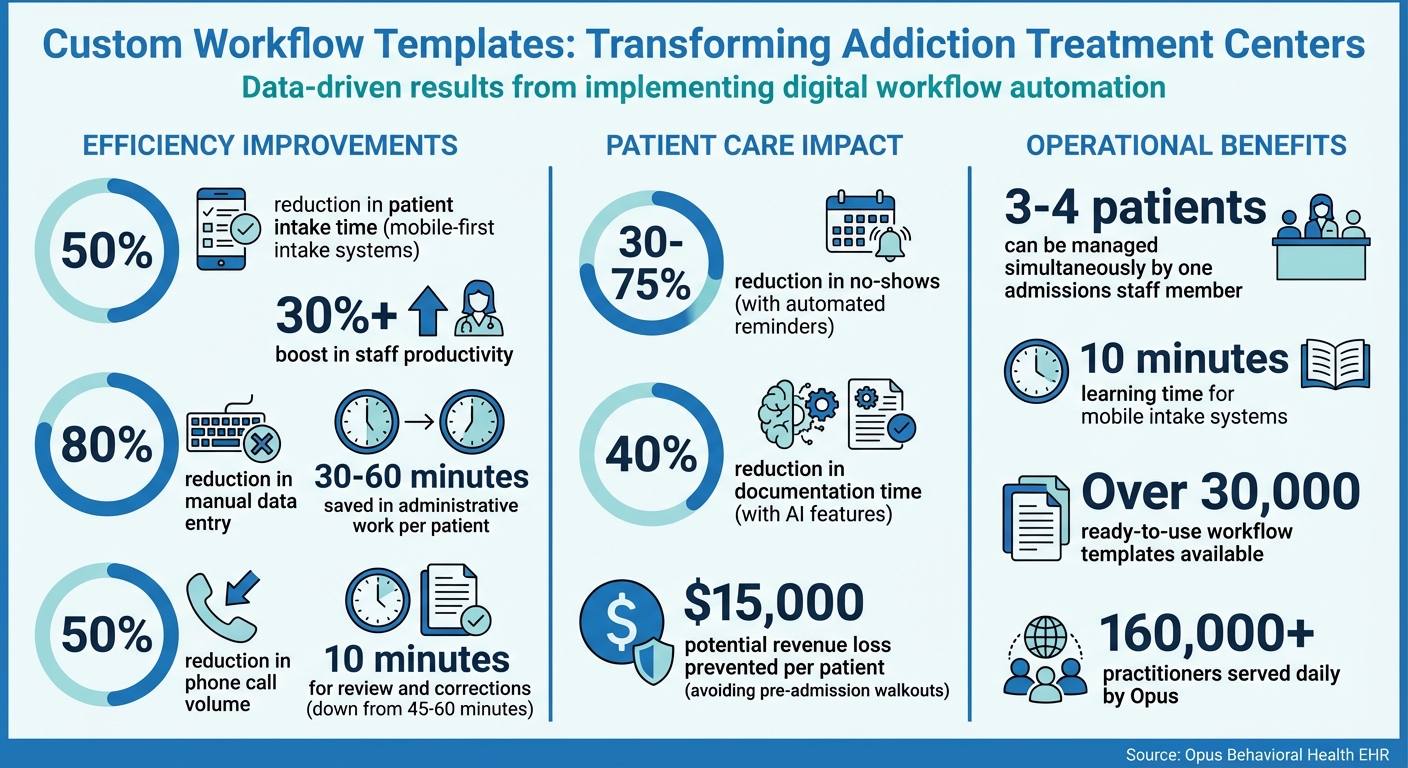
For instance, mobile-first intake systems can cut patient intake time by up to 50%, while integrated workflows boost staff productivity by over 30%. The benefits extend beyond efficiency. Automated alerts ensure compliance with strict regulations like HIPAA and 42 CFR Part 2, while smart logic forms adapt to each patient’s needs, improving form completion rates.
These workflows also enhance patient care by providing clinicians with instant access to medical histories and customized assessments, allowing them to focus more on treatment and less on administrative tasks.
Opus Behavioral Health EHR makes creating custom workflows simple with drag-and-drop builders, AI-powered tools, and integration with clinical assessments.
Whether you're managing a small clinic or a multi-state network, these tools help streamline operations, reduce costs, and improve patient care - all while staying compliant with industry standards.
Custom Workflow Templates Impact on Addiction Treatment Centers: Key Statistics
Benefits of Custom Workflow Templates
1. Simplifying Clinical Processes
Custom workflow templates take the hassle out of manual data entry by syncing digital intake forms directly with the EHR.
This automatic connection not only reduces transcription errors but also frees up staff to focus on patient care. Smart logic forms add another layer of efficiency by tailoring questions to each patient's situation.
For instance, a patient entering detox sees a different set of questions than someone starting outpatient treatment.
This targeted approach minimizes irrelevant questions, cuts down on "Not Applicable" fatigue, and boosts form completion rates.
Clinicians can also review key patient history and withdrawal symptoms ahead of time, allowing them to build rapport quickly instead of wasting time hunting for information [2]. These streamlined processes also set the stage for thorough compliance checks.
2. Meeting Compliance Requirements and Reducing Errors
Custom templates do more than just save time - they help ensure compliance with industry standards. Digital workflow templates include built-in safeguards like automated timestamps and electronic signatures, creating a clear audit trail for organizations like the Joint Commission or CARF.
This means centers can easily demonstrate adherence to standards without digging through piles of paper files [2][3].
Templates can also be customized to prompt specific regulatory requirements, such as ASAM dimensions or 42 CFR Part 2 consents, ensuring all necessary fields and signatures are completed before a patient leaves.
Additionally, the system can differentiate between standard progress notes and specialized SUD counseling notes, which require separate consents for disclosure under federal privacy rules [3].
3. Supporting Patient-Centered Care
These templates go beyond operational improvements - they also enhance patient-centered care. Formats like SOAP, DAP, and BIRP ensure clinicians consistently document critical details, from sobriety status to specific interventions.
This creates a "golden thread" that ties together the initial assessment, treatment plans, progress notes, and outcomes. Such consistency is essential for demonstrating medical necessity and keeping the entire team aligned on clinical goals.
By incorporating person-first language - like using "recurrence of use" instead of "relapse" - templates can also reduce stigma and foster a stronger therapeutic connection. Pair this with role-based dashboards that show only relevant tasks, and you have workflows that reduce "click fatigue" and let clinicians spend more time focusing on patients directly.
What Makes an Effective Workflow Template
An effective workflow template is built around three main pillars: flexibility, integration, and automation.
These elements are crucial for helping addiction treatment centers streamline the process of moving patients from initial inquiry to admission, all while maintaining compliance and clinical quality. By focusing on these areas, templates can simplify the intake process and support better clinical decision-making.
Customizable Fields for Different Needs
The intake process for a detox patient in crisis is vastly different from that of someone starting outpatient therapy. This is where smart logic forms come into play.
These forms adapt dynamically, showing only the questions relevant to the patient's situation. This reduces unnecessary complexity and lowers the risk of form abandonment. For example, marking certain fields as required ensures that essential information - like consents under 42 CFR Part 2 - is always captured.
Digital intake tools can cut manual data entry by up to 80%, allowing one admissions staff member to manage three to four patients simultaneously. The efficiency gains are impressive, reducing the time spent on administrative tasks per patient from 45–60 minutes to just 10 minutes for review and corrections [4].
Integration with Assessment Tools
Customizable fields are just the beginning. The real power of workflow templates emerges when they integrate with clinical assessment tools.
By connecting directly to instruments like the PHQ-9 (for depression), GAD-7 (for anxiety), or COWS (for monitoring opiate withdrawal), these templates give clinicians a complete picture of the patient before their first in-person meeting. This shift allows staff to focus on building rapport rather than collecting data.
Templates that align with the six ASAM dimensions provide structured documentation for level-of-care decisions, meeting the rigorous standards required by accrediting bodies [3].
Additionally, mobile-first intake automation that integrates these tools can cut the intake process by up to 50% [2]. This integration ensures a smoother, faster transition from inquiry to admission.
Automation to Save Time
Automation takes workflow templates to the next level by eliminating post-submission bottlenecks. For instance, these templates can automatically route documents requiring countersignatures to the appropriate staff member’s queue.
Two-way SMS integration is another game-changer, enabling patients to confirm or reschedule appointments with a simple text reply. This feature is especially helpful for individuals dealing with "cognitive fog" during early recovery [5].
Automated reminders also play a big role in reducing no-shows, cutting them by 30% to 75% in some cases [5]. Facilities that switch to text-based appointment management have even reported a 50% drop in phone call volume [5].
Beyond saving time, these automated workflows can prevent costly "pre-admission walkouts", which can result in a loss of approximately $15,000 in revenue per patient [2].
Creating Custom Templates with Opus Behavioral Health EHR
Opus Behavioral Health EHR offers tools designed to help addiction treatment centers create custom templates that fit their unique needs. Clinical directors and admissions coordinators can easily build and adjust templates without relying on external consultants. This flexibility allows centers to respond quickly to new treatment protocols or regulatory updates.
Using Drag-and-Drop Workflow Builders
Opus includes a visual, no-code builder that simplifies the creation of workflows. Staff can drag tasks onto a blank canvas and connect them with lines to define the sequence and flow of information.
Plus, the platform provides access to over 30,000 ready-to-use workflow templates, which can be filtered by industry [7].
For example, you can start with a pre-built ASAM assessment template and modify it to include your specific consent forms or lab protocols. Templates remain in "Draft" mode until finalized, ensuring incomplete workflows don’t interfere with daily operations.
Role-based customization enhances efficiency by tailoring dashboards to specific roles. For instance, a billing coordinator sees tasks like insurance verification and payment tracking, while a therapist’s dashboard highlights clinical assessments and treatment plans.
Jennifer Gozy, PsyD, LP, Director of Clinical Systems and Compliance at Care Counseling Clinics, shared her perspective:
We chose Opus because it is user-friendly and highly configurable. We are looking forward to designing a system that meets our agency's unique needs [8].
This level of customization ensures staff stay focused on their specific responsibilities, promoting smoother care delivery.
Using AI-Powered Features
Opus takes customization further with Copilot AI, which allows staff to create workflows using plain-English commands.
For example, typing "Create an intake workflow for detox patients that includes COWS assessment, insurance verification, and bed assignment" generates a ready-to-use template in minutes [8][9].
This feature significantly reduces setup time, especially for centers launching new programs or services. Additionally, integrated sentiment analysis helps flag early signs of relapse, cutting documentation time by 40% [8][9].
By automating these processes, clinicians can dedicate more time to patient care instead of paperwork.
Scaling for Centers of All Sizes
Opus is designed to support treatment centers of all sizes, whether it’s a single location with a small team or a multi-state network with hundreds of staff members. The platform enables centers to scale seamlessly by using reusable sub-workflows, such as insurance eligibility checks, that can be integrated into larger workflows.
In 2025, Care Counseling Clinics adopted Opus to support their expansion. Trevor Mulvey, VP of Finance, and Rebeka Tolle, VP of Operations, used the platform’s configurable workflows to manage payor rate compliance and accrual accounting as their organization grew. Mulvey highlighted the platform’s scalability:
As our organization continues to grow, we need a partner that can grow with us. OPUS is that perfect partner [8].
Serving over 160,000 practitioners daily [8], Opus offers tiered solutions suitable for practices of all sizes - from small clinics with a handful of clinicians to large organizations with dozens of providers.
Centers can start with basic modules and add features like telehealth, e-prescribing, or lab integration as their needs evolve. This adaptability ensures that workflows grow alongside the center’s clinical and operational demands.
How to Optimize Your Workflow Templates
Creating custom workflows is only the beginning. To ensure operations remain smooth and compliant, addiction treatment centers need to routinely assess and refine their templates. This regular upkeep helps workflows stay in sync with clinical objectives, regulatory changes, and staff requirements.
Conducting a Workflow Gap Analysis
A workflow gap analysis highlights inefficiencies and identifies where automation can have the most impact. Begin by mapping client statuses across the treatment journey - intake, active treatment, discharge, and closed cases - to uncover bottlenecks [1].
For example, manual paperwork processes during intake can slow things down and even lead to patient dropouts before treatment starts.
Another critical step is to audit compliance gaps by checking signature requirements for regulations like 42 CFR Part 2 and HIPAA. Missing signatures can pose risks during CARF or Joint Commission surveys [2].
Automating routing and notifications can eliminate delays caused by manual tracking or reliance on physical mailboxes [6]. Additionally, review whether your forms capture specialized information like substance abuse triggers, family history, or relational dynamics - details that generic templates often overlook [6].
Each digital form should include timestamps and a clear audit trail to satisfy accreditation standards [2]. Identifying these gaps lays the groundwork for staff training and template updates.
Training Staff on New Templates
Once gaps are identified, it’s crucial to train staff on the updated workflows. Even the most well-designed templates won’t succeed without proper training.
Modern platforms simplify this process, with some mobile intake systems requiring as little as 10 minutes to learn [5]. Focus on role-specific training so that both clinicians and administrative staff understand how the changes affect their daily responsibilities. For instance, admissions coordinators should know how digital intake reduces inefficiencies.
Offer a variety of training methods to cater to different learning preferences. Microlearning sessions of 15 minutes are ideal for busy schedules, while super users in each department can provide ongoing peer support and troubleshooting.
Hosting lunch and learn sessions creates casual opportunities for Q&A and sharing tips, which can help reduce technology-related anxiety. Case study training using real caseloads helps staff build confidence and proficiency immediately.
Highlight how automated features, like signature routing and two-way texting, can cut phone call volumes by up to 50%, freeing up more time for patient care [5].
Reviewing and Updating Templates Regularly
Workflow templates are not static tools. Regular updates ensure they stay relevant to changing clinical practices and regulatory standards. Plan quarterly reviews to compare your templates against Joint Commission or CARF requirements, updating any outdated elements or language [6].
Make sure progress note templates maintain the "golden thread" connection by explicitly linking back to treatment plan goals.
This demonstrates medical necessity and clinical progress [3]. Standardize treatment plans using the SMART framework (Specific, Measurable, Achievable, Relevant, Time-bound) to meet payer audit expectations [10].
As regulations evolve - such as updates around electronic consents or separating SUD counseling notes from official progress notes - your templates should adapt accordingly [3]. Regular reviews also allow you to incorporate staff feedback on redundant fields or confusing steps, improving usability and efficiency. By keeping templates updated, workflows remain effective, compliant, and aligned with clinical goals, enhancing the overall intake process.
Conclusion
Custom workflow templates are changing the way addiction treatment centers operate. By allowing patients to fill out forms on their phones before arrival and enabling clinicians to review medical histories ahead of time[2], the entire treatment process becomes smoother and more efficient - helping patients move toward recovery faster.
Switching from paper-based processes to digital templates offers measurable benefits. These templates can reduce manual data entry by as much as 80%, save between 30 and 60 minutes of administrative work per patient, cut phone call volume by up to 50%, and increase staff productivity by over 30%[2][4].
They also provide a reliable audit trail for Joint Commission and CARF surveys while decreasing the chances of patient dropout during the crucial intake period. These improvements span the entire patient journey, from the first inquiry to discharge, all while supporting compliance and prioritizing patient care.
Opus Behavioral Health EHR equips addiction treatment centers with the tools to create and implement these custom workflows.
Features like drag-and-drop builders, smart logic forms that adjust to patient responses, and AI-powered tools that prevent transcription errors allow facilities to manage admission spikes without needing additional staff[4]. Plus, its seamless integration across EHR, CRM, and RCM systems ensures smooth data flow from the first contact to discharge.
Ready to take the next step? Explore Opus Behavioral Health EHR to see how custom workflow templates can reduce administrative tasks and let your team focus on what matters most - providing exceptional patient care.
FAQs
Which intake, treatment, and discharge steps should we automate first?
To improve workflows, begin with automating digital patient intake. Allowing patients to fill out forms on their phones before arriving cuts down on paperwork, accelerates the admissions process, and improves their overall experience.
Following that, use automated appointment reminders to reduce the likelihood of no-shows and maintain patient engagement. These measures simplify critical stages - intake, engagement, and discharge - making the treatment process more seamless for everyone involved.
How do workflow templates help with HIPAA and 42 CFR Part 2 compliance?
Workflow templates help maintain HIPAA and 42 CFR Part 2 compliance by streamlining secure communication, organizing patient consent processes, and keeping detailed logs of interactions for audit purposes.
This approach minimizes the chances of data breaches and legal complications while ensuring privacy regulations are followed.
What’s the fastest way to build and roll out templates in Opus Behavioral Health EHR?
If you're looking to save time while building templates in Opus Behavioral Health EHR, the platform offers tools that make the process simple and efficient. Just describe your workflow in plain English, and Opus AI will generate a ready-to-use template for you in minutes.
Prefer a more hands-on approach? Use the no-code drag-and-drop visual builder to tweak steps or adjust a pre-existing template to fit your needs. Both methods are designed to ensure quick setup and smooth workflows.



- Behavioral Health
- EHR Systems
- Addiction Treatment EHR
- mental health
- Telehealth
- addiction treatment
- Behavioral health facility
- Substance Abuse Disorder
- behavioral Health center
- HIPPA Compliant
- ehrsoftware
- PTSD
- behavioral health ehr
- Depression
- hipaa
- Anxiety
- MentalHealthMatters
- RCM
- claim denials
- clinical documentation
- mental health awareness
- screening tools

September 15, 2026
September 15, 2026

September 14, 2026

September 11, 2026

September 10, 2026

September 09, 2026
Recommended Posts
Friday, April 17, 2026
EHR Software That Simplifies Addiction Treatment Care
Addiction treatment centers face unique challenges, from strict privacy regulations under 42 CFR Part 2 to managing ...

Wednesday, August 05, 2026
Care Coordination Workflows in Addiction EHRs
About 31% of SUD patients leave treatment within the first 30 days, and more than 13% leave within the first 2 weeks.
Saturday, April 04, 2026
Why Addiction Treatment EHR Needs Its Own System
Most electronic health record (EHR) systems fail addiction treatment centers because they’re designed for general ...