
Behavioral health providers need HIPAA Security Rule training that is role-based, documented, and tied to daily work.
Generic annual training often misses the risks that come with telehealth, shared workstations, mobile devices, remote staff, and highly sensitive records such as psychotherapy notes and SUD documentation.
Behavioral health leaders should focus on a short list of priorities:
- Train each workforce member before ePHI access starts
- Match training to the person’s job, not just the title
- Cover access control, password rules, MFA, device use, phishing, and incident reporting
- Retrain after role changes, system updates, policy changes, or security events
- Keep records of completion, quiz results, and policy acknowledgments for 6 years
The business issue is simple. Weak security training can lead to privacy events, audit trouble, staff confusion, and added strain on clinical, compliance, and IT teams.
In healthcare, phishing drove 41% of data breaches in 2023, and 78% of organizations reported at least one successful phishing attack. For behavioral health organizations, the risk is even more serious because exposed records may lead to stigma, employment harm, or legal concerns for patients.
What leaders need is not a longer training deck.
They need a clear training program that shows staff:
- what they can access
- how to use that access safely
- how to spot and report a problem fast
- how the organization proves training happened
For treatment centers, mental health practices, and multi-site providers, HIPAA Security Rule training works best when it is practical, easy to track, and linked to the workflows staff use every day.
Start training with workforce security and access control
Workforce security training should start with a simple rule: each staff member should use only the access needed for the job at hand. Least-privilege, role-based access applies to every workforce member.[5][8]
Once teams understand who should and should not access ePHI, the next step is teaching them how to use that access safely in day-to-day work.
Assign role-based access and verify user identity
Different roles need different levels of access. A receptionist does not need psychotherapy notes. A biller may need diagnosis and procedure codes, but not therapy session detail.
A clinician needs full chart access for documentation and care delivery. IT staff may need system settings and audit tools, but not open-ended access to clinical records.[5][8][10]
|
Role |
Typical Access Scope |
|---|---|
|
Clinicians |
Treatment records, progress notes, treatment plans |
|
Front Desk / Scheduling |
Demographics, scheduling, eligibility, contact info |
|
Billing Staff |
Diagnosis codes, insurance data, claim-related records |
|
Supervisors |
Chart review and oversight tools |
|
IT / Admin |
Security settings, audit logs, user management |
Access should match current duties, not just job titles. If a case manager moves into a billing support role in the middle of the year, clinical access should be reviewed right away rather than waiting for the next annual audit.
Every workforce member, including trainees, volunteers, and contractors, must have a unique user ID.[4][6][7] Shared logins are not acceptable. Once credentials are shared, audit trails stop being reliable, and the organization can no longer tell who accessed ePHI.[1][6][7]
After access is assigned, staff should be trained on the device and login habits that help prevent accidental exposure.
Handle access changes, shared workstations, and remote sessions safely
When a staff member changes roles, takes extended leave, or leaves the organization, permissions should be updated by the last working day, and ideally on the same day the change happens.[2][3][14] Old accounts left open create avoidable risk. Many behavioral health organizations tie HR status changes to immediate access reviews for that reason.
Shared workstations depend on steady, repeatable habits:
- Log in only with a personal account
- Lock the screen when stepping away
- Sign out at the end of the shift
Automatic logoff after inactivity should be set on all shared and clinical workstations, with shorter timeout periods in waiting areas and intake rooms.[1][10][13]
Remote sessions require the same discipline as on-site work. Staff should use approved devices, avoid public Wi‑Fi, and make sure people nearby cannot see or hear patient information. Remote work follows the same confidentiality rules as in-office care.[9][10][11][12]
Next, staff should learn how to secure the devices and logins used every day.
Teach secure device use, password rules, and phishing response
Behavioral health organizations need staff training that turns security policy into daily habits. The goal is simple: give teams device, password, and email rules they can use on the spot while handling ePHI.
Set password, screen lock, and mobile device rules staff can follow
Each ePHI account should use its own strong passphrase. Organizations should require an approved password manager and prohibit password sharing or storing passwords in shared files. If compromise is suspected, credentials should be reset at once.
MFA should be required across all ePHI systems. For remote access and privileged accounts, phishing-resistant MFA, such as security keys, can reduce risk.
Devices should lock automatically after a short period of inactivity. Staff should also lock screens any time they step away, even for a moment. Mobile devices should require a passcode or biometrics, and lost or stolen devices should support remote wipe.
These rules are basic, but they matter because they address common failure points in day-to-day work:
- Reused passwords across systems
- Unlocked workstations in shared clinical areas
- Lost phones or tablets with access to patient data
- Delayed response after suspected credential theft
Recognize phishing and social engineering before ePHI is exposed
Phishing accounted for 41% of all healthcare data breaches in 2023, and 78% of healthcare organizations reported at least one successful phishing attack, with healthcare employees clicking phishing links three times more often than workers in other industries.[15][16] A single click can expose scheduling records, clinical notes, and billing data.
Staff training should focus on the warning signs that show up in day-to-day communication. Teams should pause when a message creates urgency, asks for credentials, requests patient information by email or text, or comes from a sender address that looks almost right but not quite. Messages that appear to come from IT, billing, or leadership deserve the same scrutiny. The right move is to stop, verify through a known contact method, and report the message.
A simple training frame can help staff remember what to check:
- Password hygiene
- Locked devices
- Verified messages
If a suspicious message slips through, the next step should be immediate incident reporting.
Apply these rules inside the EHR and connected workflows
These rules do not stop at the device level. They should carry into the EHR and every connected workflow. Inside the EHR, the same habits should match the screens staff already use each day. Each staff member should sign in with individual credentials, use MFA where available, and fully sign out after documentation, telehealth sessions, e-prescribing, lab review, or billing work.
For teams using Opus Behavioral Health EHR, these practices can be tied to role-based permissions, telehealth, reporting, and automated workflows so staff follow the same security steps inside the system they use every day.
Build a clear incident reporting and documentation process
Once staff understand access controls, device rules, and phishing awareness, the next step is simple: they need to know how to report a problem right away. In behavioral health settings, delays can turn a small issue into a compliance problem, a workflow disruption, or a data exposure event. Incident reporting should be fast, easy to follow, and handled the same way every time. The Security Rule requires organizations to identify, respond to, mitigate, and document security incidents under 45 CFR §164.308(a)(6).[17][18]
Report suspected incidents right away through internal channels
Staff should know exactly what needs to be reported and where those reports should go. Common reportable events include lost or stolen devices, misdirected messages, suspected phishing, unexpected account lockouts, and unfamiliar EHR access.[19][24][27]
Reports should be made immediately, and no later than the end of the same shift.[18] At a minimum, organizations should keep two reporting channels available:
- A designated privacy or security inbox, or a ticketing system, for standard incident reporting
- An urgent phone line or secure in-system message for time-sensitive events, such as a lost device or a suspected phishing click, when remote wipe or account lockout may still be possible
Each report should capture the same core details so IT, compliance, and operations teams are not piecing together facts later. That includes the reporter’s name and role, the date and time the issue was found, the systems involved, the type of event, whether ePHI may have been exposed, and any steps already taken. For organizations using Opus Behavioral Health EHR, incident logging in the platform can help connect the report to the related workflow and audit trail.
The same reporting process should apply across telehealth, shared workstations, and mobile devices. That consistency matters, especially for multi-site providers where staff may move between locations, care settings, and devices during a single day.
Preserve evidence and document what happened
Staff should not delete, change, or try to investigate the item on their own. Suspicious emails, warning messages, and system errors should be left in place and shared only through approved channels. IT or security teams should handle log collection and audit trail review.[24][25][26]
When an incident is documented, staff should record:
- The time the incident occurred, if known, and the time it was discovered
- The affected systems, described as clearly and specifically as possible
- Each containment step already taken, such as logging out, securing a device, or alerting a supervisor
Only designated IT or security personnel should collect logs, perform disk imaging, or review audit trails. That separation helps protect evidence and supports a cleaner response process if the event leads to a formal review, risk assessment, or notification decision.
Keep training records, version history, and acknowledgments
Incident reporting training should be documented with the same level of care as the incident process itself. Each session should include the session title, date and time, trainer’s name, target audience, delivery method, and a roster showing who completed it. Records should also include quiz scores or competency check results, along with signed or electronic acknowledgments.
Training materials should be version-controlled. Each document should show a version number, an effective date, and a short change history. When a policy changes, staff should receive formal notice and acknowledge the new version before it takes effect.
Organizations should retain incident reports, investigation notes, risk assessments, and notification records under the six-year recordkeeping policy.[20][21][22][23] For teams using Opus Behavioral Health EHR, the platform can help by linking training completion data and policy acknowledgments to individual user accounts.
That can give compliance teams clearer visibility into whether staff handling ePHI have current incident reporting training before they enter sensitive workflows.
These reporting steps can also serve as the base for role-specific drills and refresher training, especially for front-desk teams, clinical staff, telehealth users, and supervisors who may be the first to spot a security event.
Roll out a role-based training plan and track completion
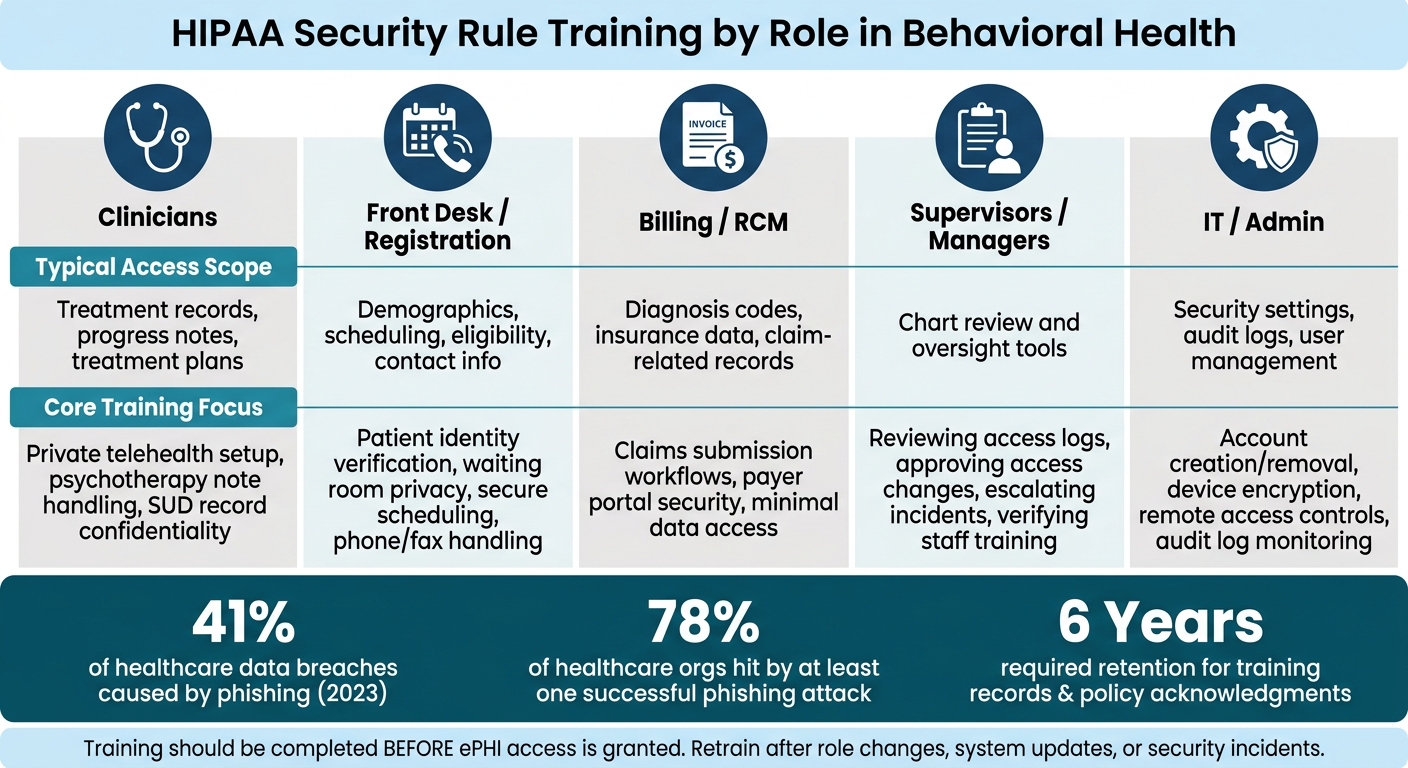
HIPAA Security Rule Training by Role: Access & Responsibilities
After staff understand the controls, training should be assigned by role and completed before ePHI access starts. That step matters in behavioral health, where clinicians, front desk teams, billing staff, managers, and IT administrators all handle patient data in very different ways.
Build separate training tracks by job function
A single training module is rarely enough. Each role interacts with ePHI differently, so training needs to match the work staff actually do.
|
Role |
Core Training Focus |
|---|---|
|
Clinicians |
Private telehealth setup and session handling, psychotherapy note handling, SUD record confidentiality |
|
Front Desk / Registration |
Patient identity verification, waiting room privacy, secure scheduling, phone and fax handling |
|
Billing / RCM |
Claims submission workflows, payer portal security, limit access to only the data needed for the task |
|
Supervisors / Managers |
Reviewing access logs, approving access changes, escalating incidents, verifying staff training completion |
|
IT / Admin |
Create and remove accounts, device encryption, remote access controls, audit log monitoring |
A better approach is to start with a shared core module that covers password rules, device security, phishing, and incident reporting. From there, organizations can add role-based modules tied to day-to-day tasks.
For providers using Opus Behavioral Health EHR, each training track should map directly to the workflows that role uses, such as scheduling, telehealth, billing, and reporting. That makes training easier to apply on the job and easier for managers to verify.
Those same role tracks should also serve as the baseline for onboarding and retraining.
Schedule onboarding, annual refreshers, and retraining after changes
Training should be completed before access to ePHI is granted. After onboarding, annual refreshers help keep security habits current and reduce drift over time.
Just as important, retraining should not wait for the yearly cycle when something changes.
It should be triggered by events that affect risk or workflow, including:
- policy updates
- new telehealth workflows
- an EHR upgrade
- new mobile device rules
- a security incident
- role changes
A practical example makes the point. If billing staff receive a phishing attempt through a spoofed payer email, that team should receive targeted email security retraining right away. Waiting until the next annual review leaves too much room for repeat mistakes.
Conclusion: Keep training practical, documented, and tied to real workflows
HIPAA Security Rule training in behavioral health should not be treated like a one-time checkbox. It works best when it is role-based, tied to real workflows, and documented in a central system.
Executive and compliance leaders should be able to show who completed training, what topics were covered, and when retraining occurred. That record should include completion status, staff acknowledgments, and version history. When an auditor asks for proof, the organization needs more than a policy on file. It needs clear documentation that staff were trained on access control, device security, phishing, and incident reporting.
FAQs
Who needs role-based HIPAA security training?
All staff in a behavioral health organization need role-based HIPAA security training to help protect sensitive patient information.
Training should match each person’s job duties. Clinical staff need guidance on accessing and documenting treatment records. Administrative staff need training for billing and scheduling. Anyone handling electronic personal health information needs instruction on encryption, access controls, and audit logging.
How soon should access be removed after a staff change?
Under 2026 HIPAA standards, organizations must revoke or update user access within 24 hours when an employee leaves or changes roles.
For security and compliance, access should be removed immediately upon termination. Automated workflows tied to HR software can help treatment centers and healthcare organizations make these changes on time and with better accuracy, which can reduce the risk of unauthorized access and privilege creep.
What should staff do first after a phishing click?
Staff should report the incident right away through the facility’s designated secure reporting channel. Fast reporting can help the organization limit potential harm and keep compliance records accurate.
Staff should then follow the organization’s established security incident protocols so the issue can be reviewed and addressed in line with HIPAA requirements.



- Behavioral Health
- EHR Systems
- Addiction Treatment EHR
- mental health
- Telehealth
- addiction treatment
- Behavioral health facility
- Substance Abuse Disorder
- behavioral Health center
- HIPPA Compliant
- ehrsoftware
- PTSD
- behavioral health ehr
- Depression
- hipaa
- Anxiety
- MentalHealthMatters
- RCM
- claim denials
- clinical documentation
- mental health awareness
- screening tools

September 15, 2026
September 15, 2026
September 14, 2026

September 11, 2026
September 10, 2026
September 09, 2026
Recommended Posts
Friday, August 28, 2026
10 HIPAA-Compliant CRM Features to Review
A healthcare CRM that touches PHI should be reviewed like a risk system, not just a sales tool.
Friday, February 11, 2022
Top Considerations for Behavioral Health Treatment Centers When Switching EHR Systems
The world is cautiously beginning to open again after the Covid-19 shelter-in-place orders are lifted. While it’s ...
Tuesday, December 16, 2025
HIPAA Compliance: Role of Audit Trails in Security
Audit trails play a critical role in ensuring HIPAA compliance by tracking every interaction with patient data. These ...