

One intake form for every SUD patient is a fast way to create delays, denials, and compliance gaps.
The fix is simple: use one intake workflow with rules that change questions, consents, alerts, and billing fields based on level of care, risk, payer, referral source, and patient answers.
Summary:
Match intake to program type: detox, residential, PHP/IOP, MAT/OTP, and telehealth each need different questions.
Use branching logic so staff and patients only see fields that apply.
Require high-risk data up front: last use date/time, overdose history, seizure history, suicide risk, meds, and allergies.
Add validated screeners like PHQ-9, AUDIT-C, COWS, and CIWA-Ar inside the same workflow.
Block submission until consents are signed, including 42 CFR Part 2 releases when needed.
Collect payer data early because registration and eligibility mistakes drive about 24% of claim denials.
Store data in discrete EHR fields, not just PDFs, so it can feed treatment plans, utilization review, billing, labs, and reports.
Automate routing so risk flags go to clinical staff, insurance details go to VOB, and expiring authorizations trigger alerts.
Build intake around reporting rules for Medicaid, state reporting, and SAMHSA-funded programs.Core Building Blocks of a SUD Intake Form
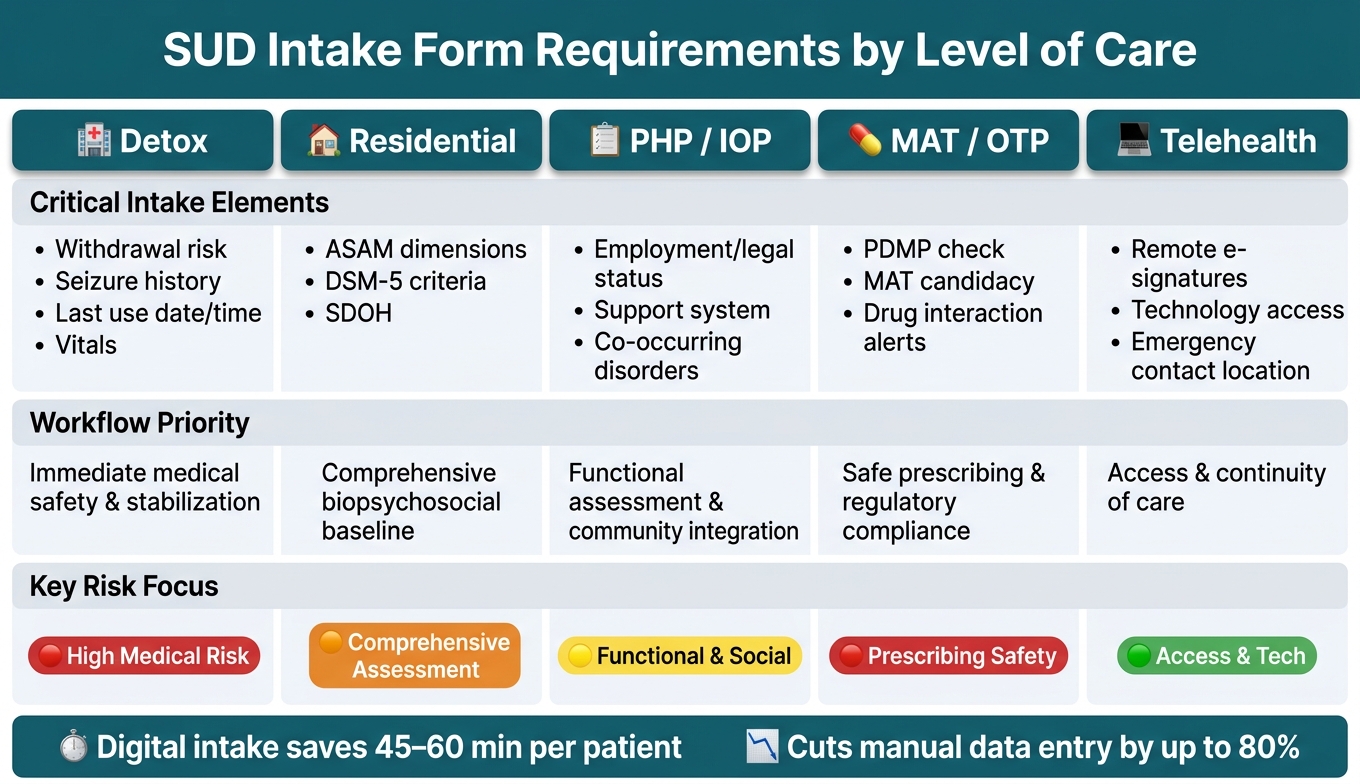
SUD Intake Form Requirements by Level of Care
Required data elements for SUD admissions
SUD intake needs to collect three kinds of information: clinical details, day-to-day program data, and compliance-related records. That starts with the basics: full name, date of birth, address, and emergency contacts. But it can't stop there. Intake forms also need substance use history, medical and psychiatric history, current medications, and allergy alerts.
Some details need extra care because they affect safety right away:
Last use date and time, plus overdose history
Seizure history, which is critical for detox safety
Suicide risk and withdrawal severity
Active medications and allergy alerts
Risk assessments should be part of every SUD intake, not only crisis cases.
That includes suicide risk, withdrawal severity, and overdose history. The same goes for social determinants of health (SDOH), such as housing stability and employment status, along with legal or program-specific details like court-ordered status and medication-assisted treatment candidacy.
Funding sources like Medicaid, Medicare, or SAMHSA Block Grants may also require priority-population data, including pregnancy status or injection drug use history [6]. These fields shape placement, billing, and reporting.
Those baseline fields also set up the branching logic and consent steps that come next.
Match intake forms to level of care and program type
The core data stays mostly the same, but the intake path should shift based on level of care. Think of it like using the same frame while swapping out the parts that matter for each setting. Start with the shared fields, then add prompts based on the program.
|
Level of Care |
Critical Intake Elements |
Workflow Priority |
|---|---|---|
|
Detox |
Withdrawal risk, seizure history, last use date/time, vitals |
Immediate medical safety and stabilization |
|
Residential |
Comprehensive biopsychosocial baseline |
|
|
PHP / IOP |
Employment/legal status, support system, co-occurring disorders |
Functional assessment and community integration |
|
MAT / OTP |
PDMP check, medication-assisted treatment candidacy, drug interaction alerts |
Safe prescribing and regulatory compliance |
|
Telehealth |
Remote e-signatures, technology access, emergency contact location |
Access and continuity of care |
Using ASAM-aligned intake templates across all levels helps clinical, utilization review, and billing teams work from the same record [8].
Most payers ask for documentation across all six ASAM dimensions to support medical necessity for placement from Level 0.5 (early intervention) through Level 4.0 (medically managed inpatient) [6].
When those dimensions are built into the intake form from the beginning, staff don't have to scramble later to patch missing details before a prior authorization request goes out.
Design forms to prevent reentry and missing data
When intake fields connect straight to discrete EHR fields instead of being stored as a flat PDF, the same data can pre-fill treatment plans, nursing assessments, and billing records without staff typing it all over again [3][1].
That saves time, but more than that, it cuts down on mistakes that creep in during manual entry.
Mandatory field enforcement helps with another common problem: incomplete records. If the form blocks submission until required fields are filled in, staff don't end up chasing patients days later for missing information [3].
It also helps to separate patient-facing fields from staff-only clinical fields. When patients can complete sensitive substance use history privately, such as through a secure SMS link before arrival, self-reporting is often more honest [3][7].
Staff can then review that information and add their own clinical observations in separate sections. That keeps documentation ownership clear and supports reporting, billing, and treatment planning from one structured record.
From there, the next step is tailoring the form with branching based on risk, screening needs, and consent type.
How to Personalize Intake with Branching Logic, Screeners, and Consents
1.) Use branching questions for substance use, risk, and special populations
Once you’ve set the core intake fields, the next step is branching. The goal is simple: show patients only the questions that fit their situation.
Branching logic helps you hide questions that don’t apply and show follow-up prompts only when they do. So if a patient says they aren’t using substances right now, the form can skip the long drug history section.
If they report active use, the intake can open the next set of questions for route of administration, frequency, and last use.
This same setup works for risk flags too. If a patient reports seizures, past overdoses, or suicidal ideation, the form can trigger an immediate clinical alert and send it to the right staff member before the first session starts [3][2].
The same idea applies to special populations. A positive pregnancy response can open care coordination fields and follow-up prompts. Justice-involved status can surface fields for legal referral data and outside agency reporting requirements [5][2].
Store these responses in coded EHR fields so alerts, reporting, and care planning can run on their own.
After the form routes the patient, add the matching screener in that same workflow.
2.) Embed validated screening and assessment tools
Each risk response should route straight to the matching screener inside the same intake record. Alcohol, depression, and withdrawal responses can lead to AUDIT-C, PHQ-9, COWS, or CIWA-Ar [7][10][9].
The big upside of doing this in a digital workflow is auto-scoring. A PHQ-9 score can be calculated and ready for the clinician before they even enter the room. If the score is high, the system can send it to the right role right away. Keep screening results in discrete EHR fields so they stay searchable, audit-ready, and usable for treatment planning and outcome tracking over time [3].
3.) Collect electronic consents, releases, and Part 2 authorizations
SUD intake usually includes treatment consent, HIPAA acknowledgment, Part 2 ROI, telehealth consent, MAT consent, and assignment of benefits [3][6][5].
A Part 2-compliant ROI must include:
The patient’s nameThe specific disclosing and receiving parties
The purpose of the disclosure
The specific information to be disclosed
An expiration date [6]
MAT informed consent should explain medication mechanisms, benefits, side effects, drug interactions, treatment duration, and the discontinuation process [6]. That is not the same as a general HIPAA release.
You should also block form submission until all required consents are signed. If a consent template changes, update it once and push that version across every site so patients always sign the current legal form [3].
The e-signature system should record tamper-evident timestamps and IP logs to meet ESIGN Act and UETA requirements [6].
Consent choices should shape access as well. Role-based access tied to consent status helps keep sensitive disclosures visible only to approved clinical staff [3].
Once branching, screening, and consent are set, the intake can move into payer, referral, lab, and billing fields.
Insurance, Referrals, Labs, Billing, and Reporting Data in Intake
1.) Collect insurance and payer data that supports revenue cycle work
You want payer data locked down during intake, not days later when a claim gets kicked back. Registration and eligibility mistakes drive about 24% of all claim denials [11], so this part of intake needs to be complete and standardized.
At a minimum, intake should collect primary and secondary payer names, member ID, group number, policyholder name, and the patient’s relationship to the policyholder [12]. Staff should also record the deductible met to date, out-of-pocket maximum, copay and coinsurance amounts, and coverage effective dates [11].
That data does more than fill out a form. It gives you what you need to build a patient responsibility estimate at intake, which makes costs clearer up front and helps avoid accounts receivable problems later [11].
Authorization tracking belongs here too. Intake should document prior authorization status, who owns the follow-up, and the reassessment date. It also helps to set EHR alerts to fire 48 hours before an authorization expires, so care doesn’t continue after coverage lapses [11]. In Opus Behavioral Health EHR, digital intake tools can sync insurance and ID documents straight into the CRM and EMR [13].
For uninsured or self-pay patients, intake must include a Good Faith Estimate (GFE) disclosure under the No Surprises Act [12]. You should also collect a signed financial responsibility agreement before services begin.
Once the financial section is done, route the intake into referral, authorization, and lab fields only when those sections apply.
2.) Collect referral data, lab orders, and billing-ready clinical details
Branching logic helps keep intake clean. Show only the payer, referral, and lab fields that fit the patient’s source of care and program. Whether someone comes in through a court order, an Employee Assistance Program (EAP), an employer, or self-referral affects compliance work, reporting, and billing [6][14].
Justice-system referrals need 42 CFR Part 2-compliant consents for court coordination. A generic HIPAA release does not cover reporting to probation or parole [6][14]. Clinics that receive SAMHSA Block Grant funding also need to identify priority populations at intake, such as pregnant women or intravenous drug users, to meet federal reporting rules [6].
On the billing side, intake should gather enough detail to support ICD-10-CM diagnosis coding and CPT/HCPCS procedure coding from the start. That includes ASAM Dimension assessments and the recommended level of care (0.5–4.0), which many commercial payers and Medicaid plans require for prior authorization [6][11]. It also helps to use utilization-review language that supports medical necessity, such as prior outpatient treatment failure [11].
For lab work and drug screening, intake forms should document:
testing typefrequency
panel details
laboratory type
consequences of positive results
consequences of missed screens
chain-of-custody procedures
Structured lab fields support medical necessity and chain-of-custody compliance [6][15].
Each field should connect to a downstream task, so missing data blocks the right workflow instead of freezing the whole intake.
Intake field reference table: downstream use and risk if missing
Each field should feed a later billing, compliance, or reporting step. If fields are missing, buried in free text, or entered inconsistently, the damage shows up later as denied claims, compliance gaps, and incomplete reporting.
|
Intake Field |
Downstream Use |
Risk if Missing or Incorrect |
|---|---|---|
|
Member ID / Group # |
Eligibility verification and claims submission |
Immediate claim rejection or denial [11] |
|
Policyholder details |
Coordination of benefits (COB) |
Denials due to incorrect primary payer or other coverage [12] |
|
Effective dates |
Verifying active coverage for date of service |
Claims denied for patient not eligible [11] |
|
Deductible / OOP max |
Patient responsibility estimates |
Revenue leakage; unexpected patient debt and drop-outs [11] |
|
Authorization number |
Utilization review and billing |
Non-payment for services rendered; coverage gaps [11] |
|
ASAM level of care |
Prior authorization and UR |
|
|
Referral source |
Reporting, compliance, and billing |
Loss of referral stream data; compliance risk with 42 CFR Part 2 [6][13] |
|
Diagnosis and medical necessity |
Supporting CPT/HCPCS codes on claims |
Denials for lack of medical necessity or level of care mismatch [11][4] |
|
Drug testing panel |
Lab orders and monitoring |
|
|
42 CFR Part 2 consent |
Care coordination and compliance |
Legal fines; inability to share data with courts or referrals [13][6] |
Keep these fields discrete so they can feed reporting rules, work queues, and billing workflows.
How to Design Intake for Reporting and Configure Workflows in Opus Behavioral Health EHR
Step 1: Build intake fields around reporting, outcomes, and compliance requirements
After branching, screening, and consent capture, that same structured data should power reporting and outcomes too. The smart move is to build intake fields around the reports, outcome measures, and compliance data your clinic is expected to produce. State reporting, Medicaid managed care, and SAMHSA Block Grant reporting all depend on specific admission data [6].
If a field doesn't map back to one of those requirements, your team usually ends up doing manual cleanup later when reports are due.
Use coded, discrete fields for each reporting variable. Standardized picklists and coded fields make outcomes tracking, audit prep, and grant reporting possible without duplicate entry. Put simply, reports are only as good as the data collected at intake.
When intake fields are consistent and structured, admission data becomes something your team can actually use for outcomes and compliance reporting.
Once the data model is set, the next step is automation.
2.) Configure and automate intake workflows in Opus Behavioral Health EHR
Opus Behavioral Health EHR supports custom form setup for SUD and behavioral health programs, with branching logic, required-field enforcement, and automated task routing built in.
The goal is simple: connect each intake trigger to the right work queue.
For example:
Insurance data routes to the VOB team
A high-risk flag on suicidal ideation or seizure history alerts the clinical director before the first session
A completed 42 CFR Part 2 release of information is required before intake can close [2]Pre-admission data gathered before arrival flows straight into the clinical record in Opus, so admissions staff don't have to enter the same information twice.
Digital patient intake can cut manual data entry by up to 80% and save 45 to 60 minutes of admin work per patient [1]. That's where personalized intake starts to pay off: the same branching logic that collects clinical detail also supports compliance and revenue-cycle workflows.
Conclusion: What a strong personalized intake process should accomplish
When intake data is structured well and routed to the right place, reporting, billing, and clinical follow-through stay in sync.
A strong intake form should drive clinical, billing, and reporting workflows from the start, built backward from the outcomes your clinic must show to payers, regulators, and your clinical team.
FAQs
How do I decide which intake fields should be required?
Require only the fields needed for regulatory compliance, billing, and clinical safety. That means the information required for accreditation, federal rules such as 42 CFR Part 2 and HIPAA, insurance verification, and the start of clinical care.
In Opus Behavioral Health EHR, mandatory-field logic can stop submission until critical information is complete. This can include emergency contacts, insurance details, and required consent signatures.
Which consents should be separate in SUD intake?
In SUD intake, consents should be separate and specific. That’s because substance use records are protected more strictly under 42 CFR Part 2 than under standard HIPAA rules.
Use separate consent forms for disclosures to third parties, such as:
Family members
Primary care providers
Insurance carriers
Other clinicsYou also need separate informed consent for MAT and for court-ordered treatment reporting to legal authorities.
How can intake data reduce claim denials later?
Missing or inaccurate insurance and demographic information is a major reason claims get denied. Digital intake forms help cut down on these mistakes by replacing manual transcription with data entered directly by the patient.
Required fields and format checks, like those for insurance IDs and phone numbers, catch incomplete or incorrectly formatted details before submission.
In Opus Behavioral Health EHR, these structured fields also help keep billing and clinical records consistent.



- Behavioral Health
- EHR Systems
- Addiction Treatment EHR
- mental health
- Telehealth
- addiction treatment
- Behavioral health facility
- Substance Abuse Disorder
- behavioral Health center
- HIPPA Compliant
- ehrsoftware
- PTSD
- behavioral health ehr
- Depression
- hipaa
- Anxiety
- MentalHealthMatters
- RCM
- claim denials
- clinical documentation
- mental health awareness
- screening tools

September 15, 2026

September 15, 2026

September 14, 2026

September 11, 2026

September 10, 2026

September 09, 2026
Recommended Posts

Thursday, August 27, 2026
How Predictive Analytics Guides SUD Care Plans
Predictive analytics helps SUD providers act before relapse, dropout, overdose, or readmission.
Tuesday, September 15, 2026
5 HIPAA Rules for Family Disclosures in SUD Care
In SUD care, staff should not answer family questions by default.

Wednesday, July 29, 2026
How Real-Time Outcome Tracking Guides SUD Care
Outcome scores can signal that a patient is at risk of dropping out of treatment.