
Personalized mHealth only works when patient data leads to clear staff action.
For behavioral health leaders, the core issue is not the app itself. It is whether symptom scores, check-ins, usage patterns, and alerts help teams act sooner, reduce missed visits, and support safer follow-up between sessions.
Five Points to Focus On:
Personalization is not the same as customization. Personalization is driven by patient data and clinical rules. Customization is chosen by the patient.
The most useful data is tied to action. PHQ-9, GAD-7, mood check-ins, craving logs, wearable data, medication logs, and app usage can help teams spot change between visits.
Workflow matters more than data volume. If no one owns alerts, triage, escalation, and EHR follow-up, the data may sit unused.
Human review still matters. Automation can flag issues, but clinical teams need set thresholds for outreach, safety planning, and crisis response.
Results should be measured. Leaders should track symptom trends, engagement, response times, staff time, and patient feedback to see whether personalization is helping or adding staff burden.
Personalization in mHealth is a care delivery and leadership issue, not just a product feature. It shows where these tools fit into behavioral health workflows, what risks leaders should review before rollout, and how teams can judge whether the model is worth keeping.
How mHealth Tools Use Patient Data to Personalize Care
Personalized care depends on usable clinical signals, not just more data.
When mHealth tools collect the right inputs and route them into care workflows, behavioral health teams can tailor outreach, treatment intensity, and follow-up based on what a patient is experiencing at that moment.
Different data types support different decisions. Some show symptom severity over time. Others help teams spot short-term risk, engagement changes, or medication adherence issues. The practical value comes from matching each signal to a clinical or operational action.
Data Sources That Drive Tailored Interventions
Standardized screeners such as the PHQ-9 and GAD-7 give providers a structured way to track symptoms over time. That matters because treatment centers and mental health organizations often need a consistent view of whether a patient is improving, stalling, or getting worse.
Daily mood check-ins, craving logs, and ecological momentary assessment (EMA) add a more immediate layer.
These tools can show day-to-day shifts that may not appear during a weekly session or at the next medication review. For addiction treatment providers, that kind of visibility can help teams time outreach more effectively and adjust support before a lapse becomes a discharge risk.
Passive data adds a different kind of signal. App usage patterns may help teams notice disengagement or early drop-off. Wearables may surface sleep disruption or stress-related changes without asking patients to enter more information. Medication logs can also help identify adherence issues that may affect symptom control or relapse risk.
|
Data Type |
What It Can Personalize |
Benefits |
Limitations |
|---|---|---|---|
|
PHQ-9 / GAD-7 |
Symptom severity tracking, medication or therapy frequency |
Standardized; easy to compare over time |
Subjective |
|
Craving / mood check-ins |
Intervention timing, content relevance |
Captures current patient state |
Relies on patient participation |
|
Ecological Momentary Assessment |
In-the-moment support triggers |
Direct insight into subjective state |
Requires active responses |
|
App usage patterns |
Engagement and early relapse warning signs |
Identifies early relapse warning signs |
Privacy concerns; requires consistent app use |
|
Wearable signals |
Stress and sleep monitoring |
Passive; detects physiological changes early |
Requires hardware; data can be noisy |
|
Medication logs |
Adherence-based intervention |
Helps prevent relapse due to non-compliance |
Relies on accurate reporting |
The next challenge is not collection alone. It is deciding how those signals should trigger alerts, prompts, and care plan updates in a way clinical teams can manage.
From Data Collection to Real-Time Treatment Adjustments
Once the data is in the system, mHealth tools can apply clinical rules or scoring models to determine the next step. Validated screeners such as the PHQ-9 and GAD-7 can provide objective benchmarks for alerts when scores fall outside the target range and can help guide changes in medication or therapy frequency [1].
That timing matters. If assessment results reach the care team in real time, clinicians may be able to adjust treatment before symptoms worsen.
For behavioral health leaders, this is where personalization starts to affect staffing, follow-up performance, and care continuity rather than sitting as unused data in a dashboard.
Personalization can also support patient follow-through, not just clinical response. Personalized reminders can reduce no-show rates by 20% to 30% [2]. For multi-site providers and outpatient programs, even a modest drop in missed visits can affect census stability, clinician schedules, and revenue performance.
The operational issue is straightforward: these signals only help when teams route them into daily workflows and follow-up. If alerts are delayed, disconnected from the EHR, or sent without a clear owner, the data may have little effect on treatment decisions.
Workflows Behavioral Health Teams Need for Personalized mHealth
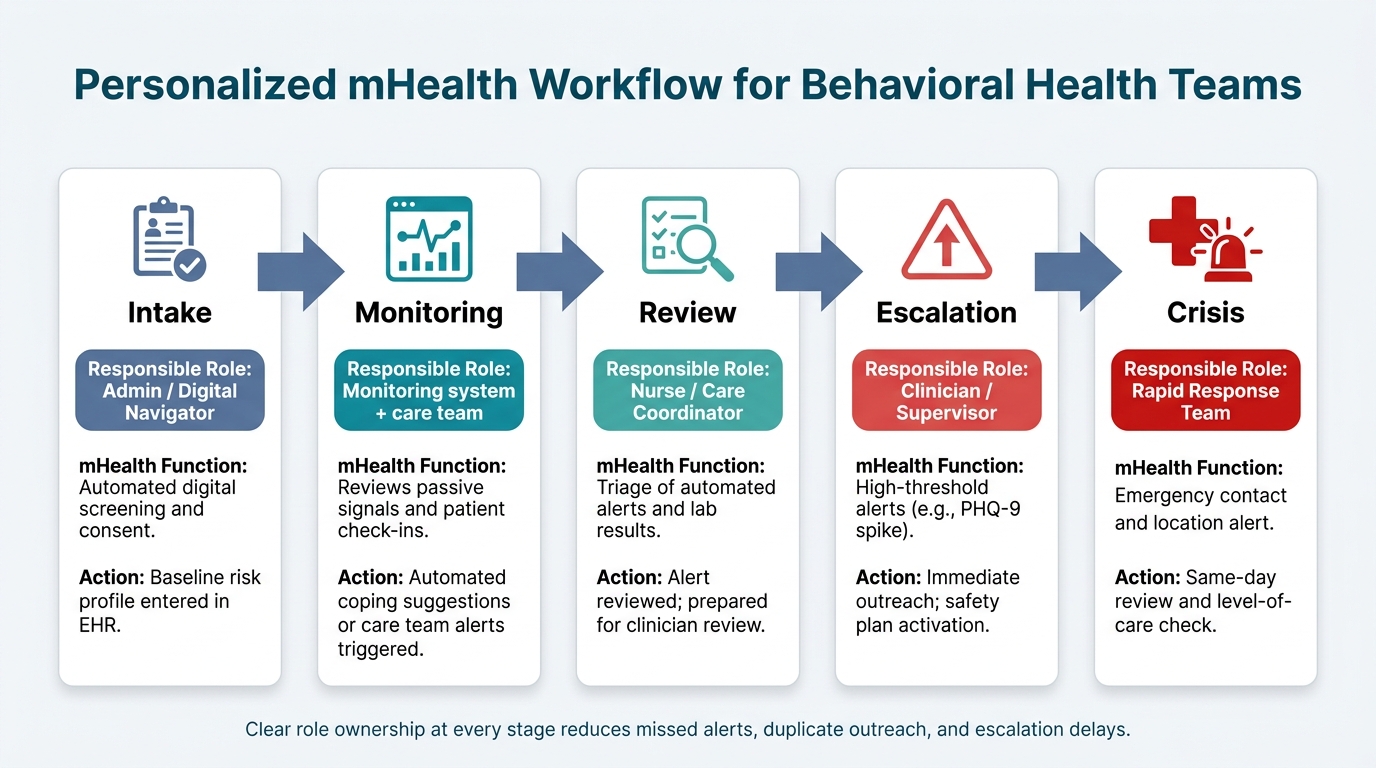
Personalized mHealth Workflow for Behavioral Health Teams
The next step is workflow: who sees each signal, when it appears, and what action follows.
Personalized mHealth only works when behavioral health teams have clear rules for ownership, review, and escalation. Without that structure, useful data can sit in a dashboard while staff juggle intake, documentation, follow-up, and crisis response.
Clinical and Administrative Roles Across the Patient Journey
Once data is tailored to the patient, treatment centers need clear role ownership from intake through escalation. That helps reduce confusion, supports more consistent response times, and gives leadership better visibility into how digital monitoring fits into day-to-day care operations.
|
Stage |
Responsible Role |
Personalized mHealth Function |
Action |
|---|---|---|---|
|
Intake |
Admin / Digital Navigator |
Automated digital screening and consent |
Baseline risk profile in EHR |
|
Monitoring |
Monitoring system + care team |
Care team reviews passive signals and patient check-ins |
Automated coping suggestions or care team alerts |
|
Review |
Nurse / Care Coordinator |
Triage of automated alerts and lab results |
Review the alert; prepare for clinician review |
|
Escalation |
Clinician / Supervisor |
High-threshold alerts (e.g., PHQ-9 spike) |
Immediate outreach; safety plan activation |
|
Crisis |
Rapid Response Team |
Emergency contact and location alert |
Same-day review and level-of-care check |
This kind of workflow matters because personalized mHealth touches both clinical and administrative teams. An intake coordinator may handle screening and consent. A nurse or care coordinator may review incoming alerts.
A clinician or supervisor may step in when symptom scores shift or safety concerns appear. In a crisis, a rapid response team may need to act the same day.
If those handoffs are vague, delays can happen fast. Alerts may be missed, duplicate outreach may occur, or staff may assume someone else is handling the issue.
Linking Personalized mHealth to the EHR and Treatment Plan
After roles are set, the next step is making those signals visible inside the treatment record. If screening results, mood trends, and safety alerts stay in a separate app, they often lose momentum. Staff may not log in consistently, and data that could shape care may end up ignored.
Behavioral health leaders should look for mHealth workflows that feed data directly into the EHR and connect to the active treatment plan. When that happens, personalized signals can support timely clinical decisions instead of living in a disconnected system. A change in mood trend, for example, may help explain attendance issues, inform a medication review, or support a change in treatment intensity.
Platforms like Opus Behavioral Health EHR support this through automated workflows, outcomes measurement tools, and AI-powered documentation that can help summarize session data and flag symptom trends.
When Human Support Should Override or Supplement Automation
Visibility alone is not enough. Teams also need firm thresholds for human intervention. Automation can flag risk, but clinicians still decide the response. That line should be set by clinical leadership, documented clearly, and built into the workflow.
A practical model often includes:
High-priority alerts for emergencies or acute symptom changes
Routine alerts for clinical review and follow-up
Simple reminders for low-risk tasks and patient engagement activity
This approach can help staff stay responsive without creating alert fatigue. It also supports safer escalation paths. For example, a high PHQ-9 spike may call for immediate outreach and safety plan activation, while a low-risk missed check-in may only need a reminder or brief review.
For executive teams, the key issue is not whether automation exists. It is whether the workflow tells each role what to do next, whether the EHR reflects that activity, and whether clinical teams can step in at the right moment without delay.
How to Set Up Personalization Without Adding Risk
The safest path is usually the simplest one. After workflows are defined, behavioral health teams need to match personalization depth to staffing levels, clinical oversight, and organizational risk tolerance. The goal is practical: a setup clinicians can explain, patients can follow, and staff can manage without adding confusion or compliance strain.
Personalization Methods Teams Should Understand
The right method depends on the clinical use case, available systems, and how much oversight the organization can maintain. In many cases, the least complex option that still supports the care goal is the better choice.
|
Method |
Infrastructure |
Clinical Oversight |
Strengths |
Constraints |
|---|---|---|---|---|
|
Patient-Selected Preferences |
Basic user interface or portal |
Low; patient-led |
Supports autonomy; increases engagement |
Depends on patient motivation and self-awareness |
|
Clinician-Assigned |
EHR-integrated assessment tools |
High; manual selection |
Clinically grounded; builds rapport |
Time-intensive; not real-time |
|
Rule-Based Logic |
Automated alerting engine |
Moderate; threshold-setting |
Immediate response to defined triggers |
Rigid rules may cause alert fatigue |
|
Machine Learning |
Advanced data processing and AI models |
High; output validation |
Flags risk patterns earlier for clinical review |
Requires large datasets; harder to explain |
For many providers, patient-selected preferences are the easiest place to start. This model gives patients more control over how they receive reminders, education, or follow-up communication.
It can support engagement, but it also depends on whether patients are ready and able to make those choices well.
Clinician-assigned personalization gives care teams more control. It may fit programs where treatment plans, symptom history, or risk factors need closer review before communication settings are assigned. The tradeoff is staff time. Manual selection can slow workflows, especially in high-volume admissions or outpatient settings.
Rule-based logic can help organizations respond to clear triggers, such as missed appointments, high-risk screening scores, or gaps in documentation. This method is often easier to govern than more advanced models, but rigid thresholds can create too many alerts if rules are not tuned carefully.
Machine learning may help surface patterns earlier for clinical review, especially in large organizations with enough data to support model training and validation. Still, this approach brings added scrutiny. Executive teams should expect heavier review around explainability, output monitoring, and how staff are expected to act on model-driven signals.
Onboarding, Preferences, and Clear Communication with Patients
Onboarding should gather patient goals, communication preferences, and consent in a single step whenever possible. That reduces friction for staff and gives organizations a cleaner starting point for follow-up workflows.
Each prompt should be explained at the moment it appears. A short explanation can make the purpose clearer, support trust, and help patients understand why a question matters. In behavioral health, that clarity matters. If a prompt feels vague or intrusive, engagement can drop fast.
Before rollout, these choices should pass privacy and governance review. That includes consent language, data handling, message timing, escalation rules, and who is allowed to adjust personalization settings. For treatment centers and mental health providers, this step can reduce the risk of avoidable workflow issues, patient confusion, or oversight gaps later in deployment.
Governance, Privacy, Evaluation, and Conclusion
Pre-Rollout Governance and Privacy Review
Once workflows are defined, behavioral health leaders need to confirm that personalization is safe, auditable, and under clinical control.
Before launch, teams should set HIPAA-compliant rules for data use, consent, access, and escalation. Those rules should make clear who reviews alerts, who can override automation, and when staff outreach should replace automated personalization. Patient feedback should also sit inside the workflow itself, rather than depending on ad hoc follow-up.
After governance is in place, the next issue is straightforward: does personalization improve care without creating more work for staff?
How to Measure Whether Personalization Is Working
Personalization should be measured across outcomes, engagement, safety, workload, and patient experience. The table below shows the main evaluation areas, what to track, how often to review each area, and who should own it:
|
Evaluation Domain |
Core Indicators |
Review Cadence |
Accountable Role |
|---|---|---|---|
|
Clinical Outcomes |
PHQ-9/GAD-7 score trends, symptom improvement rates |
Monthly |
Clinical Director |
|
Patient Engagement |
App login frequency, assessment completion rates |
Weekly |
Case Manager |
|
Safety Signals |
Alert response times, crisis escalations |
Real-time / Daily |
Risk Management Officer |
|
Staff Workload |
Documentation time saved, time from alert to documented response, override rates |
Quarterly |
Operations Director |
|
Patient Satisfaction |
Ease of use ratings, telehealth satisfaction surveys |
Every 6 months |
Patient Advocate |
If these measures stay flat, personalization may be adding complexity without enough return. Strong programs keep governance, workflows, and measurement closely aligned so leaders can see whether the model is helping care delivery or creating friction.
Conclusion: What Behavioral Health Leaders Should Take Forward
For behavioral health organizations, personalization only works when it supports clinical care, staff efficiency, and patient engagement at the same time. If those metrics are not improving, the setup likely needs review.
Platforms like Opus Behavioral Health EHR (https://opusehr.com) support this model with integrated outcomes measurement, automated workflows, and reporting tools that help clinical and operations teams track what matters.
Personalization should stay in place only where it demonstrably improves outcomes, engagement, and operational load, and leaders should revisit the configuration when it does not.
FAQs
How is personalization different from customization?
Customization allows behavioral health organizations and clinical teams to adjust system settings so the platform fits how care is delivered. That can include workflows, assessment libraries, and reporting templates shaped around specific patient populations, service lines, or clinical protocols.
Personalization works at the patient level. It uses individual data, such as medical history, mood reports, and behavioral patterns, to adjust care plans and interventions as needs change in real time.
For treatment centers and mental health providers, that distinction matters. One shapes how the system operates across the organization. The other shapes how care is delivered to each person inside that system. Opus Behavioral Health EHR supports both, giving providers a way to align platform setup with organizational needs while also supporting more individualized care delivery.
What patient data is most useful for personalized mHealth?
The most useful data set brings together both structured and unstructured patient information. That includes medical history, treatment plans, and demographic details, alongside the less tidy but often more revealing information found in day-to-day care records.
Key inputs also include patient-reported outcomes such as PHQ-9, GAD-7, and mood tracking, as well as wearable or remote monitoring data like sleep, activity, and medication adherence. Therapy transcripts, clinical notes, and patient narratives can also surface subtle emotional cues that may not appear in standard fields or scoring tools.
How can teams launch personalization without overloading staff?
Use a user-centered approach that fits tools into existing clinical workflows instead of adding workarounds or extra clicks. In behavioral health settings, that matters. When staff have to leave their normal process to use a tool, adoption often drops, documentation slows down, and data quality can suffer.
Role-based customization in Opus Behavioral Health EHR can help keep dashboards tied to each team member’s core responsibilities, so clinicians, admissions staff, billing teams, and leaders each see what matters most to their role.
AI-powered documentation and automated alerts for high-risk scenarios can also ease pressure on clinical teams.
These features may reduce manual charting, surface time-sensitive issues sooner, and help staff focus on action instead of searching through records. For treatment centers and mental health providers, that can support tighter workflows while giving leaders better visibility into care activity and risk signals.
At the same time, alert volume needs close oversight. A multidisciplinary committee with clinical, compliance, operations, and IT input can review tool performance on a regular basis, adjust thresholds, and refine how alerts are triggered. That process can help reduce alert fatigue and keep staff attention on the issues that need a response.



- Behavioral Health
- EHR Systems
- Addiction Treatment EHR
- mental health
- Telehealth
- addiction treatment
- Behavioral health facility
- Substance Abuse Disorder
- behavioral Health center
- HIPPA Compliant
- ehrsoftware
- PTSD
- behavioral health ehr
- Depression
- hipaa
- Anxiety
- MentalHealthMatters
- RCM
- claim denials
- clinical documentation
- mental health awareness
- screening tools

September 15, 2026
September 15, 2026

September 14, 2026

September 11, 2026

September 10, 2026

September 09, 2026
Recommended Posts
Wednesday, August 26, 2026
Symptom Forecasting For Behavioral Health EHRs
Symptom Forecasting For Behavioral Health EHRs Symptom forecasting only helps when it changes care before the next ...

Monday, August 31, 2026
How AI Alerts Clinicians to Suicide Risk
AI suicide risk alerts only matter when they lead to the right action at the right time.
Wednesday, August 12, 2026
How Real-Time Data Access Improves Behavioral Care
Delayed data can slow care and add risk.