
Creating well-documented treatment plans in electronic health records (EHRs) is critical for effective care, insurance compliance, and minimizing errors.
Poorly written plans - lacking clear goals, ICD-10 codes, or specific interventions - can lead to claim denials and patient risks.
Here's how to improve your treatment plans:
Key Elements: Include ICD-10 diagnosis, presenting problems, measurable goals, specific objectives, evidence-based interventions, and discharge criteria.
SMART Framework: Ensure objectives are Specific, Measurable, Achievable, Relevant, and Time-bound.
EHR Tools: Use searchable ICD-10 fields, standardized templates, and automated workflows to streamline documentation.
Compliance: Document patient consent, update plans regularly, and meet payer and regulatory standards.
Team Coordination: Leverage role-based dashboards and secure messaging for seamless collaboration.Modern EHR systems like Opus Behavioral Health EHR simplify this process with features like AI-powered documentation tools, customizable templates, and automated alerts to ensure compliance and efficiency.
What to Include in Every Treatment Plan
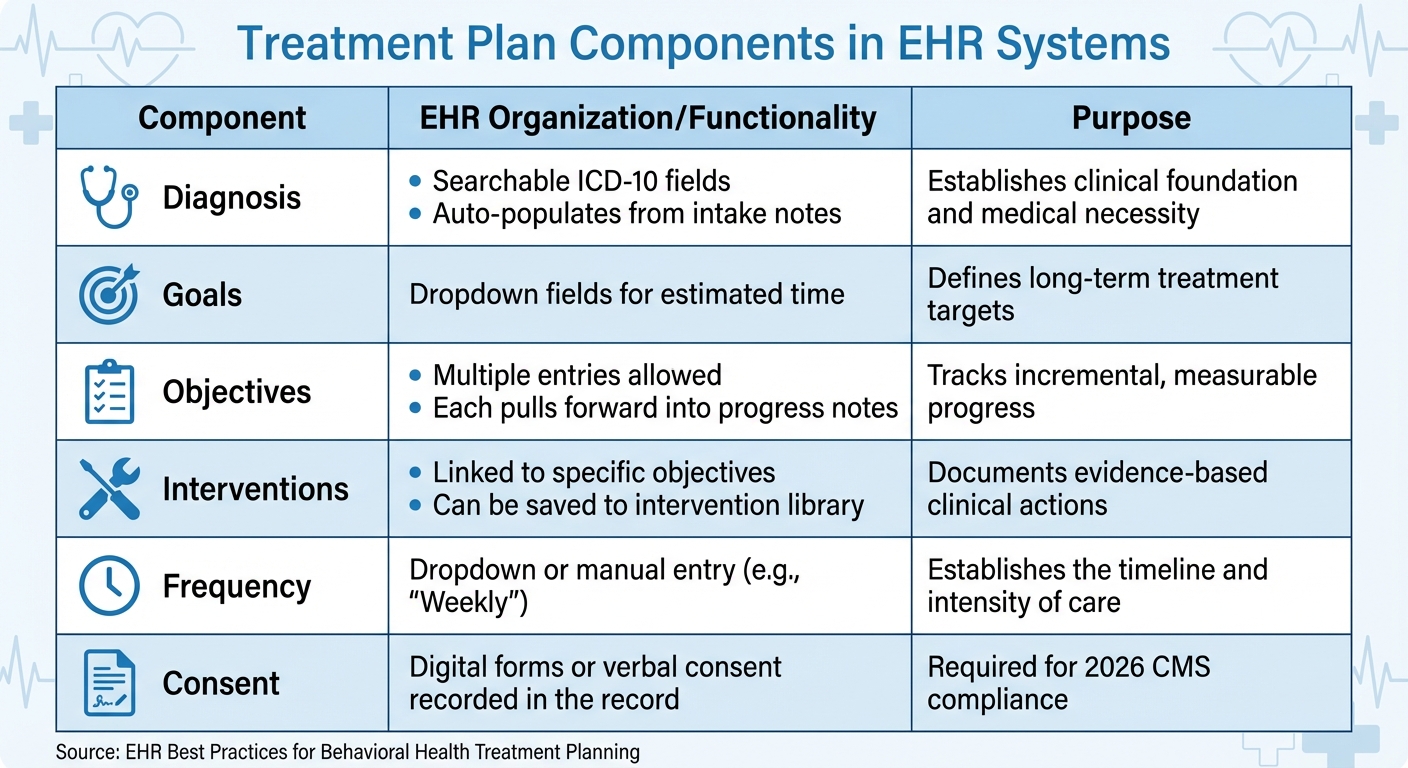
Treatment Plan Components: EHR Organization and Functionality Guide
Every treatment plan should cover the basics: an ICD-10 diagnosis, a clear presenting problem, treatment goals, and treatment frequency [5]. These core elements ensure sessions are purposeful and meet medical necessity requirements.
For a more detailed approach, include specific objectives (measurable steps toward goals), evidence-based interventions (the methods used to achieve objectives), and discharge criteria (the benchmarks indicating readiness to conclude treatment) [5].
If providing telehealth services in 2026, you'll also need to document patient consent, identity, location, modality (e.g., video or audio-only), and emergency contact information [1].
These components not only ensure compliance but also create a structured, effective plan aligned with Opus Behavioral Health EHR standards.
Diagnosis and Assessment
Accurate diagnosis begins with using the searchable ICD-10 fields in your EHR. These fields allow you to find the correct code by entering keywords like "major depressive disorder." This method ensures precision and automatically integrates the code into intake notes, treatment plans, and billing records [5].
The presenting problem section explains why the patient is seeking treatment. Many EHR platforms streamline this by pulling information from intake notes, reducing errors and saving time. Aim for specificity here.
For instance, instead of writing "Patient is depressed", detail symptoms like, "Patient reports persistent low mood, loss of interest in activities, and difficulty sleeping for the past six weeks" [5].
Using standardized screening tools, such as the PHQ-9 for depression or GAD-7 for anxiety, provides objective data to track progress [3]. Many EHR systems also auto-fill fields like ICD-10 codes and objectives, further simplifying documentation [5].
Once the diagnosis and presenting problem are established, the next step is to outline clear goals and measurable objectives.
Goals and Objectives
Goals are broad outcomes, such as "Reduce symptoms of depression" or "Develop effective coping strategies for anxiety."
Objectives, on the other hand, are the actionable, measurable steps that help achieve these goals. EHR systems often require an estimated timeline for objectives, ensuring they are both time-bound and specific [5].
"If you cannot tell whether an objective was met or not met by looking at a number, a rating scale, or a specific behavioral observation, it is not yet measurable." – Behave Health [3]
To craft effective objectives, use the SMART framework: Specific, Measurable, Achievable, Relevant, and Time-bound. For example, rather than "Patient will feel better", write, "Patient will report a PHQ-9 score ≤9 for two consecutive sessions within eight weeks."
This level of detail not only meets compliance standards but also provides clear milestones to assess during sessions.
With well-defined objectives in place, you can move on to selecting targeted interventions and setting realistic timelines.
Interventions and Timelines
Interventions are the clinical techniques or strategies used to help the patient achieve their objectives. Examples include Cognitive Behavioral Therapy (CBT) exercises, mindfulness practices, or Dialectical Behavior Therapy (DBT) skills training.
Many EHR platforms allow you to save frequently used interventions in a library, making it easier to reuse them in future plans [5].
Each intervention should be tied to a specific objective and include a timeline. For instance, if the objective is "Patient will practice three coping skills weekly for four weeks", the intervention might be "Teach and rehearse deep breathing, progressive muscle relaxation, and grounding techniques during weekly sessions."
These timelines keep the treatment plan adaptable and focused on the patient's progress [3].
|
Component |
EHR Organization/Functionality |
Purpose |
|---|---|---|
|
Diagnosis |
Searchable ICD-10 fields; auto-populates from intake notes |
Establishes clinical foundation and medical necessity |
|
Goals |
Dropdown fields for estimated time |
Defines long-term treatment targets |
|
Objectives |
Multiple entries allowed; each pulls forward into progress notes |
Tracks incremental, measurable progress |
|
Interventions |
Linked to specific objectives; can be saved to intervention library |
Documents evidence-based clinical actions |
|
Frequency |
Dropdown or manual entry (e.g., "Weekly") |
Establishes the timeline and intensity of care |
|
Consent |
Digital forms or verbal consent recorded in the record |
Using EHR Templates and Customization Options
Pre-built templates are a game-changer when it comes to simplifying treatment plan creation. Most EHR systems, including Opus Behavioral Health EHR, come with a template library that offers ready-made formats tailored to various levels of care, like detox, intensive outpatient (IOP), or residential treatment.
These templates typically include key components such as diagnosis, goals, objectives, and interventions, all designed to comply with regulatory standards set by organizations like the Joint Commission or CARF [3].
By using these templates, clinics can cut intake times by up to 50% and boost staff productivity by over 30% [4].
Standardized templates not only streamline workflows but also ensure documentation meets medical necessity requirements and supports individualized care during audits [3].
Features like digital signatures with automatic timestamps help create a clear audit trail, showing that consents were obtained on time [4].
Missing just one "pre-admission walkout" per week due to paperwork delays could cost a clinic over $750,000 annually, assuming an average admission value of $15,000 [4].
Templates ensure documentation is both clear and compliant, making them an essential tool for effective treatment planning. Plus, they pave the way for easy customization within your EHR system.
How to Access and Modify Pre-Built Templates
Accessing templates in Opus Behavioral Health EHR is straightforward. Navigate to Settings > Documentation > Template Library, then select a template based on the type or level of care required.
Once you find the right template, click "Edit" or "Duplicate" to make adjustments. Duplicating templates allows you to keep the original structure while customizing specific fields like objectives or interventions.
Focus on editing only the sections that need personalization. For example, if you're working with a patient who has co-occurring disorders, you might add sections for secondary diagnoses or family dynamics.
Use smart logic to improve the user experience - this feature can show or hide questions based on previous answers. For instance, different fields might appear for detox versus outpatient care [4]. This reduces "Not Applicable" fatigue and improves form completion rates.
Choose the correct Template Type to control where the document is stored and how it’s shared. Role-based customization ensures therapists can easily access pending treatment plans on their dashboards, while supervisors receive alerts for compliance issues [4].
After making your changes, save the template with a clear title. Use "Main Titles" for internal organization and "Display Titles" for what patients see on printed documents or in the client portal. These small adjustments ensure the template integrates smoothly into your documentation workflow.
How to Create Custom Templates
For practices with specialized needs, custom templates are invaluable. They allow you to tailor documentation to specific patient populations or workflows, such as adolescents, veterans, or patients in ASAM-aligned SUD programs.
To create a custom template in Opus Behavioral Health EHR, start by selecting "Create New Template" in the Template Library. Choose the template type (e.g., Treatment Plan) and add blocks for the unique components of your treatment protocol.
Use mandatory field logic to ensure all critical data and signatures are captured before submission. This approach guarantees that every chart is audit-ready from the outset [2][4].
For instance, you can require completion of the "Discharge Criteria" field before finalizing the plan. You can also set up automated reminders for reviews and expiration alerts [3].
Getting input from clinicians is crucial during the design process. Therapists and case managers, who are familiar with day-to-day clinical routines, can offer insights to ensure the workflow is practical and efficient. Additionally, appointing super users to refine workflows and share tips can make a big difference.
"A well-structured plan... communicates clinical sophistication, justifies the level of care, and protects the organization in the event of a dispute." – Behave Health [3]
Tracking Progress and Updating Treatment Plans
After planning, keeping track of progress and making updates is essential to ensure treatment stays effective.
Once a treatment plan is in place, it’s crucial to monitor its impact. Many modern EHR systems include tools like standardized screeners that provide measurable baselines and track symptom changes over time.
For instance, you might aim for a PHQ-9 score to drop from 14 to 9 or below within 60 days to assess the effectiveness of an intervention.
Opus Behavioral Health EHR offers over 140 detailed reports to support data-driven decisions and track progress for insurance purposes [6].
It also features tools like AI sentiment analysis, which can evaluate emotions in text or speech to help identify mental health risks early. Real-time risk flagging further aids clinicians by highlighting high-risk indicators as they arise [6][2].
Monitoring Progress with EHR Tools
Clinical dashboards within EHR systems are invaluable for reviewing progress notes, spotting trends, and assessing how well interventions are working. For example, if a patient’s GAD-7 score isn’t improving by the 45-day mark, the system might suggest documenting a referral for medication evaluation or trying a different treatment approach [3].
Automated review alerts also help you stay on top of regulatory and payer requirements, such as updating plans every 30 days for intensive outpatient care or every 90 days for standard outpatient programs [3].
Remote assessments allow clients to report their status directly, providing your care team with updates on daily mood logs or substance use patterns [6]. Even missed appointments can serve as critical clinical data. As Curogram points out:
"A missed visit is often the first warning sign of a relapse... the absence is a red flag that demands quick action" [7].
To address this, automated SMS reminders integrated with EHR systems can cut no-show rates by up to 75% [7].
If a patient doesn’t confirm or respond, the system flags this for your team, ensuring timely follow-up. Regular progress reviews naturally lead to treatment plan updates, keeping care responsive and data-driven.
When and How to Update Treatment Plans
Updating treatment plans is just as important as monitoring progress. Even if insurance only requires quarterly updates, it’s a good idea to review plans monthly [8][9].
Revisions should be made if the presenting problem shifts, symptoms change, new issues arise, or the current treatment isn’t working [8]. Michael Heckendorn, Manager of Clinician Education at Headway, emphasizes:
"A treatment plan isn't meant to be a static document. Anything and everything within it can change" [8].
When updating plans in your EHR, start with the presenting problem, then revise goals and objectives, and finally adjust interventions and timelines [8].
To stay focused, limit active treatment goals to five at a time [9]. Tools like automated alerts and clinical dashboards in Opus Behavioral Health EHR simplify this process, ensuring timely updates.
Even if no changes are needed, it’s important to document review dates (e.g., "Reviewed on 3/15/2026: all goals remain relevant") to demonstrate ongoing monitoring and compliance [9]. This documentation also creates a searchable audit trail, which is crucial for insurance and accreditation purposes [7].
Lastly, updating a treatment plan should always involve a collaborative discussion with the client. This ensures revisions reflect their current needs, motivation, and available resources [9].
Meeting Compliance Standards and Documentation Requirements
In behavioral health, compliance isn't just a box to check - it's the backbone of a sustainable practice. Treatment plans, in particular, are among the most audited and error-prone documents in the field.
Auditors scrutinize these records to ensure every billed intervention is both medically necessary and thoroughly documented. A generic plan with vague goals like "patient will feel better" simply won't hold up during a concurrent review or post-payment audit [3].
Meeting Regulatory and Insurance Requirements
Modern EHR systems are game-changers when it comes to keeping up with regulatory and insurance standards.
For example, Opus Behavioral Health EHR offers over 140 reporting options that pull data directly from client records and billing systems. These reports meet state, federal, and insurance requirements while maintaining detailed audit trails.
These trails log when reports were created, what data they include, and who accessed them - providing a clear record of compliance during audits.
Digital intake systems take compliance a step further by ensuring all required fields and signatures are completed before submission. This includes essential consents like HIPAA and 42 CFR Part 2, complete with proper timestamps [2].
As Mira Gwehn Revilla puts it:
"Digital intake acts as a 'truth filter' for addiction treatment documentation. The result is cleaner clinical records that hold up during CARF, Joint Commission, and state audits" [2].
Facilities using digital intake systems often cut their audit prep time by 50% or more [2]. These systems map patient-entered data directly to EHR fields, eliminating errors from illegible handwriting or manual entry.
To ensure compliance, treatment plans must include measurable, time-bound objectives, proper ICD-10 codes that align with progress notes, and specific intervention frequencies (avoiding vague terms like "individual therapy").
Automated reminders in EHR systems can notify staff when treatment plans need to be updated to meet level-of-care requirements [3].
Structured workflows further reduce the risk of errors and ensure compliance is built into everyday processes.
Reducing Documentation Errors with Structured Workflows
Structured workflows add an extra layer of protection against documentation errors. By guiding clinicians through required components and preventing submission of incomplete charts, these workflows help avoid red flags during audits.
Opus Copilot AI simplifies this process by converting spoken session details into organized clinical notes.
It flags potential errors and ensures documentation aligns with insurance and regulatory standards. Role-based dashboards give supervisors real-time oversight of pending progress notes, treatment plan updates, and compliance alerts, helping teams catch issues before they escalate.
High-risk flagging features also provide immediate alerts for concerning patient responses, like suicidal ideation or seizure history, ensuring timely follow-up [2].
Automated data entry further streamlines the process by pulling information from previous entries to populate new forms. Standardized templates help maintain consistency between clinical notes and treatment goals, preserving the "golden thread" - the clear link between interventions, clinical notes, and the goals in the treatment plan [10].
This connection is crucial for demonstrating the medical necessity of billed services during audits.
|
Component |
Common Deficiency |
Auditor Red Flag |
|---|---|---|
|
Diagnosis |
Missing secondary diagnoses |
ICD-10 code doesn't match progress notes |
|
Goals |
Too vague (e.g., "improve mood") |
Not tied to the presenting problem |
|
Objectives |
Not measurable |
Missing target dates |
|
Interventions |
Generic (e.g., "individual therapy") |
No frequency or modality specified |
|
Review dates |
Missing |
Plan expired with no documented review |
|
Signatures |
Missing or undated |
Signed after treatment began |
Improving Workflows and Team Coordination
Treatment plans are most effective when every member of the care team is on the same page. In behavioral health settings, however, teams often face challenges like scattered schedules and decentralized operations.
This can lead to communication gaps, missed details, and ultimately, a dip in patient care quality. Fortunately, modern technology is stepping in to address these hurdles, offering tools that save time and enhance team collaboration.
Using Automation to Save Time
Automation in modern EHR systems tackles the repetitive tasks that often bog down clinicians. For instance, Opus Copilot AI simplifies documentation by converting spoken session notes into structured clinical records.
Trevor Mulvey, VP of Finance at Care Counseling Clinics, highlights the platform’s impact, calling it a tool with "powerful automation tools that deliver valuable business insights" [6].
Digital intake processes also make a significant difference. By allowing patients to submit forms and insurance information ahead of time, clinics can reduce manual data entry and cut intake times by up to 50%.
This not only speeds up the process but also boosts administrative efficiency [4]. Additionally, automated reporting features compile compliance data seamlessly, slashing audit preparation time by half [2].
While automation boosts individual productivity, effective communication tools ensure the entire team stays connected.
Improving Team Communication
Secure messaging platforms are replacing outdated methods like phone calls and emails, which often go unanswered or overlooked. Text messages, for example, boast a 98% open rate compared to other communication methods [11].
These tools also integrate directly into patient records, ensuring no vital information gets lost in translation.
Role-based dashboards further improve coordination by tailoring information to each team member's role. Clinicians receive alerts when treatment plans need attention, supervisors can monitor pending progress notes in real time, and administrative staff stay on top of insurance authorizations.
Deborah V., a Clinical Director, sums up the benefit perfectly:
"The ability to cross reference clinical, case management, medical and demographic information within the client file is a true benefit for clinical collaboration" [6].
When teams work from a unified, centralized system, collaboration becomes seamless. There’s less need for endless meetings or duplicate documentation, allowing everyone to focus on delivering precise, compliant care.
Together, these tools ensure treatment planning stays efficient and patient care continues to improve.
Conclusion
Creating effective treatment plans within EHR systems hinges on three key practices: leveraging customizable templates for consistent documentation, using AI-powered tools to ease administrative tasks, and adopting automated workflows to simplify data entry.
When these elements are combined, behavioral health practices experience noticeable gains in both compliance and efficiency. These methods align perfectly with the step-by-step processes outlined earlier.
The data backs this up: Studies show that AI-powered documentation can cut clinical note-taking time by 40%, while digital intake systems reduce audit preparation time by over 50% [6][2]. Experts in the field agree that these tools not only improve billing processes but also streamline overall operations [6].
Opus Behavioral Health EHR brings these features together in a single, unified platform. Trusted by more than 160,000 practitioners who have collectively served over 44 million clients [6], the platform offers tools like Opus Copilot AI, which converts spoken notes into structured records, and role-based dashboards that enhance team collaboration.
These solutions tackle the unique challenges behavioral health providers face every day.
FAQs
How do I link goals, objectives, and progress notes to show medical necessity?
To show that medical care is necessary, it's important to create goals that are SMART: Specific, Measurable, Achievable, Relevant, and Time-bound.
These goals should directly connect to the patient’s diagnosis. Supporting objectives need to include measurable outcomes that make it clear how progress will be tracked.
Progress notes play a key role here. They should detail the patient’s progress, their response to interventions, and any ongoing needs.
By tying this documentation back to the established goals and objectives, you can clearly demonstrate that the treatment is focused and necessary, whether the patient is improving or not.
What should I document for telehealth consent and session details in 2026?
In 2026, documenting telehealth sessions requires attention to detail and a structured approach. Include essential elements such as the session type (e.g., consultation, follow-up, or therapy), clinical observations (noting patient presentation, symptoms, or progress), interventions (specific actions or treatments provided during the session), and patient responses (how the patient reacted or engaged with the interventions).
Ensure compliance by explicitly stating that HIPAA-compliant telehealth technology was used for the session. Additionally, document any consent or authorization obtained, whether verbal or written, as required by regulations.
Stick to clinical facts and avoid including personal opinions or unnecessary personal details to maintain both accuracy and adherence to HIPAA guidelines.
How often should treatment plans be reviewed and updated for compliance?
Treatment plans should be reviewed and updated at least every three months. Regular updates ensure the plans align with the client’s current needs, track their progress effectively, and comply with medical necessity and reimbursement standards.



- Behavioral Health
- EHR Systems
- Addiction Treatment EHR
- mental health
- Telehealth
- addiction treatment
- Behavioral health facility
- Substance Abuse Disorder
- behavioral Health center
- HIPPA Compliant
- ehrsoftware
- PTSD
- behavioral health ehr
- Depression
- hipaa
- Anxiety
- MentalHealthMatters
- RCM
- claim denials
- clinical documentation
- mental health awareness
- screening tools

September 15, 2026

September 15, 2026

September 14, 2026

September 11, 2026

September 10, 2026

September 09, 2026
Recommended Posts

Monday, July 20, 2026
Personalized EHR Intake Forms: Guide for SUD Clinics
One intake form for every SUD patient is a fast way to create delays, denials, and compliance gaps.

Wednesday, June 10, 2026
EHR Integration for Pediatric Behavioral Screening Tools
Electronic health record (EHR) systems are transforming pediatric behavioral health care by integrating screening tools ...

Friday, January 30, 2026
How Customizable EHR Workflows Improve Behavioral Health
Customizable EHR workflows are transforming behavioral health care by simplifying documentation, improving compliance, ...