
Lab integration for substance use disorder (SUD) testing can improve efficiency, reduce errors, and support better clinical decisions.
This process connects your EHR system directly to diagnostic labs, enabling test orders and results to be managed in one platform. Here's what you need to know:
Why it matters: In 2022, 17.3% of individuals aged 12+ in the U.S. (about 48.7 million people) were affected by SUD. Quick, accurate lab data is critical for care.
Key benefits: Eliminates duplicate logins, minimizes manual entry errors, and enables real-time alerts for abnormal results.
Steps to implement: Audit your current system, ensure compliance with HIPAA and 42 CFR Part 2, connect with lab partners, and configure the integration for seamless workflows.
Training and troubleshooting: Provide role-specific training, designate in-house experts, and address common issues like incomplete orders or missing results.
Maintenance: Regularly monitor performance, update workflows, and ensure data security to keep the system running smoothly.Getting Your Behavioral Health Center Ready for Lab Integration
Before integrating lab systems with Opus EHR, it's important to evaluate your current setup. This ensures a smoother transition for both clinical care and administrative operations. Begin by assessing your system's details and compliance needs to confirm readiness.
Review Your Current Systems and Requirements
Start with an audit of your staffing and ensure your electronic medical system supports behavioral health billing, coding, and discrete lab result mapping. Unlike static document uploads, discrete mapping organizes lab results into searchable fields, making them easier to access and use [2][3].
Be mindful of transcription drift- manual errors that can misrecord critical information like dosages or patient identifiers.
As Mira Gwehn Revilla points out:
"A single misread digit can change a patient's life. In detox, that digit might be a medication dose. In mental health intake, it could be a suicide risk score." [3]
Next, examine your intake process for inefficiencies like the "Admissions Logjam." Paper-heavy workflows can lead to costly pre-admission walkouts.
For example, losing just one potential admission per week, with an average revenue of $15,000 per patient, could cost your clinic over $750,000 annually [1]. Ensure your infrastructure supports secure document capture, mobile-friendly onboarding, and encrypted data storage to avoid these losses [1].
Meet HIPAA and Regulatory Requirements
Once your systems are audited, focus on regulatory compliance.
Your lab integration must meet HIPAA standards and adhere to the stricter 42 CFR Part 2 guidelines for substance use disorder records [5].
Safeguard patient information by implementing measures across three key areas:
Administrative: Train staff and establish role-based access.
Physical: Secure facilities and enforce automatic logoffs.
Technical: Use encryption and maintain tamper-resistant audit trails [4][6].Ensure all third-party vendors, including lab partners and cloud providers, have signed Business Associate Agreements (BAAs) [4][6]. Additionally, your integration should use TLS 1.2 or higher for secure data transmission [4].
Set up digital intake forms with mandatory fields to capture HIPAA and 42 CFR Part 2 consent signatures before lab work begins [3].
Define Your Integration Goals and Success Metrics
With your systems and compliance measures in place, it's time to define your goals and metrics. These will help guide a seamless workflow for substance use disorder (SUD) testing.
Set clear objectives, such as eliminating transcription drift and ensuring lab results are mapped to searchable fields [3]. Aim to cut the intake process time by up to 50% and boost staff productivity by over 30% [1].
For clinical safety, track the medication error rate using this formula:
(number of medication errors / total number of medications administered) × 100 [7].
Monitor financial performance by measuring the average insurance claim processing time [7]. Incorporate standardized screeners like the PHQ-9 or GAD-7 into your workflow, ensuring scores are automatically calculated and available in the EHR before clinical review [1][3].
Finally, enable real-time alerts for critical lab results - such as seizure or overdose indicators - so clinicians can act quickly [1][3].
How to Set Up Lab Integration in Opus EHR
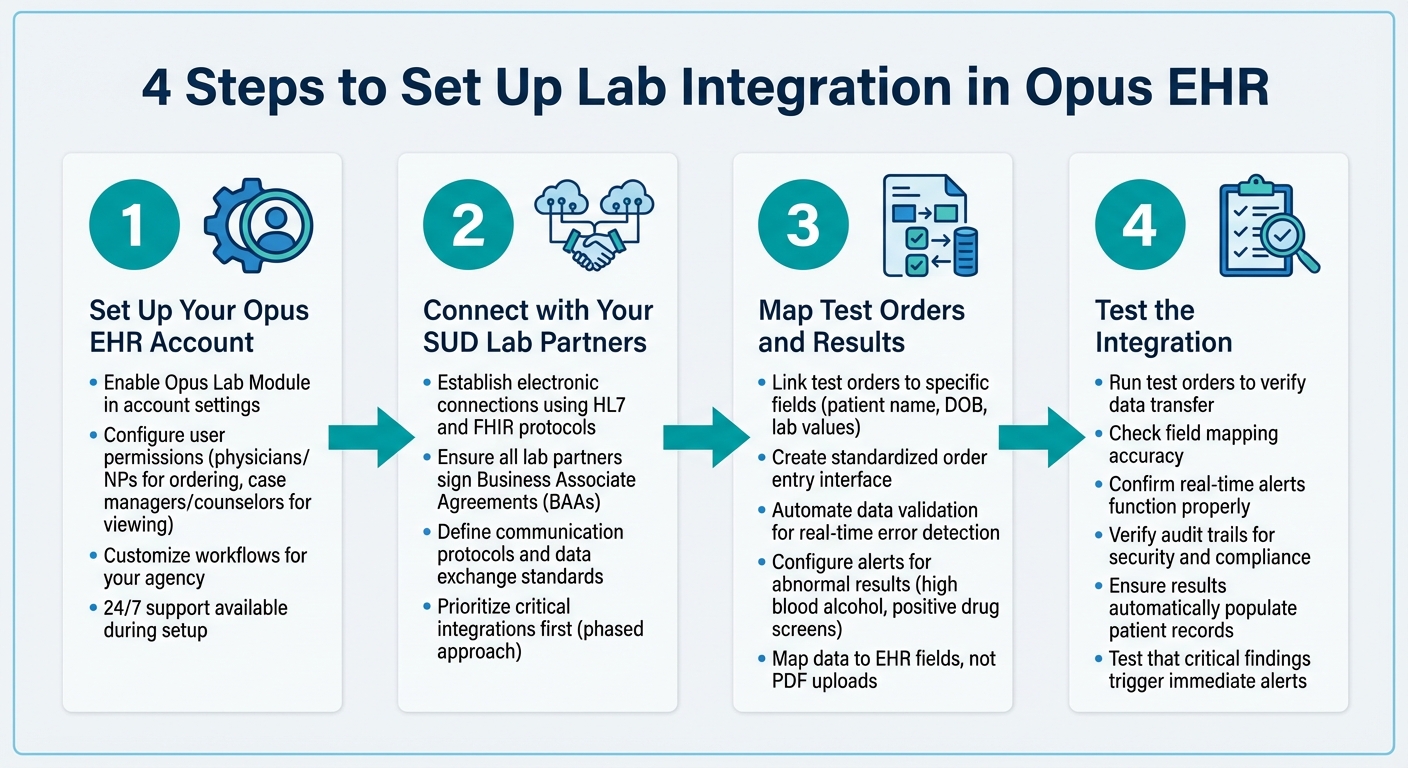
4-Step Lab Integration Implementation Process for SUD Testing
Once your systems are audited and compliance measures are in place, it's time to activate the Opus Lab Module. This powerful feature integrates all testing workflows directly into your EHR, eliminating the need for separate lab portals [9].
Step 1: Set Up Your Opus EHR Account
Start by enabling the Opus Lab Module in your account settings. This functionality lets your team order tests and view results seamlessly within the platform [9].
Work with your implementation specialist to configure user permissions. For example, physicians and nurse practitioners can be granted ordering capabilities, while case managers and counselors may only need access to view results.
The setup process is flexible and supported 24/7 to match your agency's pace [9].
You can also tailor workflows to suit your specific operational needs, from specialized assessment tools to compliant documentation frameworks [9].
As Tom C., a Billing Specialist, shares:
"Setup went at our speed and we've been live now for about a month. Support is available whenever we need it - 24/7. Virtually everything is customizable." [9]
The next step is to establish secure electronic connections with your laboratory partners.
Step 2: Connect with Your SUD Lab Partners
Linking your lab partners electronically is essential. The Opus Lab Module relies on standard protocols like HL7 and FHIR to ensure smooth and consistent data exchange [8].
Your implementation specialist will assist in setting up connectors that link Opus directly to your lab's system [9].
Make sure all lab partners have signed Business Associate Agreements (BAAs).
During the setup phase, work closely with lab vendors to define communication protocols and data exchange standards [8]. This phased approach allows you to prioritize the most critical integrations first, helping to manage costs and technical transitions effectively [8].
Step 3: Map Test Orders and Results
Once your system and connections are ready, the focus shifts to mapping test orders and results. Ensure test orders are linked to specific fields like patient name, date of birth, and lab values, rather than simply uploading them as PDFs or notes [3].
Create a standardized order entry interface that allows providers to easily select and send SUD test orders securely [10]. Automate data validation to catch and fix errors in real time [10]. Configure the system to flag abnormal results - such as high blood alcohol levels or positive drug screens - so they can be reviewed immediately by clinicians [10].
Mira Gwehn Revilla highlights this feature:
"Data maps to specific Opus EHR fields, not just a PDF upload." [3]
Step 4: Test the Integration
Before launching, run test orders to ensure everything works as expected. This includes verifying data transfer, checking field mapping accuracy, and confirming that real-time alerts and audit trails function properly [10].
Make sure providers can submit orders electronically within Opus and that results automatically populate the patient's health record [10]. Also, confirm that critical findings trigger immediate alerts and that clinicians receive updates promptly [10].
During testing, review audit trails to ensure data security and compliance with regulations [10].
Training Staff and Fixing Common Problems
Once your lab integration is set up, the next step is ensuring your staff is well-trained and equipped to handle potential issues.
When it comes to EHR implementation, success hinges more on how well your team is trained than on the technology itself [11]. A solid training plan can mean the difference between a smooth, efficient workflow and a source of daily headaches.
Train Your Staff on Lab Integration in Opus EHR
Hands-on training is key. Focus on practical sessions where your team learns how to order tests and review results directly within the system. Tailor the training to specific roles:
Clinicians: Emphasize how to review test results and flag abnormalities.
Intake staff: Ensure they master accurate data entry and proper insurance verification.
With the Opus Lab Module, your team can perform all tasks within one integrated system, eliminating the need for multiple logins or navigating separate lab portals [9].
Designate "super-users" within your team - staff members who are eager to learn and can receive advanced training.
These individuals can act as in-house experts and mentors for their peers. To ease the transition, consider rolling out the lab module in phases, starting with one department. This phased approach allows you to address any issues before expanding across the entire facility.
As Cory N., Executive VP of Operations, shares:
"Great experience with Opus. Amazing, friendly customer service... Easy to teach to new staff. This is the best EMR I have ever used" [9].
And when challenges arise, having a plan for troubleshooting is just as important as training.
Fix Common Lab Integration Problems
Even with thorough training, occasional hiccups are inevitable.
Here are some common issues and how to address them:
Incomplete Orders: Often caused by missing patient details (like ID or date of birth) or invalid test codes. Activating smart validation at the data entry stage can help catch these errors early [12].
Provider Mismatch: Discrepancies in physician names across systems can lead to errors. Use NPI database cross-referencing or fuzzy matching algorithms to resolve these issues [12].
Missing Results: If test results don’t show up, check delivery logs for transmission errors and verify that insurance mapping is accurate.
Data Ambiguity: Non-standardized codes for tests or diagnoses can create confusion. Standardize the use of code sets like LOINC to ensure consistency and clear communication [12].
For immediate help, Opus EHR's 24/7 technical support is always available. Andea H., Clinical Director, highlights their reliability:
"Opus support is friendly and resolves issues within 24 hours" [9].
Here’s a quick reference table for common issues and solutions:
|
Common Lab Integration Issue |
Potential Cause |
Recommended Resolution |
|---|---|---|
|
Incomplete Orders |
Missing patient ID, DOB, or invalid test codes |
Use smart validation at the point of entry [12] |
|
Provider Mismatch |
NPI or name format differences between systems |
Apply NPI cross-referencing or fuzzy matching [12] |
|
Missing Results |
Transmission failure or incorrect insurance mapping |
Check delivery logs and ensure accurate insurance mapping [12] |
|
Data Ambiguity |
Non-standardized test or diagnosis codes |
Enforce the use of standard code sets like LOINC [12] |
Maintaining and Improving Your Lab Integration
Once your lab integration is set up and running smoothly, keeping it efficient requires ongoing attention. Regular maintenance and monitoring help you stay ahead of potential issues and adapt to changes effectively.
Track Integration Performance
Keeping an eye on key metrics is essential. For example, track the result turnaround time (TAT) - the time it takes from ordering a test in the EHR to receiving the results.
Quick results are crucial for making timely clinical decisions [13]. Check data accuracy by comparing digital records to manual benchmarks. Set up alerts to flag downtime or transmission failures immediately, and review system logs regularly to catch bottlenecks early [13].
It’s also a good idea to form a cross-functional governance committee. This team - made up of IT staff, clinical leaders, and lab representatives - can meet regularly to review performance data and coordinate updates [13].
As Keystone Lab, Inc. explains:
"Planning transparency fosters trust, accelerates adoption, and helps your lab testing partnership for addiction centers thrive from day one" [13].
These insights will guide you in fine-tuning your integration for better performance.
Update Configurations and Workflows
Performance monitoring is just the first step. Use the data you gather to adjust your system as regulations and clinical protocols evolve.
For instance, platforms like Opus EHR allow you to update digital forms and security settings regularly. When new regulations are introduced, update digital consent forms promptly to ensure compliance across all facilities [3].
Similarly, when clinical guidelines or evidence-based practices shift, modify standing orders and treatment protocols accordingly [14].
Security is another critical area. Conduct regular audits to check encryption, access controls, and audit logs [8]. Keep your software up to date to protect against vulnerabilities and maintain peak performance [8].
Feedback from staff and patients can also uncover areas for improvement. For example, you might refine workflows based on their insights [2].
Additionally, implement features like mandatory fields in digital forms to prevent incomplete submissions and set up automated alerts for high-risk results that need immediate attention [3].
|
Maintenance Task |
Purpose |
Frequency |
|---|---|---|
|
Performance Monitoring |
Ensure system stability and resolve technical issues |
Ongoing [8] |
|
Version Control |
Keep consents compliant with new HIPAA/42 CFR Part 2 rules |
As regulations change [3] |
|
Outcome Tracking |
Adjust treatment plans using patient recovery data |
Regular team meetings [14] |
|
Security Audits |
Strengthen encryption and access controls |
Periodic/On-demand [8] |
|
Workflow Iteration |
Improve processes based on staff and patient feedback |
Periodic review [2] |
Conclusion
Integrating lab services for SUD testing into Opus EHR improves both patient care and operational workflows.
The process starts with a thorough system review, ensuring compliance with HIPAA and 42 CFR Part 2, and setting clear goals for success. After that, establish connections with lab partners, map test orders to specific EHR fields, and rigorously test the system before launching.
Proper staff training is key to eliminating the inefficiencies of manual data entry, which boosts productivity and reduces mistakes [1].
As Andea H., Clinical Director, shares:
"Overall Opus is the best EMR I have ever used in my 35 plus year career, the opus support, user-friendly, opus is available 24/7" [9].
This level of support helps staff quickly adapt to the system, allowing them to focus more on patient care and less on administrative burdens. Beyond initial training, maintaining the system is equally important.
Regular maintenance ensures the platform stays in line with changing regulations. Use detailed reports to pinpoint workflow issues and make improvements [9]. Keep digital consent forms updated, track performance metrics, and perform audits regularly to safeguard patient data.
FAQs
How long does lab integration usually take?
Lab integration for behavioral health centers, including substance use disorder (SUD) testing, usually takes anywhere from several weeks to a few months.
The timeline can vary based on factors like the complexity of the systems involved and how prepared the facility is for the transition. The process typically involves several key stages: planning, setting up interfaces, testing the system, training staff, and addressing any issues that arise.
Platforms such as Opus EHR can help simplify this process, minimizing delays and improving the efficiency of integration workflows.
What do we need to stay compliant with HIPAA and 42 CFR Part 2?
To align with HIPAA and 42 CFR Part 2, SUD treatment centers must focus on safeguarding patient confidentiality and managing records securely.
42 CFR Part 2 specifically mandates obtaining explicit patient consent before sharing any information, ensuring careful handling of re-disclosures, and using secure communication channels.
Here are some key practices to stay compliant and protect patient privacy:
1. Implement encrypted messaging systems for secure communication.
2. Maintain detailed logs of communications for audit purposes.
3. Prohibit staff from using personal texting for work-related matters.
4. Track and document patient consent meticulously.By following these steps, treatment centers can effectively meet regulatory requirements while prioritizing patient trust and privacy.
How can we prevent missing lab results or incomplete orders?
To avoid issues like missing lab results or incomplete orders, it's crucial to use reliable lab integration solutions that simplify data sharing and cut down on mistakes.
Features like automated workflows, data mapping, and mandatory fields play a key role in ensuring everything is complete and accurate. Incorporating digital patient intake processes - such as those offered by Opus EHR - can also help by gathering precise information right from the start.
These strategies improve data accuracy and ensure that all required steps are completed before orders are processed.



- Behavioral Health
- EHR Systems
- Addiction Treatment EHR
- mental health
- Telehealth
- addiction treatment
- Behavioral health facility
- Substance Abuse Disorder
- behavioral Health center
- HIPPA Compliant
- ehrsoftware
- PTSD
- behavioral health ehr
- Depression
- hipaa
- Anxiety
- MentalHealthMatters
- RCM
- claim denials
- clinical documentation
- mental health awareness
- screening tools

September 15, 2026

September 15, 2026

September 14, 2026

September 11, 2026

September 10, 2026

September 09, 2026
Recommended Posts

Wednesday, August 05, 2026
Care Coordination Workflows in Addiction EHRs
About 31% of SUD patients leave treatment within the first 30 days, and more than 13% leave within the first 2 weeks.

Monday, July 20, 2026
Personalized EHR Intake Forms: Guide for SUD Clinics
One intake form for every SUD patient is a fast way to create delays, denials, and compliance gaps.

Tuesday, May 05, 2026
HIPAA Training for Substance Abuse Centers
Substance abuse treatment centers must comply with HIPAA and 42 CFR Part 2 regulations to protect sensitive patient ...