
AI suicide risk alerts only matter when they lead to the right action at the right time.
The core issue is not just model accuracy. It is whether scores move into the EHR, route to the right staff member, trigger the right level of response, and leave a clear record for follow-up and audit.
At a high level, this process depends on a few parts working together:
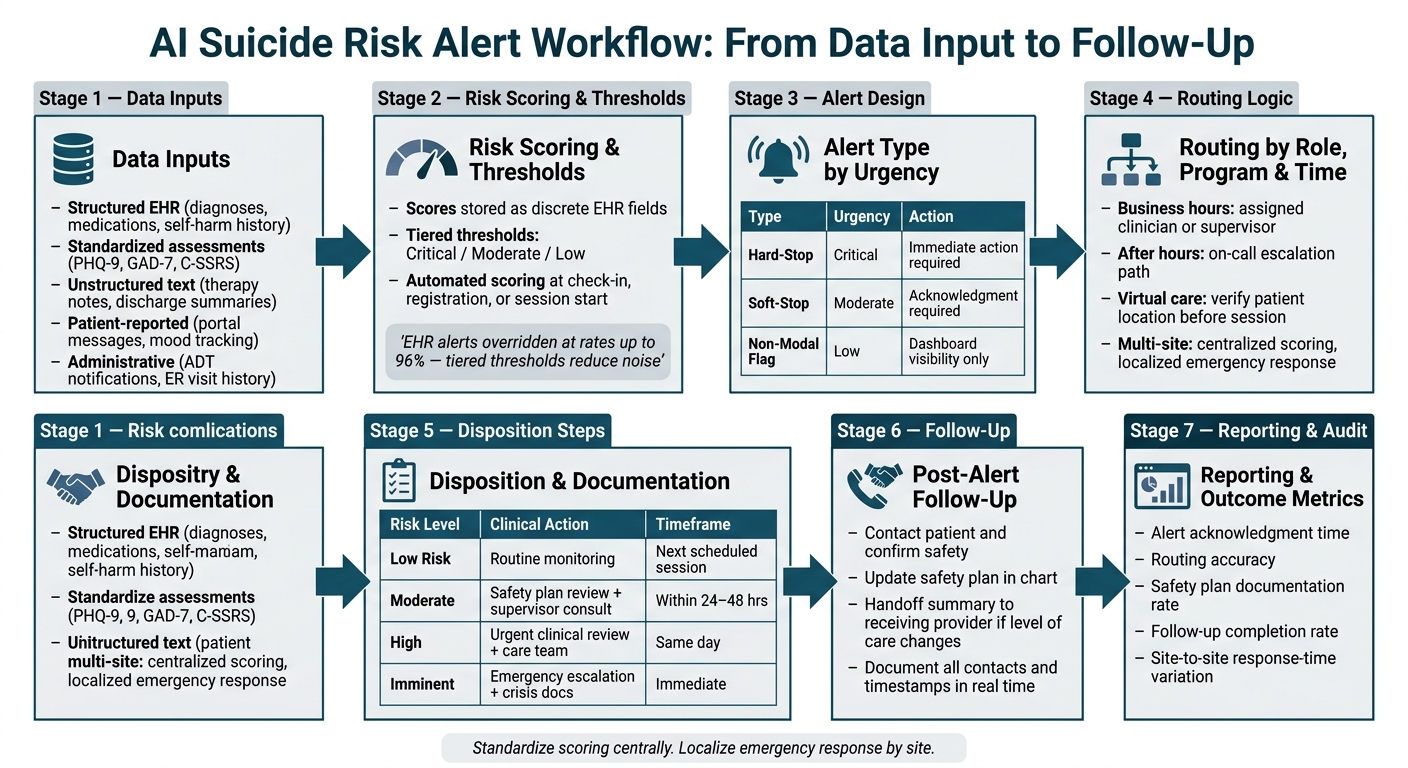
- Data inputs: EHR fields, screeners, notes, patient messages, and ADT feeds
- Scoring rules: when risk is scored, how thresholds are set, and where scores are stored
- Alert design: hard-stop, soft-stop, or dashboard flag based on urgency
- Routing logic: assigned clinician, supervisor, or after-hours on-call path
- Disposition steps: safety planning, C-SSRS review, crisis action, and charting
- Setting-specific workflows: outpatient, virtual IOP, and multi-site escalation paths
- Reporting: acknowledgment time, routing accuracy, follow-up rate, and safety plan completion
One data point stands out: some EHR alerts are overridden at rates of up to 96%.
That is why behavioral health organizations need alert rules tied to staff capacity, role-based response, and chart-level workflow rules instead of a high volume of interruptive warnings.
For executive teams, the business issue is clear. Weak alert setup can add staff burden, create documentation gaps, slow crisis response, and limit reporting visibility across programs and sites. Strong setup can help teams respond with more consistency and give leaders better line of sight into care delivery risk.
This explains how behavioral health providers can connect AI suicide risk monitoring to day-to-day clinical workflow without turning alerts into background noise.
AI Suicide Risk Alert Workflow: From Data Input to Follow-Up
How to Set Up Data Inputs and Risk Scoring
Connect Data Sources That Drive Risk Models
Risk scoring starts with data quality. Teams need to connect each source, confirm field integrity, and make sure the model reads discrete data rather than only free text. AI risk scoring is only as dependable as the information behind it.
The most useful data usually falls into five categories:
|
Data Source Type |
Examples |
Purpose in Suicide Risk AI |
|---|---|---|
|
Structured EHR |
Diagnoses, medications, prior self-harm history |
Baseline risk stratification |
|
Standardized Assessments |
Real-time symptom tracking and scoring |
|
|
Unstructured Text |
Therapy notes, discharge summaries |
NLP-based sentiment and hotspot detection |
|
Patient-Reported |
Mobile mood tracking, portal messages |
Early warning signs between sessions |
|
Administrative |
Admission, discharge, and transfer (ADT) notifications, ER visit history |
Identifying transitions in care (high-risk periods) |
When ADT notifications feed into the risk model on their own, the system can flag a recently discharged patient before the next scheduled visit instead of waiting for a clinician to spot the issue by hand.
Before launch, each data source should be checked. PHQ-9 scores should sit in discrete fields, not buried in free-text notes. Prior self-harm history should be coded the same way across the system. If data is incomplete or structured unevenly, scores may become unreliable no matter how strong the model appears on paper.
Once inputs are validated, the next step is deciding when the model scores and how each score is stored.
Set Scoring Windows, Thresholds, and Storage Rules
After data sources are connected, teams need clear rules for when the model scores risk, how the score is shown, and where it lives in the EHR so workflows can respond on their own.
Thresholds should match what the organization can handle in day-to-day operations.
A tiered model often works well:
- A critical alert for patients in the highest risk tier
- A review alert for moderate risk that prompts clinical review without stopping workflow
- A background notification for lower-priority signals
This matters because alert fatigue leads to overrides. Some EHR alerts are overridden at rates up to 96%.
Risk scores should be stored as discrete EHR fields, not only as text inside a note. When the score sits in a structured field, it can trigger automated rules at check-in, registration, or before a telehealth session starts, without asking staff to review every chart one by one.
Clinical leaders, IT teams, and administrators should review alert rules on a set schedule.
Metrics to monitor:
- Override rates
- Time to resolution
- Alerts per clinician per day
That feedback loop helps keep the system useful instead of turning it into background noise.
Structured scores matter most when they lead to action inside the chart.
Use Opus Behavioral Health EHR to Centralize Inputs and Scoring
Once scoring rules are set, the next move is to centralize them in the EHR so alerts and tasks fire on their own. Multi-source data often breaks down during ingestion, scoring, and writeback.
Opus Behavioral Health EHR centralizes the clinical, administrative, and patient-reported inputs that risk models depend on. Its outcomes measurement tools track patient progress over time, giving the AI model a longitudinal data set instead of a single snapshot. Its automated workflows surface the right fields, flags, tasks, and documentation steps once a risk score is written back into the chart.
Centralized inputs and automated writeback help keep risk scores available to the workflows that need them most.
How to Trigger Alerts and Route Cases to the Right Care Team
Once the score is written back to the chart, the next step is simple in theory but hard in practice: turn that score into the right alert and send the case to the right team. A risk score in the record does not help on its own. It only matters when it leads to a clear response without flooding staff with noise.
Set Alert Types and Required Actions
Not every elevated score should interrupt a clinician mid-workflow. The key is to match urgency to the alert type so the system stays useful and staff continue to trust it.
|
Alert Type |
Urgency |
Clinician Burden |
Best-Fit Use Case |
|---|---|---|---|
|
Hard-Stop (Interruptive) |
Critical / Imminent |
High - requires immediate action |
Suicide intent detected; immediate safety plan required |
|
Soft-Stop (Guidance) |
Moderate / High |
Medium - requires acknowledgment |
Significant shift in PHQ-9 scores; medication contraindications |
|
Non-Modal (Flag/Reminder) |
Low / Persistent |
Low - dashboard flag only |
Missed appointment; general mood decline over 30 days |
A hard-stop pauses the workflow until the clinician responds. That makes sense when the model identifies active suicidal intent. A soft-stop presents a warning and requires acknowledgment, but it does not block the workflow. A non-modal flag remains visible on the dashboard and supports follow-up without interrupting care delivery.
This distinction matters for behavioral health teams. If every score change creates the same level of interruption, staff may start clicking past alerts or treating them as background noise. A tighter alert design can help protect clinician attention for the cases that need it most.
Define Routing Logic by Role, Program, and Time of Day
Alert type sets urgency. Routing decides who owns the response.
Behavioral health organizations often need routing rules based on role, program, and time of day. That means the same score may follow a different path depending on whether the patient is in outpatient therapy, virtual IOP, or another level of care. Routing should follow role-based escalation paths so there is no confusion about who responds first and who steps in next.
During business hours, moderate-risk alerts can route to the assigned clinician for review. High-risk alerts should escalate at once. After hours, alerts should move to the on-call escalation path. In virtual care, teams should confirm the patient's location at the start of the session so emergency services can be directed to the right place if needed [3].
For executive and clinical leaders, this is less about software setup and more about operating discipline. A routing rule is only useful if staff know the escalation path, coverage is current, and after-hours ownership is clear.
Map Risk Tiers to Disposition and Documentation
Each risk tier should have a preset response, required documentation, and a deadline. That structure can help clinical teams act faster and support cleaner records for compliance and case review.
|
Risk Tier |
Action |
Documentation |
Timing |
|---|---|---|---|
|
Low |
Routine monitoring |
Standard progress note |
Next scheduled session |
|
Moderate |
Review safety plan; consult supervisor |
Updated safety plan; progress note |
Within 24–48 hours |
|
High |
Urgent clinical review; engage care team |
C-SSRS; updated safety plan |
Same day |
|
Imminent |
Emergency services escalation; continuous observation |
Crisis intervention note; involuntary hold docs if applicable |
Immediate |
In practice, this kind of mapping helps reduce variation across teams and sites. A moderate-risk case should not receive one response at one location and a very different response somewhere else unless policy or level of care calls for it.
Document each intervention, contact, and timestamp in real time [3].
Next, apply these alert rules to outpatient, virtual IOP, and multi-site workflows.
How to Build Workflows for Outpatient, Virtual IOP, and Multi-Site Programs
Once alerts are routed, the workflow shifts based on the care setting. Outpatient clinics, virtual IOP programs, and multi-site organizations may use the same core risk framework, but the handoff steps, staffing response, and emergency process often look different in practice.
Outpatient Clinics: From Check-In to Safety Planning
In outpatient clinics, the process often starts at check-in. A validated screener can trigger an alert before the session begins. The assigned clinician then reviews the flag and completes a structured risk assessment using the C-SSRS [5][3].
If risk is confirmed, the clinician updates the safety plan with the patient and documents lethal-means counseling that addresses access to firearms or medications [2][5][3]. For hybrid visits or telehealth-adjacent outpatient care, staff should verify the patient’s exact physical address at the start of every session. That step matters because emergency services need the correct location if a crisis escalates during care [5][3].
The intervention should be documented in the chart, and the safety plan should be updated in the record.
Virtual IOP follows the same risk logic before the session starts.
Virtual IOP: Pre-Session Screening, Telehealth Escalation, and Emergency Readiness
In a virtual IOP, the first signal often appears before the group session opens. Asynchronous portal questionnaires sent through a secure link before the scheduled session can collect PHQ-9, GAD-7, or ASQ responses from each participant [1][2]. The facilitator reviews flagged scores before the group begins and contacts the patient ahead of time if a higher-risk response appears.
When an active crisis unfolds on a video call, staff should keep the patient on video while a second team member contacts emergency services from a separate device [5][3]. Programs should also keep a searchable directory of local 911 dispatch numbers, mobile crisis teams, and psychiatric emergency departments for every jurisdiction they serve [3]. That step can save time when a patient is attending from a different county or state than the program’s home office.
The crisis note should include the intervention, the verified address, and backup contact details.
Multi-site programs follow the same basic workflow, then apply local escalation rules.
Multi-Site Programs: Centralized Monitoring with Local Escalation Rules
The operating model is simple: standardize scoring at the center, then localize emergency response by site [4][3].
- Centralize screening tools, risk thresholds, outcome metrics, and audit procedures across all sites.
- Localize on-call coverage assignments and emergency resource mapping based on each site’s jurisdiction.
- Maintain a backup communication plan at every site so staff can reach the patient or the patient’s emergency contact if technology fails during a high-risk alert [3].
Follow-Up, Reporting, and Next Steps
Build Follow-Up Protocols After an Alert Closes
Alert closure is not the end of the process. In behavioral health settings, it marks a handoff point that still carries clinical and operational risk. Once an alert has been routed and resolved, teams should contact the patient, confirm safety, and make sure the safety plan and next steps are documented before the case is fully closed.
When a patient moves to a higher level of care, the handoff should include the safety plan and a short summary of the alert event. That gives the receiving provider context for the first visit and can help reduce gaps during transitions.
Those closure steps should also flow into reporting and audit activity.
Measure Outcomes and Audit the Workflow
After alerts close, behavioral health leaders should track a small set of measures to see whether the workflow is improving care or breaking down at key points. These metrics show where the process is performing well and where follow-up, documentation, or routing may be slipping.
|
Metric |
What It Tells You |
|---|---|
|
Alert acknowledgment time |
How quickly staff respond after a flag is triggered |
|
Routing accuracy |
Whether the alert reaches the correct role, program, or site |
|
Safety plan documentation rate |
Whether clinicians complete and update plans after an alert |
|
Follow-up completion rate |
Whether outreach and follow-up visits happen after alert closure |
|
Site-to-site response-time variation |
Whether multi-site programs are applying standards consistently |
These measures help leadership teams assess whether scoring, routing, and follow-up are working as intended. Opus Behavioral Health EHR supports this type of audit process through outcomes measurement tools and reporting dashboards. Clinical directors can use those dashboards to review trends and identify follow-up gaps over time.
Regular audits can help teams spot issues such as delayed acknowledgment times or low safety plan completion before they turn into compliance concerns or patient safety problems.
Conclusion: A Practical Model for AI-Enabled Suicide Risk Response
With follow-up and reporting in place, AI suicide risk workflows are most useful when alerts lead to action, follow-up, and measured review.
FAQs
How often should suicide risk be rescored?
Suicide risk should be reassessed consistently and regularly so clinical teams can track changes in a patient’s status over time.
For clients expressing suicidality, standard best practice is to complete a direct risk assessment, such as the Columbia-Suicide Severity Rating Scale, at every clinical session.
Outside scheduled visits, Opus Behavioral Health EHR can support ongoing safety monitoring by flagging high-risk responses for immediate clinical review.
Who should receive high-risk alerts after hours?
High-risk alerts should route to the primary provider or the care team directly responsible for the patient. Systems such as Opus Behavioral Health EHR can send automated notifications when patients meet critical risk thresholds during assessments or through real-time monitoring.
Some behavioral health organizations also place a review step between the alert trigger and the clinical team. That extra layer can help surface the most urgent, action-ready notifications, which may reduce alert fatigue and keep clinician attention on the cases that need it most.
What metrics show if alerts are actually working?
Alerts are doing their job when dashboards show faster acknowledgment and response times, fewer repeat high-risk flags, and stronger recovery measures such as symptom trends, relapse or readmission rates, and emergency visits.
Behavioral health leaders should also monitor override rates, alerts per clinician per day, and false-positive patterns. Those measures can help teams refine alert rules, cut down on alert fatigue, and still identify real clinical risk.



- Behavioral Health
- EHR Systems
- Addiction Treatment EHR
- mental health
- Telehealth
- addiction treatment
- Behavioral health facility
- Substance Abuse Disorder
- behavioral Health center
- HIPPA Compliant
- ehrsoftware
- PTSD
- behavioral health ehr
- Depression
- hipaa
- Anxiety
- MentalHealthMatters
- RCM
- claim denials
- clinical documentation
- mental health awareness
- screening tools

September 15, 2026

September 15, 2026

September 14, 2026

September 11, 2026

September 10, 2026

September 09, 2026
Recommended Posts
Friday, August 07, 2026
AI Mental Health Assessments: Guide for Providers
AI mental health assessments can cut intake work, speed note review, and improve follow-up visibility, but they still ...
Friday, September 11, 2026
AI Risk Models for Suicide and Relapse
Suicide risk models and relapse risk models should not be treated as the same tool.
Wednesday, September 10, 2025
World Suicide Prevention Day | Resources To Support You And Your Loved Ones
World Suicide Prevention Day | Resources to Help You and Your Loved Ones Every year on World Suicide Prevention Day, ...