

If a telehealth vendor touches ePHI, I treat the review like a HIPAA risk check before any patient data moves.
Since the COVID-era OCR flexibility ended in May 2023, video, chat, recordings, mobile access, and admin settings all need the same HIPAA review you’d expect in an in-person setting.
What to look for before approval:
A signed BAA that matches the vendor’s actual data flow
Session protections like TLS 1.2+, waiting rooms, host-only sharing, and recording limits
Access controls like MFA, SSO, RBAC, and tight consent workflows
Mobile device rules for BYOD, encryption, remote wipe, and app-level safeguards
A final scorecard based on proof, not vendor promises
A few points stand out fast:
OCR can fine a provider for a missing BAA, even without a breach
HIPAA breach notice can go up to 60 days, but many providers set a tighter vendor notice window like 24–48 hours
HIPAA records and support files often need to be kept for 6 years
Behavioral health and SUD providers may also need to check 42 CFR Part 2 terms, not just HIPAA language
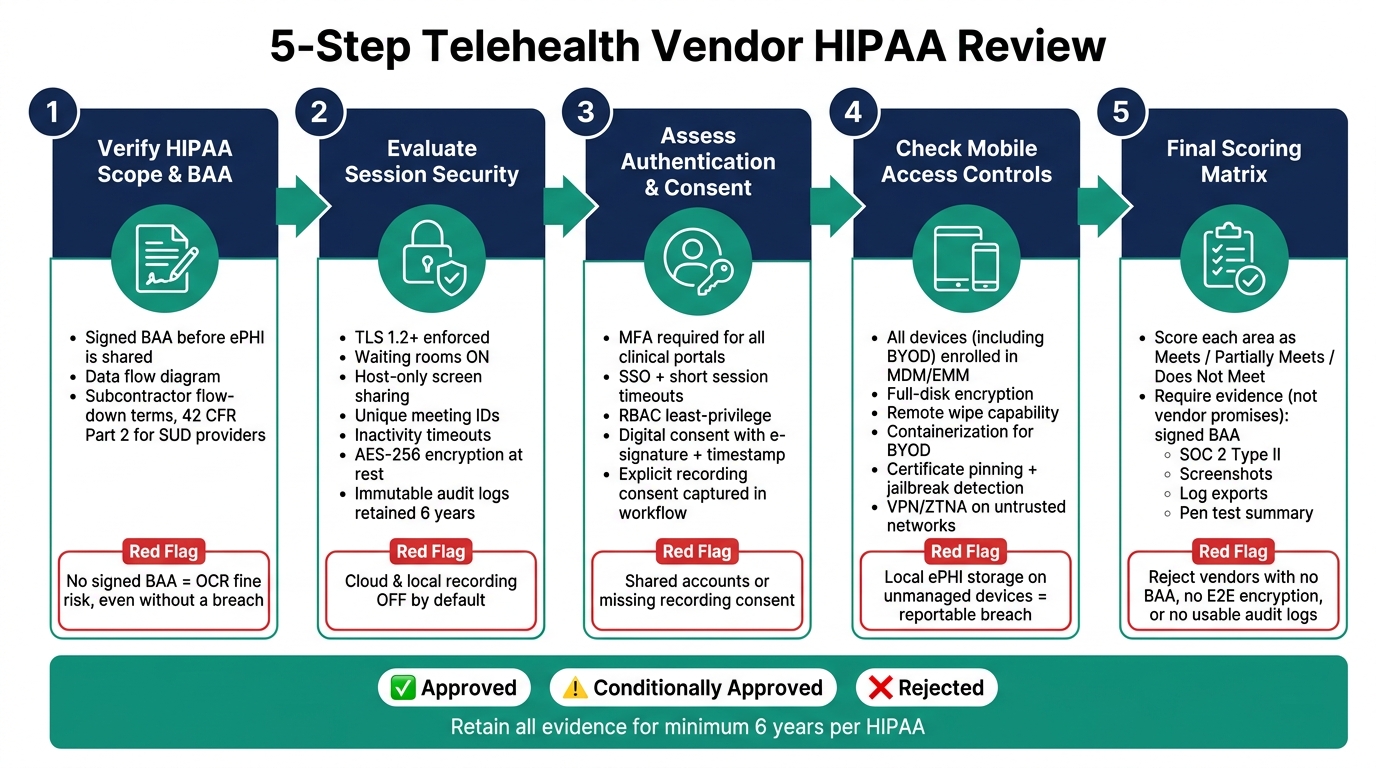
5-Step Telehealth Vendor HIPAA Review Checklist
Quick comparison
|
Review area |
What I check first |
Common red flag |
|---|---|---|
|
BAA and HIPAA scope |
Vendor role, ePHI flow, subcontractors |
No signed BAA or unclear data map |
|
Session security |
TLS 1.2+, waiting room, meeting controls |
Old protocols, open sessions, weak recording settings |
|
Access and consent |
MFA, RBAC, SSO, e-sign consent records |
Shared accounts or missing recording consent |
|
Mobile controls |
MDM, encryption, remote wipe, BYOD limits |
Local ePHI storage on unmanaged devices |
|
Final approval |
Evidence-backed scoring matrix |
Sales claims with no logs, reports, or screenshots |
So if I had to sum up the article in one line, it’s this: don’t approve a telehealth vendor until the contract, security settings, user access, mobile controls, and audit evidence all line up.
Step 1: Verify HIPAA Scope and Business Associate Agreement Terms
>Confirm the vendor's HIPAA role and ePHI flow
Start by confirming whether the vendor is a HIPAA Business Associate (BA).
Then map every place ePHI touches the platform.
Before you onboard the vendor or share any ePHI, you need to know whether it creates, receives, maintains, or transmits ePHI on your behalf. If it does,a signed BAA must be in place before services begin [9][10].
This matters because telehealth vendors often do far more than host video calls.
Scheduling tools, messaging, file sharing, recordings, storage, and third-party integrations can all involve ePHI. Ask for a written data flow diagram that shows where PHI is collected, processed, stored, and transmitted. If the vendor can't provide that, treat the review as incomplete.
If telehealth is one part of a larger platform, review the entire ePHI workflow, not just the video visit piece.
You should also require a signed BAA that spells out safeguards, breach notice duties, and limits on data use.
Once you know how data moves, make sure the contract lines up with that workflow.
>Review BAA clauses and HIPAA program documentation
Don't stop at checking whether a BAA exists. Read it. The agreement, plus the records behind it, should match how the vendor handles ePHI in practice.
|
Key BAA Clause |
Verification Action |
|---|---|
|
Permitted Uses & Disclosures |
Confirm ePHI access is limited to the specific services provided and applies "minimum necessary" standards. |
|
Safeguards |
Request summaries of the vendor's most recent Security Risk Assessment (SRA) and risk management plan. |
|
Breach Notification |
Ensure the BAA requires notification within 24–48 hours of discovery, which is tighter than HIPAA's 60-day outer limit [1]. |
|
Subcontractor Oversight |
Verify flow-down terms that bind downstream subcontractors to the same HIPAA protections. |
|
Data Return or Deletion |
Confirm secure data export procedures and require a certificate of destruction at contract end. |
|
Right to Audit |
Ensure the agreement allows for security attestations or reasonable audits of control evidence. |
Go beyond the BAA and ask for recent security evidence, incident response procedures, and training records.
Those items help show how the vendor handles security day to day. But they do not replace a signed BAA or a documented risk analysis.
It's also smart to review the BAA every year. Legal entities can change, subprocessor lists can grow, and an old agreement may no longer match current data handling.
If you're working in behavioral health or SUD care, check whether the vendor handles substance use disorder records. If it does, confirm whether the BAA or service agreement includes Qualified Service Organization (QSO) terms under 42 CFR Part 2 [8]. HIPAA BAA language does not cover Part 2 on its own.
After the contract review, the next step is to look at how the platform protects live sessions and recordings.
Step 2: Evaluate Session Security, Recording Settings, and Audit Logs
> Check encryption, waiting rooms, timeouts, and host controls
After you confirm the BAA, the next job is to review the controls that protect live behavioral health sessions.
Start with encryption. Make sure the platform enforces TLS 1.2 or TLS 1.3 for all data in transit, including video, audio, and chat. In the admin console, turn off older protocols like SSL, TLS 1.0, and TLS 1.1.
Then verify and document these session settings:
|
Security Control |
Admin Console Setting to Verify |
Evidence to Capture |
|---|---|---|
|
Encryption in Transit |
Minimum TLS Version |
Screenshot showing TLS 1.2 or 1.3 enforced |
|
Admission Control |
Waiting Room / Lobby |
"Enable Waiting Room" toggled to ON |
|
Screen Privacy |
Screen Sharing Restrictions |
"Host Only" selected in global settings |
|
Session Integrity |
Unique Meeting IDs |
"Use Personal Meeting ID (PMI)" toggled to OFF |
|
Access Control |
Automatic Session Timeout |
Timeout value set (for example, 15 minutes of inactivity) |
At a minimum, require the following:
TLS 1.2 or TLS 1.3Waiting rooms turned on by default
Host-only screen sharing
Unique meeting IDs
Short inactivity timeouts
>Review recording defaults, storage, retention, and audit logs
Recording is one of the highest-risk areas in a telehealth setup. For clinical sessions, both cloud recording and local recording should be OFF by default.
Use role-based access control so only host or admin roles can start, stop, or download recordings. If recording is turned on, document patient consent and follow the state laws that apply to recording consent.
Storage and retention matter just as much. Recordings should be encrypted at rest with AES-256 or stronger.
Retention schedules should line up with HIPAA's six-year documentation rule [12], though state medical record laws may call for a longer period. When that retention period ends, secure deletion should include destroying the related cryptographic keys.
Transcripts, chat logs, and session metadata also count as ePHI, so they need the same protection as video files [5][3].
For audit logs, check that the platform records:
Authentication eventsFailed logins
Session access
Recording views or downloads
Configuration changes
Data exports
Logs should be immutable, time-synchronized, and stored in a central location [1][6].
They should also be kept for at least six years [3]. Turn on alerts for odd activity, especially after-hours access or bulk data exports, ideally through a SIEM tool.
During the review, pull a sample log export and confirm it includes enough detail to support a breach investigation. Also review admin-console settings every month, since platform updates can reset security defaults.
After session security and recording controls are set, move to authentication and consent workflows.
Step 3: Assess User Authentication, Role-Based Access, and Consent Workflows
>Validate MFA, password controls, SSO, and least-privilege access
Once session security is in place, the next step is simple: look at who can get into the platform and what they can do once they're in.
MFA should be required for clinical portals, admin consoles, APIs, remote access, and privileged accounts. When possible, use phishing-resistant MFA. It adds a stronger layer of defense, especially for accounts that could expose patient data or system settings.
SSO can make identity management easier to handle. But SSO alone isn't enough. Pair it with strong passwords and short session timeouts. That setup lowers risk if a credential is stolen and makes deprovisioning much faster when staff leave or move into a new role.
RBAC should follow least privilege. In plain English, each person should get only the access they need to do their job. Nothing extra. Permissions should also be reviewed on a regular basis, especially when staff change roles or exit the organization.
Access controls can look solid on paper and still fail in practice if the consent workflow doesn't line up with the session.
>Verify telehealth consent capture and behavioral health privacy safeguards
Telehealth consent should address connection failures, privacy limits, emergency steps, and the patient's right to choose in-person care [2][4].
In behavioral health settings, consent records should be captured digitally with e-signatures, timestamps, and a direct link to the patient's chart.
If sessions are recorded, the platform should be set up to capture explicit consent as part of the workflow. That's not just a box to check. Recordings are PHI, and they also fall under state recording laws.
State recording laws vary by jurisdiction, so the workflow should support both one-party and two-party consent rules [2]. Don't stop at the federal baseline. Make sure the vendor's consent workflow can handle state-by-state differences.
On the privacy side, keep PHI out of chat when possible, out of visible backgrounds, and out of post-session artifacts. Disable public chat by default [13][4]. Clinicians should also confirm privacy at the start of each session.
Next, review mobile access controls for phones, tablets, and BYOD use.
Step 4: Check Mobile Access Controls
>Check mobile app security, BYOD rules, and endpoint protections
Once you've checked authentication and consent controls, look at how staff reach ePHI on mobile devices. Review phones, tablets, and laptops before you approve mobile access. Treat these devices as ePHI endpoints, not just handy tools.
Every device that can access ePHI, including BYOD devices, should be enrolled in MDM or EMM. That gives you control over full-disk encryption, strong passcodes or biometrics, and remote wipe if a device is lost or stolen [14][15]. Under HIPAA, a lost unencrypted mobile device is a reportable breach [2].
For BYOD, use containerization to keep clinical data separate from personal content. Add DLP controls to stop copy-and-paste of ePHI into unauthorized apps and to block copying into personal apps, photos, or notes [14][15]. Mobile access should also be limited to roles that actually need it.
At the app level, check for:
Certificate pinningJailbreak/root detection
Screenshot blocking
Mobile inactivity timeouts
These controls help reduce risk on devices that can leave the office as easily as a set of car keys. Also confirm that the app uses temporary caching so session data is cleared after the session ends [15][10][14].
On untrusted networks, require VPN or ZTNA, and block public Wi-Fi for ePHI access [14][15]. Audit logs on mobile devices should record device ID, source IP, and location data so you can trace incidents later [14].
Record these mobile findings in the final scoring matrix.
Step 5: Use a Final Scoring Checklist Before Approval
>Use a consolidated review matrix before vendor approval
After Steps 1–4, bring everything into one final matrix. The goal is simple: score the vendor using the proof you already gathered, not what the vendor says it plans to do later.
Use three status labels: Meets, Partially Meets, or Does Not Meet. Every row should point to actual proof. That means signed documents, screenshots, reports, exports, and policy records, not sales claims or verbal assurances.
Approve only vendors that meet every critical item and show low residual risk. If a gap can be fixed, use conditional approval, but only if there's a clear owner, a deadline, and a milestone tied to the fix.
Reject vendors that refuse a BAA, don't have end-to-end encryption, or can't produce usable audit logs [9][11][7]. Higher-risk vendors need tighter log review and more frequent attestation cycles [1][9].
Each row below ties back to one of the earlier review steps.
|
Requirement |
Evidence Collected |
Status |
|---|---|---|
|
Signed BAA covering all subprocessors |
Executed BAA; subprocessor list |
Meets / Partially Meets / Does Not Meet |
|
Session encryption; AES-256 at rest; TLS 1.2+ in transit |
Security whitepaper; SOC 2 Type II report |
Meets / Partially Meets / Does Not Meet |
|
Immutable audit logs; 6-year retention; searchable history [8][16] |
Sample log export; retention policy |
Meets / Partially Meets / Does Not Meet |
|
MFA enforced; RBAC (least privilege); SSO integration |
Configuration screenshots; IAM policy |
Meets / Partially Meets / Does Not Meet |
|
Telehealth consent with timestamps, version history, identity verification, and separate psychotherapy notes |
Consent template; workflow demo; identity verification records |
Meets / Partially Meets / Does Not Meet |
|
BYOD under MDM, full-disk encryption, and no local ePHI storage |
BYOD policy; MDM attestation |
Meets / Partially Meets / Does Not Meet |
|
Pen test summary |
Meets / Partially Meets / Does Not Meet |
In behavioral health and SUD treatment settings, two rows deserve extra scrutiny: separate psychotherapy notes and 42 CFR Part 2 compliance for substance use records [8].
If a vendor can't show both, it shouldn't move forward for approval, even if the rest of the matrix looks strong.
Conclusion: Document findings and repeat the review when changes occur
Keep every piece of evidence on file: executed BAAs, SOC 2 Type II reports, SOC 2 bridge letters, configuration screenshots, and log exports. Retain them for at least 6 years under HIPAA [8][16].
Run the review again after major product, integration, hosting, or policy changes [9][2]. Once the matrix is complete, file it and mark the vendor as approved, conditionally approved, or rejected based on any unresolved critical gaps.
FAQs
How do I know if a telehealth vendor is a Business Associate?
A telehealth vendor is a Business Associate if it creates, receives, maintains, or transmits PHI on your behalf.
In practice, most telehealth platforms fit that role. They often handle patient identity details, session recordings, scheduling data, and visit notes as part of normal use.
That’s why marketing claims about being “HIPAA-compliant” aren’t enough on their own. You should confirm the vendor will sign a formal Business Associate Agreement (BAA).
A BAA matters because it requires the vendor to protect PHI and report breaches.
What evidence should I collect before approving a vendor?
Before you approve a vendor, make sure they can protect ePHI. That means collecting a small set of legal, technical, and day-to-day documents that show how they handle security in practice.
Ask for:
A signed BAA that spells out permitted ePHI uses, breach notification timelines, and subcontractor requirements
Proof of their security posture, such as a recent SOC 2 Type II report and any ISO 27001 or HITRUST certifications
Their latest HIPAA risk analysis, risk management summary, and policies for access control, encryption, incident response, audit logging, and data retention/deletionThis step helps you move past promises and look at what the vendor has on paper and in place.
When should a telehealth vendor HIPAA review be repeated?
Repeat a telehealth vendor HIPAA review at least once a year. How often you revisit it should depend on the vendor’s risk tier.
You should also run an ad hoc review after any material change. That includes platform upgrades, new integrations, major security incidents, hosting moves, acquisitions, changes in state consent laws, or updates to the BAA when the service scope or feature set expands PHI access.



- Behavioral Health
- EHR Systems
- Addiction Treatment EHR
- mental health
- Telehealth
- addiction treatment
- Behavioral health facility
- Substance Abuse Disorder
- behavioral Health center
- HIPPA Compliant
- ehrsoftware
- PTSD
- behavioral health ehr
- Depression
- hipaa
- Anxiety
- MentalHealthMatters
- RCM
- claim denials
- clinical documentation
- mental health awareness
- screening tools

September 15, 2026

September 15, 2026

September 14, 2026

September 11, 2026

September 10, 2026

September 09, 2026
Recommended Posts
Friday, July 31, 2026
HIPAA Audit Log Checklist for Behavioral Health Software
If a behavioral health platform cannot show who accessed ePHI, what changed, when it happened, and whether the action ...

Friday, August 28, 2026
10 HIPAA-Compliant CRM Features to Review
A healthcare CRM that touches PHI should be reviewed like a risk system, not just a sales tool.
Thursday, July 09, 2026
Ultimate Guide to Telehealth Risk Mitigation
Telehealth is transforming behavioral health care but comes with risks like data breaches, compliance violations, and ...