

Behavioral health referral management affects census, staff workload, billing flow, and patient access.
When inquiry data, clinical screening, insurance checks, and admission steps sit in different places, referrals slow down and teams lose visibility. In behavioral health, where average inquiry-to-admission conversion is about 2.1%, even small delays can hurt performance.
For treatment centers and multi-site providers, a behavioral health CRM can help by keeping referral intake, source tracking, outreach activity, payer details, and admission handoff in one process.
That gives leadership a clearer view of:
Time-to-first-touchInquiry-to-admit conversion
Not-admitted reasons
Referral source performance
Payer mix and financial risk
CRM-to-EHR-to-billing handoff
Strong referral management usually depends on a few core disciplines:
1. Defined intake stages with clear ownership2. Clean referral, clinical, and payer fields
3. Source records tied to outreach history
4. Admission workflows that move data into the EHR and billing record without repeat entry
5. KPI reporting that links admissions activity to revenue and staffing decisions
It also points to a clear service expectation: many programs aim for a callback within 15 minutes during business hours and a VOB within 30 minutes after insurance details are received.
For executive teams, the issue is not just intake speed. It is whether the organization can track demand, route referrals well, support compliance, and connect front-end admissions work to back-end collections.
For behavioral health leaders, the main takeaway is simple: referral management works best when CRM, clinical, and revenue workflows are connected and measured from first inquiry through admission and payment.
Referral Intake Workflow Inside a Behavioral Health CRM
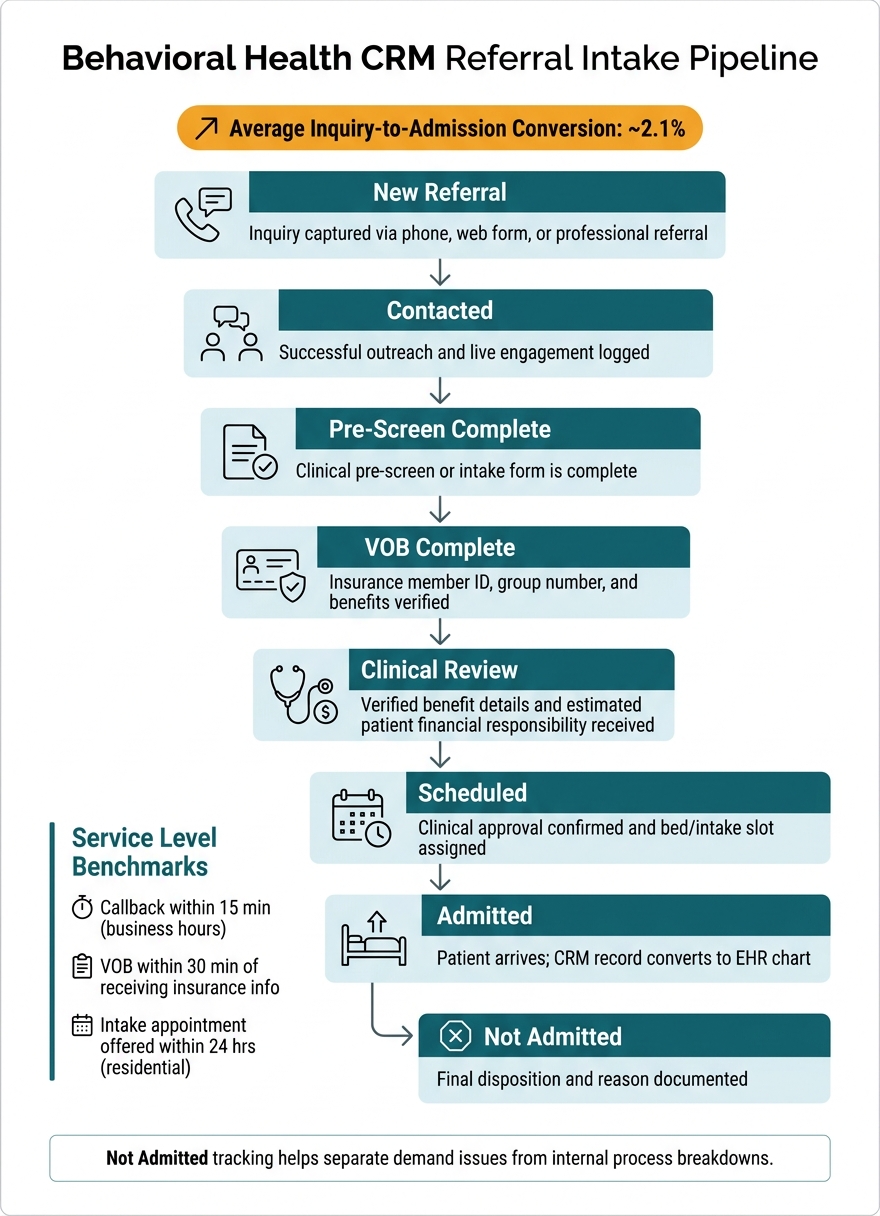
Behavioral Health CRM Referral Intake Pipeline: From Inquiry to Admission
From the first call through admission, a behavioral health CRM moves each referral through a set intake pipeline with a clear owner and status at every step.
That structure matters. When intake teams work from scattered notes, inboxes, or spreadsheets, referrals can stall, follow-up gets missed, and demand becomes hard to measure.
Intake Stages and Status Pipeline
Most behavioral health CRMs organize intake around defined pipeline stages. Each stage includes a clear trigger that moves the referral record forward. Using one status sequence for every referral helps staff see the current owner, the next action, and where handoffs may be slowing down the process.
|
Stage |
What Triggers the Move Forward |
|---|---|
|
New Referral |
Inquiry captured via phone, web form, or professional referral |
|
Contacted |
Successful outreach and live engagement logged from an outbound call or email |
|
Pre-Screen Complete |
Clinical pre-screen or intake form is complete |
|
VOB Complete |
Insurance member ID, group number, and benefits are verified |
|
Clinical Review |
Verified benefit details and estimated patient financial responsibility are received |
|
Scheduled |
Clinical approval is confirmed and bed availability or an intake slot is assigned |
|
Admitted |
Patient arrives for admission and the CRM record converts to the EHR chart |
|
Not Admitted |
Final disposition and reason are documented |
Tracking Not Admitted reasons is especially useful. It helps leadership separate true demand issues from internal process breakdowns.
For example, a center may see strong referral volume but weak admission conversion because outreach is delayed, beds are not matched well, or benefit checks are taking too long.
Once the intake pipeline is set, the next job is making sure the right source, clinical, and payer data is collected at the right point in the workflow.
Required Referral, Clinical, and Payer Fields
Capturing the right data at the right stage cuts down on downstream rework. In practice, the CRM record works best when it is built in layers: referral data first, then clinical details, then payer and financial information.
Referral and demographic fields should include the referral date and time, source organization name, specific contact person, referral channel such as phone, web, or walk-in, and the assigned staff owner.
Patient demographics should also be confirmed early, including full name, date of birth, verified address, phone, email, and preferred language. That early data check helps the EHR record start clean and may reduce duplicate or incomplete charts later.
Clinical fields should capture presenting concerns, current substance use, mental health history, prior treatment history, risk indicators such as suicidality or violence, and the requested level of care, including detox, residential, PHP, or IOP.
Intake teams also need room for operational details that affect placement, such as bed availability, preferred facility location, and transportation needs.
Payer and financial fields should include insurance carrier, member ID, group number, carve-out payer such as Optum, Carelon, or Magellan, in-network status, remaining deductible in USD, co-insurance percentage, benefit maximums, and prior authorization requirements.
Collecting estimated patient financial responsibility during intake, rather than after admission, can help lower back-end billing risk and set clearer expectations for patients and families.
"A lead that enters the CRM today becomes a chart in the EHR tomorrow and a paid claim in the RCM next week - without anyone re-entering data or reconciling spreadsheets." - Behave Health [4]
User Roles in Intake and Pre-Admissions
Each pipeline stage usually has a natural owner. Clear role definition helps intake move faster and gives leaders better visibility into where work is getting stuck.
Intake coordinators capture and log new referrals. Their focus is fast contact and clean documentation of every outreach attempt.
Admissions specialists complete pre-screening and scheduling, helping qualified leads move toward a confirmed bed or intake slot.
VOB and RCM staff handle insurance verification and financial counseling.
Clinical reviewers, often a clinical director or medical staff member, approve or deny admission based on medical necessity.
At this stage, the CRM is still qualifying the referral. The EHR typically begins only after admission is confirmed, when the workflow shifts from qualification and routing to chart creation.
Referral Source Management and Outreach
Once intake captures a referral, the CRM should keep two things tied to that lead: where it came from and who owns the relationship.
That sounds basic, but in behavioral health, referral paths are rarely simple. Hospitals, detox programs, private practices, payers, case managers, courts, and community organizations all send referrals in different ways. Without a clear system, those relationships often live in personal inboxes, phone contacts, or scattered notes, and they can disappear when staff leave. [1]
A behavioral health CRM is not just a place to store leads. It should help treatment centers manage the network behind those leads, so admissions, business development, and leadership teams can see which sources are active, which ones are drifting, and which ones may need more attention.
How to Build Referral Source Records
Each referral source should have its own organization-level record in the CRM, with individual contacts listed under that parent record.
For example, a hospital discharge planning department would sit at the organization level, while each planner or case manager would appear as a separate contact under that account.
The organization record should capture details such as source type, ZIP code, specialty, payer affiliations, service line, referral preferences, and contract notes. Individual contact records should add the person’s name, role, direct phone number, email address, and preferred communication method.
Source records should also include relationship status and performance context, not just contact data.
That usually means fields such as:
Relationship tier, such as VIP, Tier 1, or emergingAssigned account owner
Admissions history
Census contribution
That history gives executive teams a clearer view of which referral sources are contributing to census and which relationships may justify more outreach time. [1][4]
"We can see where patients are coming from, how they are getting to us, where referrals are coming from, and if referrals are appropriate for us." - Webster Bailey, Executive Director of Business Development and Marketing, Cornerstone of Recovery [2]
Referral volume should be tracked for outreach and performance visibility only.
Compensating or rewarding sources based on referral volume can violate the federal Anti-Kickback Statute and state patient brokering laws. [1]
Outreach Workflows for Liaisons and Marketing Teams
Business development and outreach teams tend to perform better when they can use the CRM from the field. Mobile access matters because it lets liaisons log calls, visits, and follow-up notes in real time rather than trying to rebuild activity later.
That gives leadership a live operational view instead of a static record created after the fact. [1]
Outreach activity should post directly to the referral source timeline. That includes calls, site visits, lunch-and-learns, follow-up tasks, emails, and SMS when logged under policy. When activity slows down, the CRM should flag that change early. A dormancy alert at 30 or 60 days, based on source type, can help account owners step back in before the relationship goes cold. [1]
That structure supports cleaner routing, faster follow-up, and a smoother handoff into admissions.
|
Referral Source Type |
Key Data Fields |
Outreach Approach |
Performance Metrics |
|---|---|---|---|
|
Hospitals |
Discharge planner name, department (ER, Psych), ZIP code, payer affiliations |
Site visits, lunch-and-learns, facility brochures |
Referral-to-admit conversion rate, average acuity of referrals |
|
Detox Programs |
Program director, clinical focus, bed availability, refer-out preferences |
Clinical coordination calls, facility tours, shared alumni events |
Reciprocal referral volume, lead-to-assessment speed |
|
Private Practices |
Specialty (e.g., trauma, SUD), NPI number, communication preference |
One-on-one coffee meetings, clinical white papers, case updates |
Net collected revenue per referral, referral-to-admit conversion rate |
|
Payers / Case Managers |
Provider relations contact, in-network status, carve-out details, contract terms |
Quarterly business reviews, credentialing updates |
In-network vs. out-of-network conversion, denial rates |
|
Courts / Legal |
Case manager name, court jurisdiction, legal reporting requirements |
Compliance documentation delivery, status updates |
Adherence to reporting timelines, admission success rate |
|
Community Orgs |
Program type, region, historical volume |
Community events, educational workshops |
Cost-per-acquisition (CPA), referral volume |
Segmenting outreach by source type helps teams spend time where it is most likely to matter. High-converting referral partners usually need steady relationship maintenance. Lower-converting sources may need more direct follow-up, better qualification, or a different outreach approach.
Once a source sends a referral, that relationship history should stay attached to the record as it moves into admissions and the intake handoff.
Admissions Coordination Across CRM, EHR, and Billing
When a qualified referral becomes an admission, the handoff between systems has to be clean. The CRM should pass source history, payer details, and clinical context into the next system so admissions, clinical, and billing teams are all working from the same record. If those teams rely on separate tools without connected workflows, duplicate data entry climbs and claims may stall.
CRM-to-EHR Handoff at Admission
The handoff should begin with a status change, not a manual task. When admissions staff updates a lead to "Admitted" in the CRM, that change should automatically create the patient record in the EHR, with demographics, payer data, consent details, and referral source mapped into the chart [4].
Clinical teams should have intake data available before the first visit. That includes pre-screen results, substance use history, level of care, and prior treatment history. The same record should also feed billing, so coverage, authorization, and source attribution stay in sync. An integrated platform can move intake data into clinical and billing workflows without duplicate entry.
How Billing and RCM Teams Use Referral Data
If intake completes eVOB during intake, billing teams can already see the deductible remaining, coinsurance percentage, and benefit maximums. That matters because carve-out payers often have separate credentialing and authorization rules [4].
Authorization tracking should begin in the CRM as well, with the authorization number and approved days flowing into the utilization review (UR) log in the EHR.
Source attribution should remain intact through the billing process. That gives billing and business development teams a clear way to track revenue by referral partner [4].
Role-Based Responsibilities During Admission
During admission, ownership changes by function. Clear role definition helps each team know what it owns, what moves into the next system, and what must be checked before services begin.
|
Role |
CRM Data Owned |
EHR / RCM Destination |
Responsibility at Admission |
|---|---|---|---|
|
Admissions Staff |
Demographics, referral source, initial inquiry notes |
Patient profile, marketing attribution |
Verify identity, coordinate arrival, and assign bed/clinician |
|
Clinical Leadership |
Pre-screen results, SUD history, level of care |
Clinical chart, treatment plan |
Review clinical fit, approve admission, and initiate intake documentation |
|
Billing / RCM Specialist |
eVOB results, auth #, payer carve-outs, copay/deductible |
Billing record, coverage and authorization clearance |
Confirm coverage and authorization clearance, apply fee schedules, and track approved days |
Reporting, KPIs, and Conclusion
After intake, source management, and admission handoff, reporting shows where the workflow is working and where it is slowing down.
Referral Management KPIs Leadership Should Track
Tracking the right numbers turns a CRM from a contact log into a management tool. For behavioral health leaders, the point is not just to collect data.
The point is to see where referrals stall, where staff response times slip, which sources bring in admitted patients, and how those patterns affect revenue, staffing, and care access.
|
KPI |
Definition |
Formula |
Data Source |
Primary User |
|---|---|---|---|---|
|
Referral Volume by Source |
Total inquiries from a specific source |
Count of inquiries grouped by source |
CRM |
Marketing / BD |
|
Time-to-First-Touch |
Speed of initial response to a new inquiry |
Timestamp (First Contact) − Timestamp (Inquiry) |
CRM Call/SMS Logs |
Admissions Manager |
|
Inquiry-to-Admit Conversion |
Overall effectiveness of the admissions funnel |
(Total Admissions / Total Inquiries) × 100 |
CRM + EHR |
CEO / Leadership |
|
Not-Admitted Rate by Reason |
Percentage of qualified leads that did not admit |
(Leads Lost for Specific Reason / Total Leads) × 100 |
CRM "Lost" Records |
Clinical Director |
|
Payer Mix Percentage |
Distribution of admissions by insurance type |
(Admissions per Payer / Total Admissions) × 100 |
CRM Insurance Fields |
RCM / Finance Manager |
|
Cost Per Booked Admission |
Marketing efficiency for paid channels |
Total Marketing Spend / Total Booked Admissions |
CRM + Marketing Spend |
Marketing Director |
|
Referral Return on Investment |
Financial value of specific referral relationships |
(Net Collected Revenue − Cost of Outreach) / Cost of Outreach |
CRM + RCM Integration |
Business Development |
Leadership teams often use service-level targets to keep admissions performance on track.
A common benchmark is an initial callback within 15 minutes during business hours, VOB completion within 30 minutes of receiving insurance information, and an intake appointment offer within 24 hours for residential referrals [3].
How Integrated Reporting Improves Staffing, Outreach, and Revenue
Once referral data moves through CRM, EHR, and RCM, leaders can use it to make staffing, outreach, and revenue decisions with far more confidence.
When systems are disconnected, each team works from a partial view. Admissions may see inquiry volume but not downstream collections. Clinical leaders may see scheduled intakes but not referral source trends. Billing teams may see claims and cash flow but not the intake steps that shaped payer mix or admission timing. That split view often leads to missed handoffs, uneven staffing, and weak source reporting.
Integrated dashboards help connect those dots. They can link referral volume to bed availability, admissions activity to staffing levels, and source attribution to net collected revenue. That matters in behavioral health, where census, labor cost, and reimbursement performance are tightly linked.
In practical terms, a business development director can review one report and see which hospital partner drove the most admissions last quarter, what payer mix those admissions carried, and how much revenue was collected from that source, without exporting three separate reports.
One outpatient SUD center reported a 25% increase in referral-to-admission conversion and 40% faster intake after unifying calls, web forms, and referral data [5]. Opus Behavioral Health EHR connects CRM, EHR, and RCM reporting in one platform, helping referral performance, clinical documentation, and collections data stay aligned.
Conclusion: The Systems and Processes That Make Referral Management Work
Reporting closes the loop between intake performance and operational action.
Effective referral management depends on a few non-negotiable elements:
Standardized intake stagesComplete data fields at every step
Clear role ownership across admissions, clinical, and billing teams
A CRM-to-EHR-to-billing handoff that moves data without duplication
Referral source tracking connects outreach spend to actual admissions. KPI-based reporting gives leadership visibility into what is working, where delays are building, and which parts of the process need attention.
"The programs with stable, growing census almost always have a managed, measured admissions process - not a better marketing budget." - Saint Health Group [1]
The goal is faster access to care, fewer errors, and a referral process leaders can measure and improve.
FAQs
How does a behavioral health CRM reduce referral delays?
A behavioral health CRM can reduce referral delays by taking manual work out of the front-end process and keeping communication in one place. It can pull inquiries from web forms and VoIP calls into a single system automatically, which helps treatment centers avoid missed leads, delayed follow-up, and unassigned outreach.
It can also help admissions teams move faster by supporting real-time electronic verification of benefits, automated follow-up reminders, and clearer visibility into callback tasks that have stalled.
For executive teams, that matters because delays at intake often affect admissions volume, staff workload, and reporting across the funnel. Opus Behavioral Health EHR supports this through a unified platform that syncs CRM, clinical, and billing data.
What data should intake teams capture first?
Intake teams should first record the core inquiry details needed to route the lead and set clear follow-up accountability: inquiry timestamp, source attribution, staff assignment, and inquiry method.
They should also capture basic contact details, the referral source, and initial insurance information.
Demographic data should stay limited in the CRM until the patient is ready for formal intake. That approach can help reduce staff burden, keep early-stage workflows cleaner, and limit unnecessary data collection before admission is likely.
Which KPIs matter most for referral management?
Track four core KPIs: referral volume by source, inquiry-to-admission conversion rate by source, average response time, and referral source retention.
In many behavioral health organizations, a strong inquiry-to-admission conversion rate often falls between 25% and 35%, while top-performing sources may reach 40% or more.
Leaders should also look at conversion across each stage of the funnel, including contact-to-assessment and assessment-to-admit.
That level of visibility helps admissions and growth teams spot where prospects are dropping off, whether the issue sits with follow-up speed, scheduling, handoffs, or intake process friction.
A combined ROI view that brings together source volume, conversion, and revenue gives executive teams a clearer picture of which referral relationships are producing the most business value.
That matters because a high-volume source does not always produce the strongest admissions yield or revenue performance.



- Behavioral Health
- EHR Systems
- Addiction Treatment EHR
- mental health
- Telehealth
- addiction treatment
- Behavioral health facility
- Substance Abuse Disorder
- behavioral Health center
- HIPPA Compliant
- ehrsoftware
- PTSD
- behavioral health ehr
- Depression
- hipaa
- Anxiety
- MentalHealthMatters
- RCM
- claim denials
- clinical documentation
- mental health awareness
- screening tools

September 15, 2026

September 15, 2026

September 14, 2026

September 11, 2026

September 10, 2026

September 09, 2026
Recommended Posts

Monday, August 17, 2026
Behavioral Health Billing Workflow Mapping 2026
Most behavioral health billing problems start before the claim is sent.

Monday, July 20, 2026
Personalized EHR Intake Forms: Guide for SUD Clinics
One intake form for every SUD patient is a fast way to create delays, denials, and compliance gaps.

Sunday, December 14, 2025
AI in Patient Intake: What Clinics Need to Know
AI-powered patient intake systems are changing how clinics handle data collection and patient interactions. These tools ...