

Most behavioral health billing problems start before the claim is sent.
This workflow map shows where revenue slips: intake errors, missing prior auth, unsigned notes, time-code mismatches, scrubber misses, slow denial follow-up, and weak payment reconciliation.
Behavioral health leaders reviewing billing workflow mapping in 2026 should focus on a few points first.
KEY POINTS AT A GLANCE:
Front-end checks drive claim quality. Eligibility, benefits, telehealth rules, and auth status should be verified at scheduling and again at check-in.
Documentation controls billing risk. Session time, modality, diagnosis support, treatment plan links, and clinician credentials should be in the note before coding starts.
Claims need pre-bill gates. Encounters should not move forward if data is missing, time does not match the CPT code, modifiers are absent, or auth units are exhausted.
Payer responses need named owners. 999, 277CA, 835, denials, and pended claims should route to role-based work queues instead of a shared inbox.
Cash posting is not the end of the workflow. ERA auto-posting, EFT matching, variance review, and denial logging should happen the same day to limit revenue leakage.
Denial patterns should feed process changes. If one root cause repeats, the fix usually belongs upstream in intake, clinical documentation, coding, or billing rules.
For executive teams, the message is simple: a billing workflow is only as strong as its handoffs.
Missed details at the first step can delay payment by 30 to 60 days or more, while filing-limit failures can turn a billable claim into a full write-off. The strongest maps tie each step to a role, a system, a deadline, and a checkpoint.
This summary gives decision-makers a clear view of how behavioral health billing workflow mapping supports claims accuracy, staff accountability, and cleaner follow-up across the full revenue cycle.
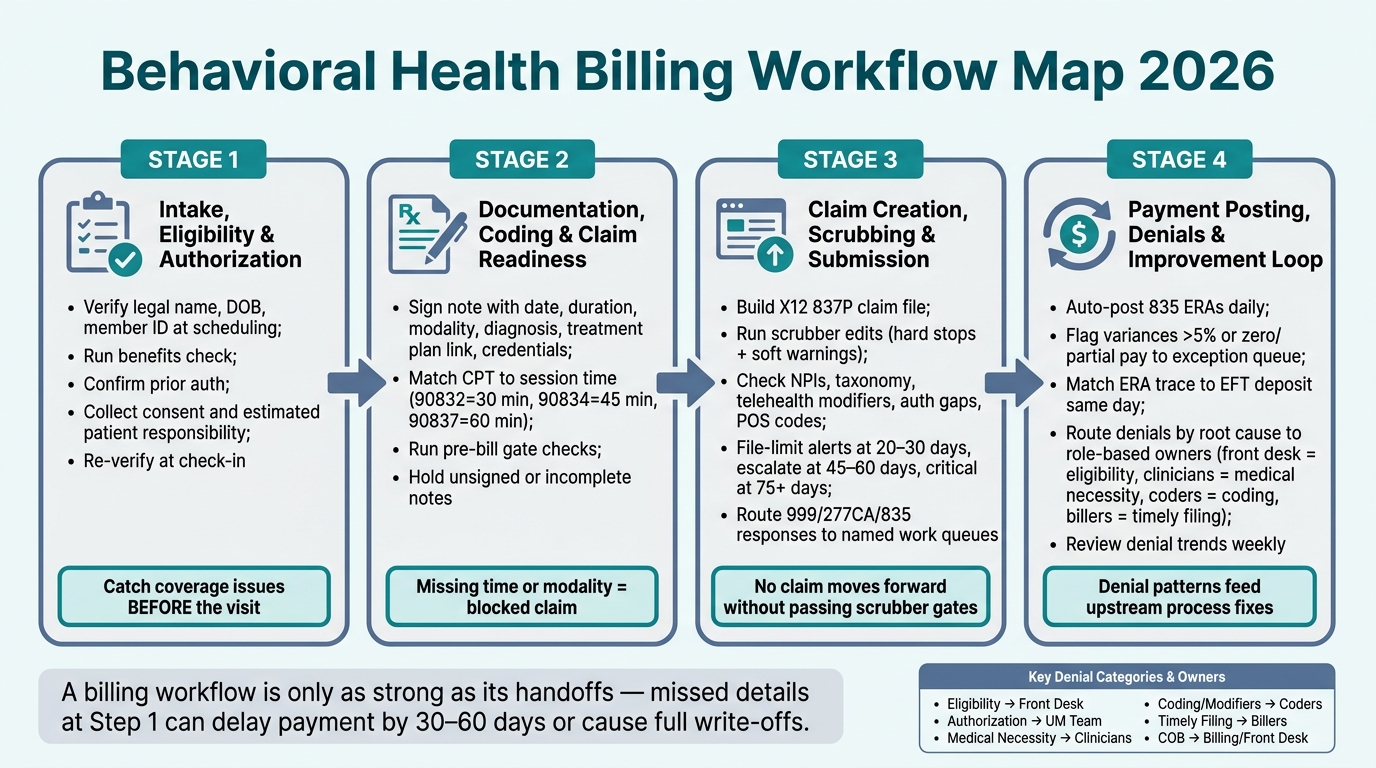
Behavioral Health Billing Workflow Map 2026: 4-Step Revenue Cycle Process
Step 1: Map intake, eligibility, and authorization before the visit
Behavioral health organizations should map pre-visit checks early in the intake process to catch eligibility and authorization issues before the visit happens. Pre-visit verification can help stop avoidable denials before they ever reach billing.
Build the front desk workflow from scheduling to check-in
The front desk workflow should follow the same sequence every time. At scheduling, staff should collect the patient’s legal name, date of birth, and insurance details. From there, the team should run an initial benefits check to confirm the plan is active and identify any prior authorization needs.
Consent forms and financial responsibility should also be captured during this stage so the visit is set up before the patient arrives. This matters for both operations and cash flow. Estimated patient responsibility should be collected before check-in, since late collection often slows reimbursement.
Add verification rules and authorization alerts at the earliest possible step
Verification rules should start before the appointment is booked. Exact matches for legal name, date of birth, member ID, and group number should be required before scheduling. Small mismatches at this stage often lead to denials that could have been avoided.
Teams should also apply visit-level rules, not just basic data checks. That includes checking virtual-visit coverage, required modifiers such as 95 or GT, and the correct Place of Service code at scheduling.
Scheduling and check-in serve different purposes, so both should be part of the workflow.
|
Feature |
Verification at Scheduling |
Verification at Check-In |
|---|---|---|
|
Primary Goal |
Identify high-level coverage and auth needs |
Confirm active status and exact patient responsibility |
|
Data Points |
Payer ID, Member ID, Benefit limits |
Remaining deductible, exact copay, current auth units |
|
Impact |
Prevents booking of non-covered services |
Ensures point-of-service collection and clean claim data |
|
Risk |
Coverage may change before the visit date |
May lead to same-day cancellations if issues are found |
Both checkpoints matter, but scheduling is where behavioral health teams can catch coverage and authorization issues early enough to keep the visit claim-ready.
Define the handoff from intake staff to the clinical schedule
Verified eligibility, patient responsibility, and authorization details should be passed from intake staff to the clinical schedule before the visit. That information should be visible in the clinical schedule ahead of time, not buried in a separate screen or left for staff to chase down later.
For clinical and billing teams, this handoff sets the starting point for documentation and coding in Step 2.
Step 2: Map documentation, coding, and claim readiness after the encounter
Once eligibility and authorization details from Step 1 are tied to the clinical schedule, the next task is turning the visit into a claim that can pass payer review.
Verified intake data needs to become signed documentation and then a code-ready encounter. In behavioral health, that only works when documentation, coding, and pre-bill checks follow a set order before claim creation.
Connect clinical documentation to medical necessity and charge capture
Each note should include the date of service, duration, modality, diagnosis, symptoms, functional impairment, interventions, patient response, progress toward goals, treatment plan link, level of care, credentials, and signature.
For most psychotherapy services, time drives code selection. That means documented minutes need to match the billed code.
CPT 90832 covers 30-minute individual psychotherapy, 90834 covers 45 minutes, and 90837 covers 60 minutes.
Services under 16 minutes should not be reported. For group therapy billed under CPT 90853, the record should show how each patient benefited. A single generic group note is not enough.
When a visit includes both medication management and psychotherapy, each part should stand on its own in the record.
The psychotherapy portion should appear alongside the medical evaluation and management work, including medications reviewed, side effects assessed, and treatment decisions made. Add-on codes 90833, 90836, and 90838 apply only when both parts are clearly documented.
Vague wording often creates coding and audit risk. Notes should identify the modality used, such as CBT, DBT, motivational interviewing, or supportive therapy, and describe measurable progress tied to treatment goals.
Once the note is signed, the focus moves from documentation completeness to coding accuracy.
Define coder review steps and claim checks that prevent avoidable errors
After a clinician signs a note, the encounter should move to a coder work queue only if documentation is complete. Unsigned or partial notes should be held automatically.
Coder review in behavioral health should confirm a few core points:
The primary ICD-10-CM diagnosis matches the documented clinical picture.
The CPT or HCPCS code fits the service type and duration.
Any required modifiers are present.
The place-of-service code matches the setting where care was delivered.
|
Documentation Element |
Associated Code Type |
Workflow Check or Alert |
|---|---|---|
|
Diagnosis and clinical criteria |
ICD-10-CM |
Alert if the diagnosis is missing, non-specific, or not supported by the documented symptoms and severity |
|
Session duration (start/stop times or total minutes) |
CPT time-based psychotherapy codes |
Block if time is missing or does not match the selected code |
|
Service modality (individual, group, family) |
CPT/HCPCS |
Alert if the note's modality does not match the billed code |
|
Telehealth vs. in-person delivery |
CPT/HCPCS + place of service and modifiers |
Check that telehealth documentation and billing fields align with the encounter |
|
Level of care (outpatient, IOP, PHP, residential) |
HCPCS/CPT + place of service |
Flag mismatches between documentation, code set, and authorization |
|
Treatment plan and goals linkage |
ICD-10-CM + CPT |
Alert if the progress note does not reference active goals or the treatment plan is expired |
|
Clinician credentials and NPI |
CPT/HCPCS |
Alert if the billed service is not allowed for the clinician's role under payer rules |
These checks should act as pre-bill gates so claims do not move forward until issues are resolved.
Use configurable workflow rules inside Opus Behavioral Health EHR
Opus Behavioral Health EHR supports this step by allowing teams to set required fields inside progress note templates. A psychotherapy template, for example, can require session duration, modality, diagnosis, and treatment plan linkage before a clinician can sign the note. If one of those fields is blank, the note stays open and does not move to the coding queue.
Opus Copilot AI can suggest structured note language, but clinicians still need to review and sign off. Integrated RCM workflows allow teams to place pre-bill claim checks directly in the encounter. That means gaps like a missing telehealth modifier or an expired treatment plan can trigger alerts before a payer denial shows up.
Teams can also set dashboards and worklists that surface stalled encounters, giving managers a clear view of what is slowing the coding queue. That helps keep encounters ready for claim creation and submission.
Step 3: Map claim creation, scrubbing, submission, and payer response handling
Once a note is signed and coded, the billing team converts that visit into a claim. This step often looks routine on paper, but it has a direct effect on cash flow, denial volume, staff workload, and payer follow-up across behavioral health organizations.
Set the handoff from coding to billing and build the claim file
The move from coding to billing should be a defined, role-based workflow step. Only encounters that are fully coded and signed should enter the billing queue. When a coder marks an encounter as final, workflow rules can send that encounter into a ready-to-bill queue assigned to billers.
Before the claim file is built, billers should confirm core data points that often drive rejections or denials later in the process. That includes patient and payer data, authorization numbers, rendering and billing provider NPIs, taxonomy codes, and place-of-service details.
The claim is then built in HIPAA-standard X12 837P format, with billing provider, payer, and subscriber data in the header and encounter data tied to each service line. Each line should include the procedure code, diagnosis, units, modifiers, charge, and date of service.
Place scrubber edits, filing-limit checks, and aging alerts before submission
Claims should pass internal edits before submission. Scrubber edits should run before a claim reaches the clearinghouse or payer. Edits should be grouped into hard stops, which block submission until the issue is fixed, and soft warnings, which flag a claim for review without stopping the workflow. [5]
For behavioral health providers, scrubbers should check for:
missing or invalid NPIstaxonomy mismatches
diagnosis-procedure pairings
telehealth modifier requirements
authorization gaps
place-of-service accuracy
duplicate-claim risk
payer-specific rules for services such as IOP, PHP, or SUD treatment [5]
This kind of automated scrubbing can cut preventable denials before the claim goes out the door.
Internal alerts should also fire well before payer filing limits. A common setup is to warn at 20–30 days, escalate at 45–60 days, and trigger a critical alert at 75 days or more. Claims with no adjudication response after 14 days should also be flagged. [4]
Route adjudication outcomes into clear follow-up paths
After submission, every payer response should lead to a named next step. The clearinghouse sends standard acknowledgment transactions - 999 for transmission acceptance and 277CA for claim acceptance or rejection - before the payer sends its adjudication decision. [2][3]
These responses should flow into named work queues, not sit in a general inbox.
Each outcome should route to a clear destination:
Paid claims go to payment posting for ERA reconciliation, allowed-amount posting, and patient balance updates.
Denied claims go to worklists grouped by root cause, such as eligibility, authorization, coding, or data entry.
Pended claims go to an information-requested queue for deadline-based follow-up.Follow-up should stay tied to the stage that caused the problem. If a denial involves coverage or eligibility, front desk or intake staff should own the fix.
If the issue is tied to documentation, clinicians and coders should review the record. If the problem comes from billing or data entry, billers should correct and resubmit the claim. [1]
The denial date should be recorded as soon as the ERA is posted so appeal deadlines can be calculated with accuracy. Denial worklists should show the task owner, payer aging, and resolution status. [1]
Paid claims move into posting. Denied and pended claims move into follow-up. Those follow-up queues then feed payment posting and denial resolution in Step 4.
Step 4: Map payment posting, denials, and workflow improvement loops
Design payment posting and reconciliation from ERA to patient balance
Once payer responses come in, the work moves from claim tracking to cash posting, reconciliation, and denial follow-up.
Payment posting is the point where cash hits the ledger and denial signals first show up in a way teams can act on.
Auto-post 835 files each day. Any claim with a payment variance outside 5%, or with a nonstandard result such as zero-pay, partial pay, denial, negative payment, or a COB issue, should move straight to an exception queue.
After payments post, reconciliation should happen the same day. Match each ERA trace number to the related EFT bank deposit, then compare posted totals to the general ledger.
Any unmatched item should be investigated that day rather than pushed into month-end cleanup.[7][10][9] Once posting is complete, move the remaining balance to secondary insurance or patient responsibility as needed, and generate secondary claims when required.
Patient statements should then go out on a fixed schedule after payer posting, with follow-up based on balance age and minimum balance thresholds.[13]
Tie denial worklists back to the stage that caused the error
Denials should be logged within 24–48 hours of ERA receipt and routed by root cause, not just by payer code.[6][12]
The same role map used from intake through billing should also drive denial ownership. That keeps each denial tied to the team responsible for the step that failed. Eligibility issues belong with the front desk. Documentation issues should go back to clinicians. Coding issues should land with coders. Posting issues should move to billers.
|
Denial Category |
Workflow Stage Source |
Recommended Fix |
Preventive Rule or Alert |
|---|---|---|---|
|
Eligibility/Coverage |
Intake / Front Desk |
Verify active coverage 24–72 hrs before visit[6] |
Real-time eligibility check at scheduling |
|
Authorization Missing |
Intake / UM Team |
Submit retro-auth or appeal with medical necessity |
Hard stop in scheduler if auth is missing or expired |
|
Medical Necessity |
Clinical Documentation |
Route back to clinicians for documentation review and appeal support |
Mandatory documentation fields for medical necessity and functional impairment |
|
Coding/Modifiers |
Coding / Billing |
Correct coding and modifier selection before claim release |
Automated claim scrubber for CPT/modifier logic |
|
Units Exceeded |
Billing / UM Team |
Reconcile sessions against authorized units |
Alert when authorized units are nearing exhaustion |
|
Timely Filing |
Billing |
Resubmit with proof of timely filing if available |
Filing-limit alerts before the payer deadline |
|
Coordination of Benefits |
Billing / Front Desk |
Confirm primary/secondary payer order and resubmit |
COB verification prompt at intake and eligibility check |
Work queues should be ranked by recoverable dollar value and appeal deadline, not only by the date received.[6][7][12]
Resubmissions often fall within a 30–45 day window. Appeals should be tracked against payer-specific deadlines, which are often 30–60 days.[6]
Each worklist item should show the task owner, denial age, and resolution status so teams can see what is stalled and what needs action now.
Conclusion: Build one workflow map that teams can monitor and improve over time
Denial trends should be reviewed each week with intake, authorization, clinical, and coding leads so upstream rules can be fixed before the same claims fail again.[7][8][11][12]
A simple example makes the point: if authorization denials jump after new intake staff start, that pattern may point to a scheduling alert gap or the need for same-day verification. That kind of fix is usually far less costly than repeated claim rework.
The strongest workflow maps set role-based handoffs at every stage, place rules and alerts before errors leave the organization, and use reconciliation and denial data to sharpen each step over time.
Opus Behavioral Health EHR connects workflow, RCM, and reporting in one platform, which can help behavioral health teams automate handoffs, flag billing exceptions, and trace denials back to the step that broke.
That closed loop gives leaders a clearer way to correct upstream issues before they turn into repeat denials.
FAQs
How do I map billing handoffs by role?
Assign a primary owner and a backup for each stage of the revenue cycle. Clear ownership helps treatment centers avoid handoff gaps, missed steps, and delays that can slow cash flow.
Front desk or intake teams should verify payer-service matrices and eligibility at the time of booking.
Clinicians should capture charges and document services so that data flows into billing records without extra manual work. The utilization management specialist should manage authorizations, while the clinical lead should oversee documentation tied to medical necessity.
The billing team should then scrub claims for compliance, confirm authorization numbers and approved units, submit claims, and post payments. Tools like Opus Behavioral Health EHR can automate these handoffs and send real-time alerts when a transition stalls.
Which pre-bill checks prevent the most denials?
Behavioral health organizations often need to start with insurance eligibility and benefits verification.
Eligibility mistakes are a common source of denials, and they often begin before a claim is ever created. Real-time eligibility checks can help teams spot coverage problems, session limits, and prior authorization requirements before care is delivered.
Pre-submission claim scrubbers also play a key role in denial prevention. These tools can catch routine billing errors before a claim goes out, including incorrect NPIs, missing authorizations, invalid modifiers, and demographic mismatches.
Opus Behavioral Health EHR can automate these checks within the billing workflow, which may help billing teams reduce manual review and catch issues earlier in the process.
How should denial trends change the workflow?
Denial trends should shape workflow changes by showing where the same problems keep showing up, whether that is coding errors, missing authorizations, or gaps in documentation.
For behavioral health organizations, those patterns matter because they point to root causes that can often be addressed earlier, before a claim ever reaches the payer.
For example, if denials frequently cite medical necessity, intake teams and clinical staff may need tighter upfront workflows around assessments, supporting notes, and documentation quality.
That kind of reporting helps leaders route fixes to the right team instead of treating every denial as a one-off issue. Automated rules or alerts can also help stop repeat errors before claims are submitted, which may reduce rework, protect cash flow, and ease pressure on RCM teams.



- Behavioral Health
- EHR Systems
- Addiction Treatment EHR
- mental health
- Telehealth
- addiction treatment
- Behavioral health facility
- Substance Abuse Disorder
- behavioral Health center
- HIPPA Compliant
- ehrsoftware
- PTSD
- behavioral health ehr
- Depression
- hipaa
- Anxiety
- MentalHealthMatters
- RCM
- claim denials
- clinical documentation
- mental health awareness
- screening tools

September 15, 2026

September 15, 2026

September 14, 2026

September 11, 2026

September 10, 2026

September 09, 2026
Recommended Posts

Tuesday, July 07, 2026
The Admin Burden Is Real - Here's How the Right EHR Helps
Behavioral health teams lose a huge part of the week to admin work. In many cases, therapists spend 10–14 hours a week ...

Monday, June 22, 2026
Want Fewer Billing Delays? Modernize Your EHR Mental Health Records
Billing delays in mental health practices can disrupt cash flow, increase administrative costs, and harm patient trust. ...

Friday, February 11, 2022
Top Considerations for Behavioral Health Treatment Centers When Switching EHR Systems
The world is cautiously beginning to open again after the Covid-19 shelter-in-place orders are lifted. While it’s ...