

Behavioral health follow-up often breaks down after the visit, not during it.
No-show rates in behavioral health often run 18% to 22%, far above primary care, and missed follow-up can lead to lost revenue, heavier staff workload, and gaps in care.
Behavioral health leaders looking at AI follow-up automation should focus on a few core decisions first: which visit events trigger outreach, when texts or calls go out, what patient replies trigger staff review, and how every step is logged in the record.
In most organizations, the goal is not to replace staff contact. It is to move routine reminders and check-ins out of manual queues so teams can spend more time on higher-risk cases.
A clear setup usually includes:
- Visit-based triggers such as completed visits, discharge, cancellations, and no-shows
- Timed outreach rules for reminders, post-visit check-ins, and missed-visit recovery
- Staff handoff rules for crisis language, relapse signals, non-response, and repeat no-shows
- Privacy controls such as a BAA before sending protected health information by text
- Performance tracking for confirmation rates, rebooking, response rates, and follow-up time
AI follow-up automation works best when workflows, escalation rules, and documentation standards are set before any messages go live.
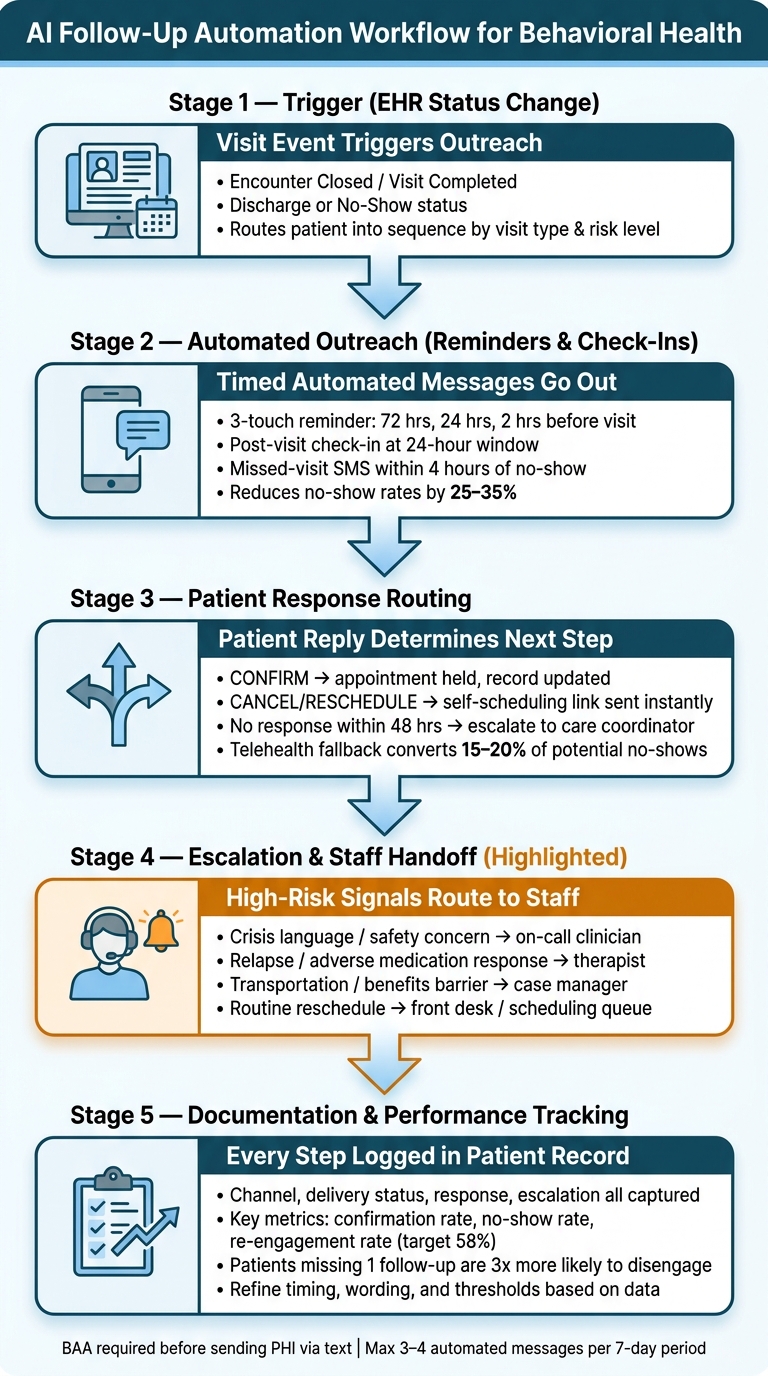
AI Follow-Up Automation Workflow for Behavioral Health
Step 1: Map the post-visit workflow before turning on automation
Before any automation goes live, behavioral health teams need a clear post-visit workflow map.
Each visit type, risk level, and patient response should connect to one follow-up action. When that step gets skipped, organizations can end up sending the wrong message to the wrong patient.
After the workflow map is defined, teams can apply timing rules to each path.
Define trigger points by visit type, diagnosis, and risk level
Automation should begin with an EHR status change such as "Encounter Closed", "Visit Completed", "Discharged," or a no-show status. Each trigger should route the patient into a different follow-up sequence based on visit type and risk level.
An outpatient therapy session may call for a 24-hour SMS check-in to monitor mood and treatment adherence.
A detox or residential discharge usually calls for more frequent staff outreach, especially since patients who receive follow-up contact within 48 hours of discharge have a 32% lower 30-day readmission rate [6].
In MAT programs, follow-up may run at 3 days, 14 days, and 30 days to confirm medication fill status, check tolerance, and prompt refills [6][1]. Patients discharged after a mental health crisis should receive direct staff outreach rather than fully automated messaging.
Set timing for reminders, check-ins, and no-show recovery
Timing rules shape whether outreach supports engagement or creates confusion. A three-touch reminder sequence at 72 hours, 24 hours, and 2 hours before the appointment can reduce no-show rates by 25% to 35% [3].
For post-visit outreach, the 24-hour window is the recommended point for checking mood, cravings, or adherence. Missed-visit recovery should start within 4 hours of the no-show. If the patient does not respond within 48 hours, the task should escalate to a care coordinator [2][1].
Offering a telehealth fallback 24 hours before the visit, or right after a patient cancels, can convert 15% to 20% of potential no-shows into virtual visits [3]. Those time windows should drive escalation rules and staff handoffs.
Use one system to connect scheduling, telehealth, and outreach
Disconnected systems often create a simple but costly breakdown. A patient reschedules, but the outreach platform does not update in time, so a reminder still goes out for the canceled slot. That kind of gap can hurt patient trust and create extra work for staff.
Opus Behavioral Health EHR keeps scheduling, telehealth, and outreach in one system, so cancellations and reschedules sync before reminders are sent. That setup helps keep missed-appointment follow-up and post-visit check-in timing aligned.
"A behavioral health appointment warrants a 24-hour check-in with escalation for concerning responses. Document these protocols before touching any configuration." - Garrett Mullins, Healthcare Operations Specialist [6]
That documentation work, including visit types, risk levels, timing rules, and escalation thresholds, makes the configuration step far more direct and far less reactive.
Configure reminder texts, care check-ins, and missed-visit follow-up
A workflow map only starts the process. To make it work in daily operations, behavioral health teams need message templates, reply rules, and routing steps that fit the pace of scheduling and follow-up.
Separate templates for reminders, care check-ins, and missed-visit outreach help centers keep communication clear and improve the odds that patients return for follow-up care.
A practical rollout usually starts with appointment reminders. After that, teams can add post-visit check-ins and missed-visit recovery rules.
Build appointment reminders with confirm, cancel, and reschedule options
Appointment reminders work best when they do more than announce a visit.
They should also give patients an easy way to confirm, cancel, or reschedule. A common cadence is a first message 72 hours before the visit, a second 24 hours before to address logistics, and a final prompt 2 hours before the appointment [3].
|
Reminder Stage |
Timing |
Sample Message |
|---|---|---|
|
72 hours before |
72 hours before |
"Hi [Name], your appointment with [Clinician] is [Day] at [Time]. Reply CONFIRM or tap to reschedule: [Link]" |
|
24 hours before |
24 hours before |
"Your appointment is tomorrow at [Time]. Reply VIDEO to switch to telehealth, or CONFIRM for in-person." |
|
2 hours before |
2 hours before |
"Your appointment starts in 2 hours. Reply C to confirm or R to reschedule." |
Message content should stay brief and non-clinical.
Patient name, appointment date, time, and clinician name are usually enough. Diagnosis details, treatment details, and other sensitive health information should never appear in these texts [4][3].
This matters even more in addiction treatment and mental health settings, where privacy concerns can affect whether a patient reads or responds to a message at all. For patients in early recovery who may be dealing with fatigue, simple one-letter replies such as "C" or "R" reduce friction and may improve response rates [5][3].
When a patient cancels, the next step should happen right away. The system should send a self-scheduling link at once and update the schedule in real time so front-desk and admissions staff are not stuck cleaning up changes by hand [3][4][5].
The same routing model can support post-visit check-ins, with different message content and escalation rules.
Create post-visit care check-ins for mood, cravings, and treatment adherence
Post-visit check-ins can help clinical and operations teams spot issues that may not surface during a scheduled session. That may include mood changes, cravings, or medication adherence concerns.
The most useful check-ins are short and easy to answer.
Low-effort prompts such as "On a scale of 1–5, how are you feeling today?" or "Have you taken your medication as prescribed? Reply YES or NO." make it easier for patients to respond without feeling burdened. Natural-language replies should still be allowed when a patient needs to explain a concern in more detail [5].
If a response points to elevated risk, the message should not sit in a queue. It should route to staff at once based on the organization’s response rules and staffing model [4][9]. For behavioral health leaders, this is where message automation stops being a convenience feature and starts affecting patient safety, staff workload, and follow-up consistency.
Set no-show and missed-visit outreach rules that drive re-engagement
Missed-visit outreach should do two things at the same time: recover the appointment and identify patients who may need a higher-touch response. An immediate SMS with a rescheduling link or telehealth option can recover 40% to 60% of at-risk appointments [3]. If there is no response within 30 to 60 minutes, staff should follow with a voice call [9].
Not every no-show means the same thing operationally or clinically. A patient who misses several visits in a row, or a patient who was discharged recently, may need a different path than someone who rescheduled once for the first time. A cleaner setup is to build two outreach tracks:
- A standard rescheduling flow for routine no-shows
- A high-priority staff task for patients with multiple consecutive no-shows or recent discharge history [8]
This kind of routing helps treatment centers avoid treating every missed visit as a simple scheduling issue. In many cases, it may be an engagement risk, a care continuity issue, or an early warning sign that staff should review quickly.
Cancellations should also connect to waitlist outreach so newly open slots can be filled fast.
Set escalation rules and staff handoff points
When reminders and check-ins do not resolve an issue, the workflow should move out of automation and into human review. Behavioral health leaders need clear rules that define exactly when automation stops, who receives the case, and what details staff need to act without delay.
Define response and non-response patterns that trigger escalation
Escalation should be tied to specific response and non-response patterns. Before automated outreach goes live, treatment centers should define the signals that require the system to stop and route the case to a staff member.
The clearest triggers usually fall into two groups: what a patient says and what a patient does not say.
On the response side, crisis language, suicidal or homicidal statements, relapse indicators, adverse medication reactions, and high-risk check-in replies should go to clinical staff at once.
On the non-response side, a patient who does not confirm an appointment by a set cutoff before the visit, such as one hour before the visit [4], should trigger a staff alert. Multiple unanswered check-ins should also move to review, especially when the patient already has elevated risk flags in the record.
Route handoffs to the right team with the right context
Each handoff should include enough context for staff to act right away. The same escalation rules should also guide routing so that each issue reaches the right team instead of landing in a general queue and sitting there.
Clinical distress, relapse signals, and safety concerns should go to a therapist or licensed clinician. Barriers tied to transportation, coverage, or housing should go to a case manager or care coordinator. Routine rescheduling and visit logistics should go to front desk staff. Urgent after-hours concerns should go to on-call personnel.
|
Escalation type |
Destination |
Context to include |
|---|---|---|
|
Crisis language / safety concern |
On-call clinician or crisis staff |
Exact message, recent visit date, program, risk flags, contact attempts |
|
Distress / relapse / adverse medication response |
Therapist / licensed clinician |
Last session date, program, patient response, prior risk history |
|
Transportation / benefits / logistics |
Case manager / care coordinator |
Appointment details, barrier identified, suggested next action |
|
Reschedule / cancel / no-show recovery |
Front desk / scheduling queue |
Visit type, provider, open slots, preferred contact method |
|
New inquiry / re-engagement after discharge |
Intake / admissions |
Last contact date, readiness signals, next step |
Document outreach and escalation inside the patient record
Once escalation routes are set, every outreach step should be documented in the patient record. Every message, reply, and escalation should be logged in the chart. A complete, timestamped audit trail supports care continuity and compliance [5][10].
The record should show more than “message sent.” It should capture the channel used, delivery status, patient response or non-response, whether escalation was triggered, who received the handoff, and what happened next. If unanswered check-ins keep stacking up, that pattern should be easy to spot in the chart rather than buried across separate, unlinked events.
Opus Behavioral Health EHR supports centralized workflow documentation and reporting across clinical and administrative teams, which can help keep outreach history, escalation notes, and staff actions in one place instead of spread across multiple tools [7][11].
Measure performance and refine the automation program
Track no-show rates, response rates, and escalation outcomes
When outreach is logged in the chart, behavioral health leaders can see which messages lead to confirmations, replies, and rebooked visits. The main metrics to monitor are appointment confirmation rate, no-show rate, patient response rate to check-ins, reschedule rate, time to staff follow-up after a missed visit, and missed treatment milestone rate [1][2].
This matters early. Patients who miss just one follow-up appointment are 3x more likely to disengage from their treatment plan entirely [2]. That makes response rate and re-engagement rate two of the most important numbers to track from day one.
|
Metric |
Target Range |
|---|---|
|
Care coordinator time per week |
5–8 hours [2] |
|
Re-engagement rate |
58% [2] |
|
Appointment confirmation rate |
Track weekly for trend |
|
Reschedule rate |
Track against no-show rate |
These metrics help executive teams separate surface activity from actual patient movement. A high message volume does not always mean better engagement. What matters is whether outreach leads to action, staff follow-up happens on time, and missed visits convert into rescheduled care.
Adjust timing, wording, and thresholds based on workflow data
When a metric falls short, the issue usually comes back to timing, wording, or frequency. Low response rates often signal one of three problems:
- The message was sent at the wrong time
- The wording felt generic
- The outreach volume was too high
Personalized messages that include specific details - such as a clinician's name or the type of visit - perform 3–4x better than generic "thank you" notes [1]. That kind of detail can make the message feel tied to care rather than part of a broad broadcast.
Message volume also needs close control. Sending more than 3–4 automated messages within a 7-day period tends to drive opt-outs rather than engagement [1]. For treatment centers and mental health providers, that can create a quiet failure point: the workflow still runs, but fewer patients are willing to respond.
Escalation thresholds also need review. If staff are dealing with too many unnecessary escalations, the non-response window may be too loose or too broad. For example, no engagement after 7 days can trigger a care coordinator review [1]. That kind of rule helps staff focus on patients who may be drifting out of care, instead of chasing every unanswered text.
Conclusion: Start with one workflow, then expand
Behavioral health organizations usually get better results when they start with the workflow causing the biggest performance gap, improve it, and then expand. If confirmed appointments are still being missed, reminders and missed-visit follow-up are often the right starting point. Once that workflow is stable and the data shows improvement, post-visit care check-ins and broader behavioral health outreach can be added without creating confusion across teams.
At each stage, escalation rules should stay clear, staff handoffs should stay documented, and every outreach step should remain logged in the patient record. For organizations using Opus Behavioral Health EHR, centralized reporting and workflow documentation keep these metrics and outreach logs in one place.
FAQs
How does AI decide when to text, call, or alert staff?
AI can use preset rules, live EHR data, and patient-specific milestones to choose the right outreach channel, whether that is text, email, or a voice call. The choice can shift based on appointment status, missed visits, and clinical milestones, which helps treatment centers match communication to the patient’s situation instead of relying on one standard workflow.
It can also handle two-way responses for tasks such as scheduling and basic questions. Staff only need to step in when human follow-up is needed, including intake readiness, repeated nonresponse, last-minute cancellations, or possible relapse concerns.
What patient messages should trigger immediate staff review?
Patient messages should move to immediate staff review when they point to clinical risk or a gap in care. That includes AI-generated alerts tied to major shifts in patient-reported mood, abnormal lab results, or vital signs that fall outside an established baseline.
Review also matters when patients do not respond to appointment reminders or send cancellation or rescheduling requests. In behavioral health settings, those signals can point to a lapse in engagement, missed follow-up, or a break in the care plan that staff may need to address quickly.
How can behavioral health teams start automation without overwhelming staff?
Start with one narrow, predictable workflow and fix the biggest bottleneck first. Instead of trying to account for every exception, behavioral health teams can use Opus Behavioral Health EHR to automate routine outreach such as appointment reminders and care plan check-ins.
The goal is simple: let the system manage repeatable communication while staff stay focused on patients who need direct support. That usually works best when the workflow includes two-way messaging and clear escalation rules. Standard outreach can move forward automatically, while staff receive alerts only when a patient needs personal follow-up or a task remains unresolved.



- Behavioral Health
- EHR Systems
- Addiction Treatment EHR
- mental health
- Telehealth
- addiction treatment
- Behavioral health facility
- Substance Abuse Disorder
- behavioral Health center
- HIPPA Compliant
- ehrsoftware
- PTSD
- behavioral health ehr
- Depression
- hipaa
- Anxiety
- MentalHealthMatters
- RCM
- claim denials
- clinical documentation
- mental health awareness
- screening tools

September 15, 2026

September 15, 2026

September 14, 2026

September 11, 2026

September 10, 2026

September 09, 2026
Recommended Posts

Thursday, July 30, 2026
How AI Enhances Online Appointment Booking Systems
AI booking does more than let patients pick a time. It helps clinics cut no-shows, fill canceled slots, match patients ...

Friday, July 10, 2026
The Numbers Don't Lie: What Clinics Save After Switching EHRs
An EHR switch is a money call before it is a software call. If I were sizing up a change, I’d focus on seven numbers: ...

Sunday, December 14, 2025
AI in Patient Intake: What Clinics Need to Know
AI-powered patient intake systems are changing how clinics handle data collection and patient interactions. These tools ...