
AI booking does more than let patients pick a time.
It helps clinics cut no-shows, fill canceled slots, match patients to the right visit, and reduce front-desk phone work.
Why AI makes things much easier:
AI can predict no-shows and refill open slots
AI can route urgent cases to staff instead of a normal booking flow
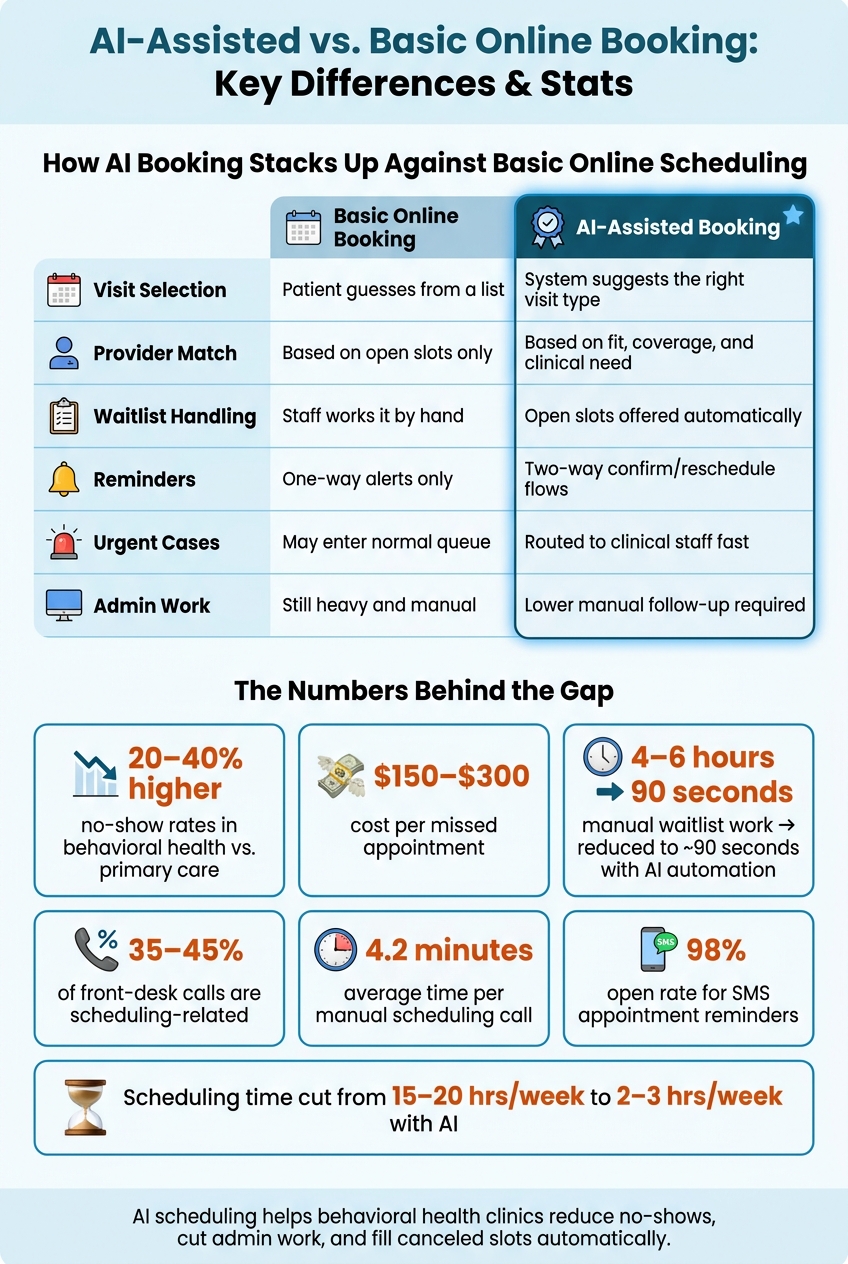
Scheduling calls make up 35% to 45% of front-desk phone volume
Manual waitlist work can take 4 to 6 hours (AI can take 90 seconds)
AI helps booking systems make better decisions before problems hit the front desk. Instead of just collecting requests, it can match, remind, triage, and refill schedules with less manual work.
Quick view:
|
Area |
Basic online booking |
AI-assisted booking |
|---|---|---|
|
Visit selection |
Patient guesses from a list |
System suggests the right visit type |
|
Provider match |
Based on open slots |
Based on fit, coverage, and need |
|
Waitlist handling |
Staff works it by hand |
Open slots can be offered automatically |
|
Reminders |
One-way alerts |
Two-way confirm/reschedule flows |
|
Urgent cases |
May enter normal queue |
Can be routed to staff fast |
|
Admin work |
Still heavy |
Lower manual follow-up |
If you want online booking to do more than collect appointment requests, AI is the layer that helps turn it into a working scheduling system.
AI-Assisted vs. Basic Online Booking: Key Differences & Stats
Where Standard Online Booking Falls Short
Standard booking tools cut some manual work. But in behavioral health, staff still end up fixing mismatched visits, dealing with odd cases, and patching schedules after the fact.
Patients Can Book a Time, But Not Always the Right Appointment
The main issue with basic booking tools is that they ask patients to pick from fixed visit types without giving them the clinical context to make the right call.
A patient trying to book a first visit may not know if they need a follow-up or a new-patient visit. So they open a dropdown, make their best guess, and move on. That guess is often wrong, which means the appointment type doesn't match what the patient actually needs.
AI improves online booking by translating patient intent into the right appointment type and provider match - something basic tools cannot do on their own.
Standard systems usually match patients to providers based on open calendar slots, not whether that provider can bill the patient's plan. Credentialing data often lives outside the scheduling system, so a patient can book with a provider who cannot bill their insurance. Staff may not spot the issue until check-in [3].
And even when the patient picks the right slot, the workflow still pushes cleanup work onto staff later.
Staff Still Handle Exceptions, Reminders, and Schedule Fixes by Hand
Once the patient books, the work isn't over.
A request form with a 24- to 48-hour response window is still a callback workflow, not self-scheduling.
If a slot opens because of a cancellation, staff still have to work through waitlists by hand to fill it. Standard reminder systems also tend to send one-way reminders. So if patients want to confirm, point out a problem, or reschedule, they still need to call the office. And if a patient's insurance has lapsed, staff often catch it at check-in, when the problem is much harder to fix [3].
The numbers make the gap hard to ignore.
Appointment scheduling already makes up 35% to 45% of all front desk phone interactions, and each manual scheduling call takes 4.2 minutes on average [4]. Adding a basic booking widget to a clinic's website may shift some calls into form submissions, but those forms still need a person to respond. The admin burden doesn't go away.
How AI Improves Online Appointment Booking
Basic booking tools let people pick a time. AI goes further. It adds prediction, routing, and automation to help clinics fill schedules, place patients with the right care team, and cut back on manual follow-up.
AI helps close common scheduling gaps by predicting demand, matching patients, and handling follow-up tasks automatically.
Predictive Scheduling and Demand Forecasting
AI scheduling tools look at past attendance and cancellation patterns to rank time slots by the chance that a patient will show up. They can also flag patients who are more likely to miss appointments, which gives staff a chance to step in with targeted outreach [6][4][2].
If a cancellation opens up a slot, AI can offer that opening automatically to the next matched patient by SMS or automated voice [1][6][4]. That means staff don't have to call down a list by hand, and open time is less likely to go to waste.
Appointment Matching and Triage
AI can use the reason for visit, symptoms, and urgency signals to suggest the right provider, the right appointment length, and the right care setting, whether that's telehealth or in-person care. In plain terms, it helps steer patients to the best-fit visit instead of dropping everyone into the same booking path.
AI triage also needs clear safety rules. If a patient uses crisis language, including suicidal ideation or self-harm, the system should route that case to clinical staff instead of sending the person through the standard booking flow [2][5].
Automated Reminders, Self-Service Booking, and Slot Usage Data
Once a patient is in the right slot, AI helps keep the appointment on track with smarter reminders. These reminders can adjust by channel - SMS, email, or automated voice calls - based on what each patient is most likely to respond to. SMS reminders have a 98% open rate [1].
A simple reminder cadence works well:
72 hours before the visit24 hours before the visit
2 hours before the visit
Patients can confirm or reschedule right from the reminder itself [6][4].
When a cancellation creates an opening, the system can automatically send that slot to a matched patient on the waitlist, which helps keep calendars full without manual outreach [2].
For Opus Behavioral Health EHR users, direct integration can sync live availability and confirmed bookings back to the record without manual re-entry [1][4].
These gains depend on clean data, real-time integrations, and clear staff override rules.
What It Takes to Deploy AI Scheduling Safely
Safe deployment is what turns AI booking from a handy feature into a workflow your team can count on. That only happens when the scheduling layer has clean historical data and live system connections.
The model needs past data on no-shows, cancellations, visit types, clinician availability, and acuity. If that data is messy, missing, or out of date, the system’s suggestions can drift fast. And when that happens, trust drops.
Data, Integration, and Workflow Design
Scheduling should connect to the EHR, CRM, and RCM through API links so it can check eligibility, prior authorization, and documentation needs before a slot is confirmed. That way, the booking process doesn’t just look smooth on the front end while creating cleanup work behind the scenes.
Opus Behavioral Health EHR connects scheduling with EHR, CRM, and RCM.
HIPAA Compliance, Bias Controls, and Staff Override Policies
Once the workflow is connected, the next job is protecting patient data and setting clear escalation rules. Any AI scheduling tool that handles patient data should have a signed Business Associate Agreement (BAA) with the vendor.
Protect data with:
AES-256 at rest
TLS in transit
Role-based access controls
Multi-factor authentication that limits access by role
Audit trails should be detailed and reviewed at least quarterly.
Use a three-tier routing model:
1. Routine requests go to AI2. Acute symptoms go to staff
3. Crisis indicators go to clinical escalation
Staff override options are required for safety.
Patient-clinician matching should be based on specialization, performance data, and clinical need, not old patterns that carry bias forward. Staff should also be able to see why the system suggested a given slot or provider. If the reasoning stays hidden, problems can slip through before anyone notices.
Metrics to Track After Rollout
After launch, check whether the system is cutting missed visits and reducing manual work. Track these metrics monthly:
|
Metric |
Why It Matters |
|---|---|
|
No-show rate |
Whether predictive scheduling is reducing missed visits |
|
Time to first appointment |
Whether access has improved for new patients |
|
Online booking rate |
Whether patients are using the self-service channel |
|
Reduction in inbound call volume |
Whether AI is lowering staff call handling workload |
|
Weekly scheduler time saved |
Whether staff are being freed from manual follow-up |
|
Clinician utilization rate |
Whether slots are being filled efficiently |
If no-show rates and clinician use stay flat, change reminder timing, acuity scoring, or waitlist backfill rules.
Conclusion: AI Makes Online Booking More Accurate, Efficient, and Patient-Friendly
Once the workflow is set up, the payoff shows up fast: fewer missed visits, faster slot fills, and less hands-on admin work. Standard online booking removes some friction, but AI helps fix the gaps that still lead to wrong appointments, missed reminders, and manual follow-up. The result is better scheduling, smoother operations, and an easier booking experience for patients.
When scheduling works better, access improves. It also helps patient engagement and cuts revenue lost to no-shows and empty slots. Day to day, that means simpler calendars, faster access to care, and less time wasted cleaning up avoidable errors.
One of the biggest wins is time. Cutting scheduling work from 15–20 hours to 2–3 hours per week gives staff more room to handle intake, insurance problems, and the other tasks that always seem to pile up.
In behavioral health, AI shifts online booking from a basic intake feature into a stronger way to keep care moving.
FAQs
How does AI reduce no-shows?
AI cuts no-shows by using predictive analytics and automated workflows to stay ahead of missed visits. It looks at past data to spot patients who are more likely to miss an appointment, giving staff a chance to reach out before that happens.
Opus Behavioral Health EHR supports this with automated SMS and email reminders, two-way communication, instant rescheduling, and waitlist management. The goal is simple: fill open slots faster and keep care on track.
Can AI safely route urgent booking requests?
Yes. AI can help manage urgent booking requests by using set rules and clinical protocols to spot urgent needs and sort them based on clear criteria.
That said, AI should not manage clinical emergencies by itself. Its job is to flag those cases and pass them to human staff right away.
In behavioral health, Opus Behavioral Health EHR can support scheduling and day-to-day workflow while routing high-priority exceptions to the right people.
What systems should AI scheduling connect to?
AI scheduling should connect with your EHR, practice management system, billing and insurance verification tools, and patient communication channels like SMS, voice, and web portals.
It should also tie into resource management data, such as room use and clinician availability.
That keeps scheduling accurate, cuts down on mistakes, and helps prevent double-bookings or other appointment conflicts.



- Behavioral Health
- EHR Systems
- Addiction Treatment EHR
- mental health
- Telehealth
- addiction treatment
- Behavioral health facility
- Substance Abuse Disorder
- behavioral Health center
- HIPPA Compliant
- ehrsoftware
- PTSD
- behavioral health ehr
- Depression
- hipaa
- Anxiety
- MentalHealthMatters
- RCM
- claim denials
- clinical documentation
- mental health awareness
- screening tools

September 15, 2026
September 15, 2026

September 14, 2026

September 11, 2026

September 10, 2026

September 09, 2026
Recommended Posts
Tuesday, July 07, 2026
The Admin Burden Is Real - Here's How the Right EHR Helps
Behavioral health teams lose a huge part of the week to admin work. In many cases, therapists spend 10–14 hours a week ...

Wednesday, June 03, 2026
Mental Health EHR Software That Cuts No-Show Rates
Missed appointments are a costly issue for mental health practices, with no-show rates ranging from 20% to 50%.
Thursday, July 16, 2026
Real-Time Feedback Tools for Behavioral Health
Timing is extremely essential in healthcare. If feedback comes in too late, it can’t change care.