

Behavioral health lab workflows fail when the order, specimen, result, review, and follow-up stop matching the same patient record.
For treatment centers, mental health providers, and SUD programs, that can lead to delayed medication changes, missed follow-up, billing issues, and audit gaps.
This workflow is built around a simple path: order, collect, receive, review, act, report. When behavioral health software uses bi-directional lab integration, teams can send lab orders from the chart, track specimen status, post discrete results back to the right order, route review by role, and document the next step without re-entering data.
Behavioral health leaders should focus on:
Order quality at entry, including ICD-10, provider data, NPI, and lab-ready test mapping
Specimen tracking, so staff can see whether an order is collected, pending, final, corrected, or canceled.
Result posting and routing, so results land in the right chart and reach the right clinician.
Follow-up documentation, so review turns into a task, note, medication change, or repeat test.
Reporting and audit history, so leadership can track turnaround time, abnormal result review, and corrected results.
Manual workflows often add 15 to 20 hours per week per staff member and carry a 1% to 4% data-entry error rate.
Connected HL7 workflows can reduce duplicate entry and help teams keep lab data tied to care, billing, and compliance records.
|
Workflow step |
What leaders need to see |
|---|---|
|
Order |
Required fields, diagnosis, provider data, test mapping |
|
Collection |
Specimen details, collection time, status visibility |
|
Result |
Match to patient and order, discrete data, corrected result handling |
|
Review |
Queue routing, abnormal flags, clinician sign-off history |
|
Follow-up |
Tasks, outreach, repeat testing, medication actions |
|
Reporting |
Turnaround time, exception trends, follow-up completion |
For behavioral health organizations, the main issue is not just getting a result back. It is making sure the result moves through the full record with clear ownership, documented action, and clean reporting.
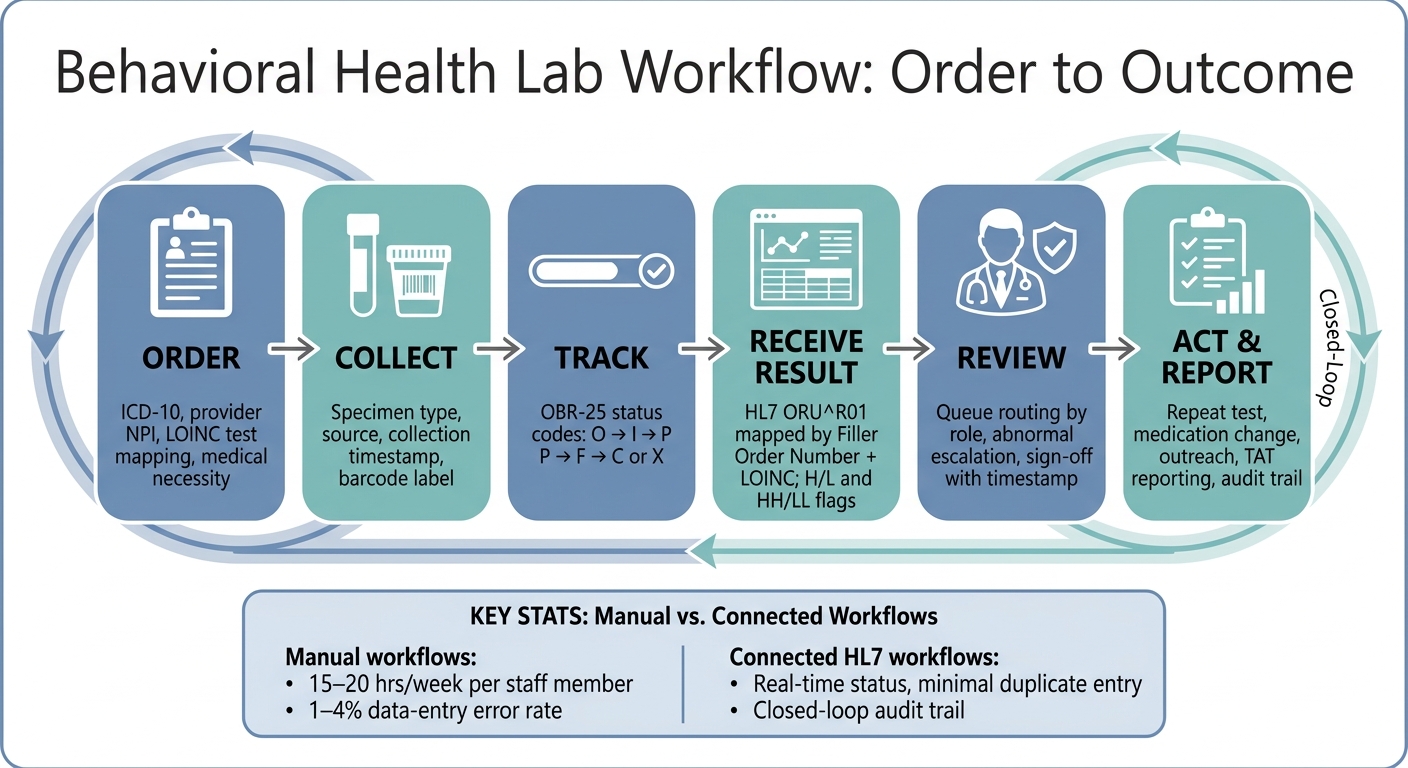
Behavioral Health Lab Workflow: Order to Outcome
How to create and send lab orders from the patient chart
Lab orders should begin in the patient chart, where staff enter required data one time before submission.
That matters because incomplete or mismatched information can delay processing, trigger corrections, or lead to rejected orders.
For behavioral health teams managing medication monitoring, toxicology, and routine medical labs, a clean order workflow can reduce staff burden and help the lab receive what it needs the first time.
Set up order catalogs, favorites, and required fields
Before an order can be sent, the system needs a configured test catalog that uses LOINC codes rather than local mnemonics such as "GLUC." LOINC mapping helps the receiving lab process the order without manual intervention [3].
For behavioral health organizations, pre-configured panels for common behavioral health orders, including lithium levels, toxicology screens, metabolic panels, CBC, and liver function tests, can cut down on manual entry and make it easier to order related tests together [4][5].
Required fields to enforce at the point of entry:
ICD-10 diagnosisA brief medical-necessity note
Provider name
NPI
These fields help support cleaner submissions and reduce the risk of missing information at the lab or billing stage [3][4].
Transmit orders with collection details and requisitions
When the clinician submits the order, the system sends the information the lab needs to process it. That transmission includes the patient's first name, last name, date of birth, and sex assigned at birth for matching.
It also includes specimen type, source, collection method, and an exact collection timestamp such as 07/01/2026 3:15 PM [3][7][8].
Time data needs close attention. If the EHR and LIS are set to different time zones, collection times can appear 3–5 hours off, which may affect trend review and create confusion during clinical follow-up [3].
The system may also generate a requisition and barcode labels as part of the same workflow. In Opus Behavioral Health EHR, this process stays inside the patient chart, which helps staff confirm that an order was sent without switching between systems.
Manual vs. electronic lab ordering: comparison table
The contrast between paper-based and electronic ordering is often most visible in staff workload and compliance exposure. Manual entry carries an estimated 1–4% error rate and can take up to 15–20 hours per week per staff member [2].
|
Feature |
Manual/Paper |
Electronic |
|---|---|---|
|
Workflow speed |
||
|
Data accuracy |
1–4% error rate from manual entry [2] |
High; uses structured data and standardized LOINC codes [2][7] |
|
Staff effort |
Up to 20 hours/week on manual entry and portal logins [2] |
|
|
Order status visibility |
Limited; requires manual follow-up [8] |
|
|
Compliance support |
High risk of missing medical necessity documentation [4] |
Built-in prompts enforce diagnosis and necessity at order entry [4] |
Once the order is transmitted, the workflow moves into specimen collection and status tracking.
How to track specimen status and receive results
After transmission, the system tracks the specimen until the final result returns to the chart. Once the order is sent, the next step is keeping the specimen linked to the correct order until the final result posts.
Without clear status visibility, staff may not know whether a specimen has been collected, is still pending, or is final.
Follow an order from collected to finalized
Status updates return to the EHR through OBR-25 result status codes. As the order moves from collection to processing and final reporting, the patient chart updates automatically.
|
Status Code |
Meaning |
|---|---|
|
O |
Order received; specimen not yet received by the lab |
|
I |
Specimen received; testing in progress |
|
P |
Verified by a technician but not yet final |
|
F |
Verified and complete; the definitive record |
|
C |
Corrected; replaces a prior final result with audit trail preserved |
|
X |
Order canceled before completion |
These status codes matter most when staff need to identify stalled specimens fast. Results should be matched by Placer and Filler Order Number, then keyed by Filler Order Number plus LOINC to prevent duplicates and misapplied corrections.[3]
Use queues, filters, and overdue specimen alerts
A pending lab queue gives staff a single view of every open order, with filters by status. For behavioral health teams, that makes it easier to spot specimens that are collected, still preliminary, or waiting on a final result.
This is especially important for time-sensitive behavioral health labs, where delays may affect care decisions.
Overdue alerts cut down on manual portal checks. Staff can be notified when a collection is delayed or when a result is reported. In Opus Behavioral Health EHR, real-time alerts appear in the workflow, allowing staff to confirm receipt in the workflow.[6]
Manual tracking vs. alert-based tracking: comparison table
|
Feature |
Manual Tracking |
Alert-Based Tracking |
|---|---|---|
|
Staff workload |
15–20 extra hours/week per staff member[2] |
Low; automated updates reduce manual checking[2] |
|
Error rate |
1% to 4% from manual data entry[2] |
Minimal; direct HL7 data mapping[2] |
|
Escalation speed |
Delayed; requires manual review |
Instant; real-time critical value alerts[6] |
|
Risk of missed follow-up |
High |
Lower; closed-loop tracking supports follow-up |
A corrected result should replace the prior value in the main view while preserving audit history. Staff need to see one current result, one audit trail, and no conflicting entries during review.[3]
Once the result is final, the workflow moves to posting, review, and follow-up.
How to post results, route clinician review, and document next steps
Once a final result reaches the chart, the workflow moves from tracking into clinical review. At that point, the main job is simple but high stakes: make sure the result lands in the right chart, reaches the right clinician, and leads to a documented next step.
Map result data into the correct chart and order
Incoming HL7 ORU^R01 results should map to the correct patient and order by using patient identifiers, the Filler Order Number, and LOINC. H/L flags identify abnormal values, while HH/LL flags should trigger escalation.
Because the result data is stored in discrete fields, teams can use it for trend views and longitudinal reporting.[3]
That data structure matters more than it may seem at first glance. In behavioral health settings, lab history often affects medication decisions, follow-up timing, and risk review. If results are only scanned in as documents, clinical teams lose visibility and reporting becomes much harder.
Set up review queues, alerts, and release rules
Unsigned results should route to a review queue tied to the ordering provider. For routine normal results, batch sign-off can help keep the queue under control.
For medication-monitoring labs, such as lithium levels or liver function panels, critical values should escalate at once instead of waiting for a provider to open the queue.
Review queues can also support delegated sign-off. That allows organizations to give staff-level users permission to handle routine results while sending flagged values to the ordering clinician.
The workflow should show who reviewed the result, when the review happened, and what action followed. After review, the system should create the next task, note, or outcome record.
Three things you need:
Clear routing rules for normal, abnormal, and critical results
Role-based permissions for delegated review and escalation
A documented handoff into follow-up work, not just a sign-off eventWithout those controls, results may sit in queues, actions may happen outside the record, and leadership may have limited visibility into whether follow-up was completed.
Manual review-and-sign vs. rule-based review workflows: comparison table
|
Feature |
Manual Review-and-Sign |
Rule-Based / Automated Review |
|---|---|---|
|
Clinician time |
High; every normal result requires manual opening |
Low; normal results can be batch-signed or auto-archived |
|
Intervention speed |
Depends on when the provider checks their queue |
High; critical values (HH/LL) trigger real-time alerts |
|
Documentation |
Manual entry of follow-up notes |
Automated prompts for follow-up tasks based on result values |
|
Patient release |
Manual sharing via portal or letter |
Automated release based on result status or time-delay rules |
|
Auditability |
Basic sign-off timestamp |
Detailed logs covering access, review, and corrective actions |
Rule-based workflows can reduce the risk of a critical value sitting unread in a queue. For behavioral health programs that manage medication-monitoring labs, that time gap can affect both patient safety and staff workload.
After clinician sign-off, the result should push the next step forward through follow-up tasks and outcome tracking.
How to turn lab results into follow-up tasks, outcomes tracking, and reports
Create follow-up actions from reviewed results
After a clinician reviews a lab result, the process should move straight from sign-off to the next task.
A signed result should lead to a clear next step, such as a repeat test, an outreach call, a care plan update, or a medication change. Low, positive, or inconclusive results can each trigger different follow-up actions based on the provider’s workflow and clinical needs.
The post-review screen should make that next step easy to place right away. That matters because delays between review and action often create missed follow-up, extra staff work, and weaker visibility across the record.
Those follow-up actions should also flow into reporting so leadership teams can see not just what result came back, but what happened next.
Report on turnaround time, exceptions, and program trends
Structured lab data gives behavioral health teams a clear way to track outcomes and monitor patterns over time. Reports can help teams watch turnaround time, abnormal result acknowledgment, follow-up completion, and corrected results.
|
Metric |
What It Measures |
|---|---|
|
Result turnaround time (TAT) |
Time elapsed between order placement and final result receipt |
|
Abnormal result acknowledgment rate |
Whether every abnormal result was reviewed and signed |
|
Follow-up test completion |
Whether concerning results led to a required repeat test |
|
Corrected result frequency |
How often the lab submits corrected results |
Recurring labs such as lithium levels or metabolic panels can be trended over time to help clinical teams monitor patient progress and support treatment decisions. The same reviewed result should also show whether the follow-up action was completed, which helps keep outcomes visible in the patient record.
Opus supports reporting and real-time data export for clinical and operational review [6].
Conclusion: Build a closed-loop lab workflow
When follow-up tasks and reporting stay connected to the original order, the lab process remains closed loop. Each order should lead to a documented next step, and each result should support care.
FAQs
How does bi-directional lab integration reduce errors?
Bi-directional lab integration can reduce errors by creating a closed-loop workflow between the lab and behavioral health software. That setup removes manual data entry and cuts down on duplicate logins, which often slow staff down and create room for avoidable mistakes.
When lab orders and results sync automatically between systems, providers may reduce re-entry errors, mismatched records, missing results, duplicate data, and incorrect patient identification.
For behavioral health organizations, that matters because even small data issues can disrupt care coordination, delay follow-up, and add strain to clinical and operations teams.
What should staff do when a lab result is corrected or canceled?
Staff should ensure the updated result replaces the prior record while preserving full accountability. In Opus Behavioral Health EHR, corrective action logs and audit reports help maintain a clear trail for regulatory and HIPAA compliance.
For corrections, the system should match the new data to the original order, update the clinician’s view, and notify the care team. Staff should use automated logs to verify that all changes are clinically accurate.
How can behavioral health teams track lab follow-up completion?
Behavioral health teams can track lab follow-up completion in Opus Behavioral Health EHR by monitoring lab order status in real time within the platform.
Because information moves between the facility and the lab, clinical teams can review results, request follow-up tests when needed, and keep records such as critical call logs and audit reports organized in one place. That setup can support compliance, reduce missed follow-up steps, and help providers respond to patient needs on time.



- Behavioral Health
- EHR Systems
- Addiction Treatment EHR
- mental health
- Telehealth
- addiction treatment
- Behavioral health facility
- Substance Abuse Disorder
- behavioral Health center
- HIPPA Compliant
- ehrsoftware
- PTSD
- behavioral health ehr
- Depression
- hipaa
- Anxiety
- MentalHealthMatters
- RCM
- claim denials
- clinical documentation
- mental health awareness
- screening tools

September 15, 2026

September 15, 2026

September 14, 2026

September 11, 2026

September 10, 2026

September 09, 2026
Recommended Posts

Wednesday, August 12, 2026
How Real-Time Data Access Improves Behavioral Care
Delayed data can slow care and add risk.

Friday, April 24, 2026
How to Implement Lab Integration for SUD Testing
Lab integration for substance use disorder (SUD) testing can improve efficiency, reduce errors, and support better ...

Monday, March 09, 2026
Case Study: Billing Errors Reduced with EHR Integration
Billing errors are a major headache for behavioral health centers,leading to claim denials, delayed payments, and lost ...