
Therapists often face challenges with generic EHR systems that don't align with their specific needs.
Behavioral health requires tools tailored for narrative documentation, privacy, and therapy-focused workflows. Misaligned systems lead to inefficiencies, frustration, and wasted time.
Here’s what you need to know:
Customization is key: Tailor EHRs to match therapy workflows like SOAP, DAP, or BIRP formats.
Focus areas: Streamline documentation, enable compliance (e.g., 42 CFR Part 2), and improve patient care with outcome tracking tools like PHQ-9 or GAD-7.
Use specialized platforms: Systems like Opus Behavioral Health EHR offer features such as customizable templates, AI tools to reduce charting time, and automated workflows to minimize errors.
Plan thoroughly: Map workflows, prioritize changes, and continuously refine using data and feedback.
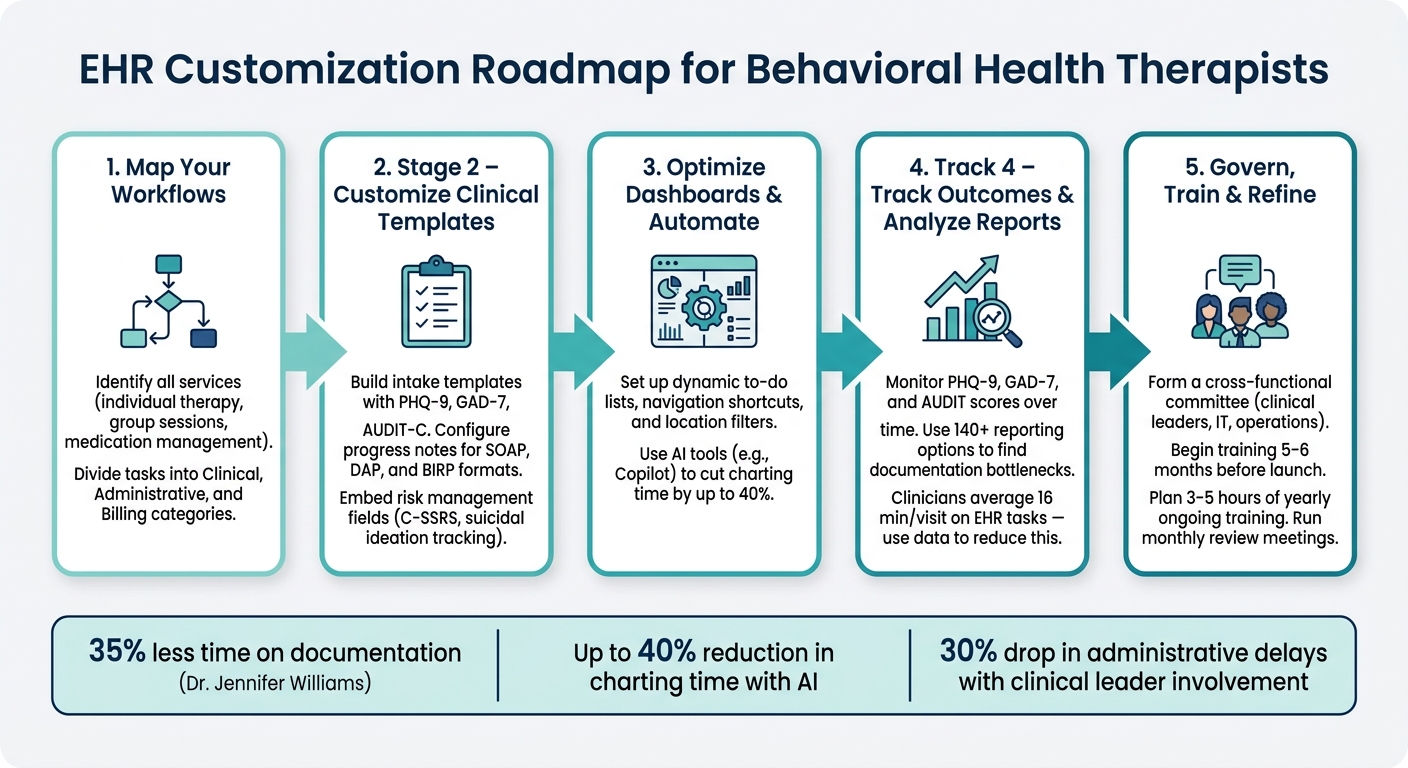
EHR Customization Roadmap for Behavioral Health Therapists
Mapping Behavioral Health Workflows Before Customizing
Before diving into EHR customization, take the time to map out your current practice workflows. Without a clear workflow map, you might solve one issue only to create new problems elsewhere. The next step is to outline your practice's specific needs, which lays the groundwork for meaningful customization.
Understanding Your Practice's Needs
Start by listing all the services your practice offers, such as individual therapy, group sessions, medication management, crisis intervention, or substance use treatment. Each service comes with its own requirements for documentation, scheduling, and billing.
To make things manageable, divide workflows into three main categories:
Clinical: Includes tasks like intake, treatment planning, session documentation, and tracking patient outcomes.
Administrative: Covers scheduling, managing patient portals, and handling digital intake forms.
Billing: Encompasses insurance verification, charge capture, and denial management.By keeping these categories separate, it's easier to identify where bottlenecks or inefficiencies occur.
Documenting Workflows Step by Step
Once you've identified your services, break down each workflow step by step. From the moment a patient first contacts your practice to the final stages of claim processing, document every task.
Note who performs each step, what information is needed, and where delays or errors tend to happen.
"Map your current workflow in detail... This exercise reveals redundant steps and gaps." [5]
Pay close attention to areas where staff must re-enter the same information multiple times or where processes rely on manual handoffs between clinical and billing systems.
These inefficiencies can cause significant slowdowns and errors. Having a clear and accurate workflow map will help you spot the most pressing issues to address first.
Setting Customization Priorities
When it comes to EHR customization, focus on changes that save time, reduce errors, and ensure compliance. Here's a quick guide to help set your priorities:
|
Prioritization Criterion |
Focus Area |
Expected Outcome |
|---|---|---|
|
Time Savings |
Documentation, note-taking |
Reduced clinician burnout; more face-to-face patient time [5][4] |
|
Error Reduction |
Data entry, medication lists |
|
|
Compliance |
Consent forms, audit logs |
Audit readiness for CARF/Joint Commission [4][6] |
|
Patient Experience |
Portals, scheduling |
Compliance is often the most urgent priority. For example, segmenting substance use records under 42 CFR Part 2 or requiring mandatory fields to prevent incomplete intake forms can make a big difference.
As Mira Gwehn Revilla from Curogram explains:
"Digital intake acts as a 'truth filter' for addiction treatment documentation. The result is cleaner clinical records that hold up during CARF, Joint Commission, and state audits." [6]
Customizing Templates for Clinical Documentation
With your workflow map in hand, you're ready to create templates that align with the specific needs of behavioral health workflows.
Building Intake and Assessment Templates
A well-designed intake template gathers essential details like demographics, presenting issues, psychiatric history, trauma history, current medications, and more. To streamline care, include validated screening tools - such as the PHQ-9 (for depression), GAD-7 (for anxiety), AUDIT-C (for alcohol use), and ASAM criteria for substance use disorders - directly within the form. This keeps everything in one place and supports evidence-based care right from the first session.
Incorporate dropdown menus and buttons for commonly observed clinical details. For example, a dropdown for "affect" could offer options like "congruent", "flat", or "labile" [1]. This approach not only saves time but also ensures that clinical nuances are captured effectively.
Opus Behavioral Health EHR provides templates that support narrative-style documentation and include DSM-5 integration, offering flexibility that checkbox-heavy forms often lack.
Once intake is streamlined, turn your attention to progress note templates to suit various therapy formats.
Configuring Progress Notes for Different Therapy Formats
Behavioral health progress notes often follow specific formats, including SOAP, DAP, and BIRP:
|
Note Format |
Stands For |
Best Use Case |
|---|---|---|
|
SOAP |
Subjective, Objective, Assessment, Plan |
Ideal for individual sessions focused on client-reported issues and clinician observations [7] |
|
DAP |
Description, Assessment, Plan |
Useful for concise yet detailed session summaries and clinical insights [7] |
|
BIRP |
Behavior, Intervention, Response, Plan |
Best suited for tracking client behaviors and their responses to interventions [7] |
To make documentation seamless, add a template selector at the top of each progress note. This allows clinicians to switch formats based on session type without leaving the page [9].
For group therapy, configure templates to auto-generate individual placeholders for each participant, and include a batch signing feature so clinicians can finalize all notes simultaneously [8].
Each template should also have a field linking session interventions to specific treatment plan goals, which helps demonstrate medical necessity to payers [10].
Once you've optimized your note formats, focus on embedding elements that address risk management and compliance.
Adding Risk Management and Compliance Elements
Risk documentation is critical for both clinical care and legal protection. Every progress note and assessment template should include fields for suicidal and homicidal ideation, covering details like ideation, plan, intent, means, history, protective factors, current risk level, and safety plan status [11].
Embedding tools like the C-SSRS (Columbia Suicide Severity Rating Scale) ensures that high-risk scores are flagged automatically, prompting immediate follow-up documentation [1][11].
To meet compliance requirements, templates must also capture start and stop times (necessary for psychotherapy CPT codes), Place of Service codes, telehealth modifiers (e.g., modifier 95), and provider or supervisor signatures [10].
If your practice treats substance use disorders and receives federal assistance, include 42 CFR Part 2-compliant features, such as redisclosure warnings and a separate consent process that exceeds standard HIPAA requirements [11].
Additionally, configure your EHR to segregate psychotherapy notes from the general medical record. Enhanced access controls should ensure that only the treating clinician can view these notes, as required by HIPAA [1][11]. This level of security must be integrated into every template to protect sensitive information.
Optimizing EHR Workflows, Dashboards, and Automations
Once you've customized your templates, it's time to ensure your EHR interface supports smoother daily operations. By fine-tuning dashboards, simplifying navigation, and automating repetitive tasks, you can significantly cut down on administrative burdens.
Configuring Dashboards for Behavioral Health
Think of your dashboard as the central hub for your clinical activities. A well-organized dashboard helps you access critical tasks at a glance.
With Opus Behavioral Health EHR, you can use a dynamic to-do list that updates automatically based on document progress. Tasks are neatly divided into two categories: "Create" (for documents that need to be started) and "Complete" (for documents awaiting signatures or finalization) [12].
To keep things focused, you can enable the "Show My Patients Only" toggle, which filters out other providers' caseloads.
You can also refine your task list by date range, highlighting overdue or same-day tasks. For non-clinical reminders, like tracking attendance in an intensive outpatient program (IOP) room, the manual to-do feature centralizes everything in one place [12]. This setup ensures your workflow is both intuitive and clutter-free.
Simplifying Navigation and Creating Shortcuts
Smooth navigation is essential for saving time. Here’s a breakdown of some handy shortcuts and features available in Opus Behavioral Health EHR:
|
Navigation Feature |
What It Does |
Why It Helps |
|---|---|---|
|
Location Filter |
Narrows patient lists and schedules to one facility |
Reduces distractions from irrelevant locations |
|
"Show My Patients" Toggle |
Displays only your caseload on the calendar |
Saves time searching through others’ schedules |
|
Document Hyperlinks |
Links directly from the to-do list to specific forms |
Cuts down on unnecessary clicks |
|
Grid vs. List Toggle |
Switches between card-style and table-style layouts |
Lets you choose the view that fits your workflow |
|
MR Number Search |
Quickly finds patients using unique record numbers |
Reduces errors in patient identification |
"Since implementing Opus EHR, our providers spend 35% less time on documentation while capturing more comprehensive clinical data." - Dr. Jennifer Williams, Mental Health Practice Owner [2]
Automating Routine Tasks
Automation takes efficiency to the next level by reducing repetitive work. When paired with optimized dashboards, it creates a seamless system that lightens your administrative load. For example, Opus Behavioral Health EHR's Copilot AI can cut charting time by up to 40%, all while ensuring detailed and accurate clinical notes [2][13].
Features like Batch Sign are particularly useful for group therapy sessions, allowing clinicians to sign off on all participant notes in one go. This not only saves time but also ensures consistency across records [8].
As Judd Carey, Director of Operations at VirtualServices, Mindful Health, explains:
"By automating the quality of internal data, and applying an algorithm, it will cut back on errors to not miss a thing, especially from group sessions." [13]
Using Data and Reporting to Refine EHR Customization
Once you've streamlined workflows and automated processes, it's time to use data and reporting to validate your EHR customizations.
Without ongoing monitoring, you might miss issues like slow documentation, incomplete records, or treatment plans that aren't as effective as they could be. Data insights allow you to fine-tune templates and improve workflows based on real-world results.
Tracking Outcomes with Standard Measures
Incorporate standardized tools into your EHR to track clinical outcomes effectively. Tools like PHQ-9 (for depression), GAD-7 (for anxiety), and AUDIT (for alcohol use) produce measurable scores over time, offering a clear view of patient progress [1][4].
These scores can be directly tied to your EHR templates. For example, Opus Behavioral Health EHR can be set up to trigger treatment plan updates when a patient's PHQ-9 score reaches a certain threshold [1][16].
This ensures that outcome data drives actionable clinical decisions.
If scores remain unchanged over time, it’s a sign to revisit your treatment documentation. It might indicate that your templates aren’t guiding clinicians toward the right interventions or that specific prompts - like monitoring sleep patterns or identifying anxiety triggers - should be added or adjusted [1][15].
Using Reports to Find Gaps
Once you’ve tracked outcomes, leverage detailed reports to uncover operational inefficiencies. For instance, studies show that clinicians spend an average of about 16 minutes per outpatient visit on EHR tasks [4].
If your reports show clinicians are consistently exceeding this benchmark, it’s worth investigating which types of notes are causing delays.
High click counts on certain templates often signal that a form is overly complicated and needs simplification [4].
With Opus Behavioral Health EHR’s reporting tools - offering over 140 reporting options - you can analyze documentation delays by clinician, department, or specific note types to pinpoint bottlenecks [14].
Reports can also be configured to flag critical risks, such as suicide indicators or seizure history, ensuring no vital information is overlooked [6].
Adjusting Customizations Based on Data
Data is only valuable if it leads to meaningful changes. If reports reveal recurring issues - like incomplete notes or missing diagnosis codes - it’s time to adjust your templates. For example, updating mandatory fields can help ensure these gaps don’t persist [1][6].
Before rolling out changes practice-wide, have "super users" test updates in a sandbox environment. During this pilot phase, track click-count metrics to measure the impact of the changes [4].
This approach minimizes disruptions and provides clear before-and-after comparisons. By continuously measuring, identifying, adjusting, and testing, you can create an EHR system that works seamlessly for your practice.
Governance and Training for Long-Term Customization Success
Once you've fine-tuned your system using data, the next step to maintaining success is ensuring there’s a solid governance structure and consistent training in place. EHR customization isn’t a one-and-done process. Without ongoing attention, even the best setups can drift out of sync with your practice's changing needs.
Setting Up a Customization Governance Structure
Start by forming a cross-functional committee that includes clinical leaders, program managers, operations directors, and IT staff [17].
Designate a project manager to oversee a prioritized roadmap for customizations and hold monthly review meetings to monitor performance. These meetings help catch issues early - like billing errors or compliance problems - before they grow into bigger challenges. Organizations that make clinical leaders part of the decision-making process have seen up to a 30% drop in administrative delays [17].
|
Governance Role |
Primary Responsibility |
|---|---|
|
Clinical Leaders |
Ensure EHR configurations align with workflows and clinical standards. |
|
IT Staff |
Maintain system security, interoperability, and technical stability. |
|
Project Manager |
Manage the roadmap and prioritize customization requests. |
|
Operations Directors |
Focus on customizations that support billing, reporting, and organizational efficiency. |
Training Staff on New Configurations
Governance lays the foundation for effective training. Start training efforts 5–6 months before the system’s launch. Begin with super user sessions, and then move to general staff training during the final 4–6 weeks [18].
Use a sandbox environment with realistic patient data so staff can practice full workflows without affecting live records. After the system goes live, offer at-the-elbow support for the first 1–4 weeks, providing side-by-side coaching to build confidence and proficiency.
It’s worth noting that physicians are 3.5 times more likely to report a poor EHR experience if their training is insufficient [18]. Beyond the initial rollout, plan for 3–5 hours of yearly training to cover system updates and teach efficiency-boosting techniques.
"The quality of training is the single strongest predictor of whether an EHR implementation succeeds or fails." - EHR Source [18]
Improving Customizations Through Staff Feedback
Monthly governance meetings are also a great opportunity to gather feedback from the team [17]. Encourage clinicians and staff to point out templates or workflows that cause unnecessary steps.
As Lauris Online puts it:
"The fastest path to adoption isn't training harder. It's starting with forms that feel familiar." - Lauris Online [19]
When feedback highlights inefficiencies, pilot changes with a small group before introducing them across the practice [5]. Testing and refining adjustments ensures that your EHR system keeps pace with your practice’s evolving workflows.
Key Takeaways for EHR Customization
Effective EHR customization revolves around tailoring the system to fit your workflow needs - it's not a one-and-done task but an evolving process.
"Since implementing Opus EHR, our providers spend 35% less time on documentation while capturing more comprehensive clinical data." - Dr. Jennifer Williams, Mental Health Practice Owner [2]
The key to boosting efficiency lies in mapping workflows, refining clinical templates, and keeping an eye on metrics like time-per-chart and click counts. These insights help pinpoint areas where documentation might be slowing down [4].
Here’s a quick look at some essential refinement activities that can help streamline your EHR system:
|
Refinement Activity |
Frequency |
Primary Benefit |
|---|---|---|
|
Workflow Analytics Review |
Weekly |
Identifies workflow bottlenecks |
|
Access & Security Audits |
Quarterly |
Ensures HIPAA and 42 CFR Part 2 compliance |
|
Template/Macro Updates |
Ongoing |
Cuts down on clicks and charting time |
Regularly analyzing workflows and gathering user feedback is key to maintaining an efficient system. Engaging users in the process - like piloting changes with small groups - helps fine-tune configurations and ensures they align with the practice's needs [4][5].
FAQs
What should I customize first in my EHR?
Start by customizing your documentation templates and clinical workflows to align with your specialty, whether that’s addiction recovery, family therapy, or another area of focus. Swap out generic forms for tailored templates that meet your practice’s specific needs - think progress notes, assessments, and treatment plans that capture the right data.
Once your documentation process is in order, set up role-based dashboards, automated scheduling, and tools for tracking outcomes. These adjustments can help streamline your workflow and make daily tasks more manageable.
How do I keep therapy notes private and compliant?
To ensure therapy notes remain private and meet compliance standards, implement role-based access controls (RBAC).
This approach enforces HIPAA’s minimum necessary standard by restricting access to only the staff who truly need it. Additionally, keep psychotherapy notes separate from general medical records since these notes require stricter safeguards and explicit client consent before sharing.
Other key measures include enabling automated audit logs to track access, enforcing data encryption to protect sensitive information, and using digital intake forms to gather required consents under 42 CFR Part 2 and HIPAA before finalizing any charts. These steps help maintain both privacy and compliance.
How can I measure if my EHR changes are working?
Evaluating how well your EHR customizations are working means digging into custom reports and analytics. These tools help you take a closer look at workflows and uncover areas that might not be running as smoothly as they could. By tracking key metrics like staff productivity, compliance alerts, no-show rates, and resource utilization, you can get a clear picture of what’s working and what needs attention.
Role-based dashboards are another powerful tool. They let you monitor treatment outcomes over time, giving you insights into whether your documentation is meeting patient care needs. Plus, these dashboards and standardized tools can help you identify opportunities for operational improvements, keeping everything aligned with your goals.



- Behavioral Health
- EHR Systems
- Addiction Treatment EHR
- mental health
- Telehealth
- addiction treatment
- Behavioral health facility
- Substance Abuse Disorder
- behavioral Health center
- HIPPA Compliant
- ehrsoftware
- PTSD
- behavioral health ehr
- Depression
- hipaa
- Anxiety
- MentalHealthMatters
- RCM
- claim denials
- clinical documentation
- mental health awareness
- screening tools

September 15, 2026

September 15, 2026

September 14, 2026

September 11, 2026

September 10, 2026

September 09, 2026
Recommended Posts

Tuesday, November 25, 2025
How Analytics Enhances Patient Outcomes in Addiction Care
Analytics is transforming addiction care by using patient data to create personalized, effective treatment plans. This ...

Monday, March 16, 2026
How AI Automates Progress Notes for Therapists
AI tools are transforming how therapists handle progress notes, saving time and reducing burnout.

Friday, December 05, 2025
Real-Time vs. Manual Payment Reconciliation
Payment reconciliation ensures financial accuracy by matching incoming payments to claims or invoices. In healthcare, ...